This discussion has been locked.
You can no longer post new replies to this discussion. If you have a question you can start a new discussion

nRF9160 Modem Firmware Update Stops at %0

Hi All,

I'm using nRF9160DK PCA10090 Version 0.9.0 and I want to update the Cellular Modem Firmware using nRFConnect 3.8.0 Programmer v2.0.0. Debug Probe is switched to the nRF91 side.

The current version of my modem firmware according to the AT+CGMR is mfw-m1_nrf9160_0.6.8-131.alpha and I want to upgrade it to mfw_nrf9160_1.2.3.

However none of the versions I have tried from 1.1.0 to 1.2.3 are worked and the update itself is always stuck at 0%.
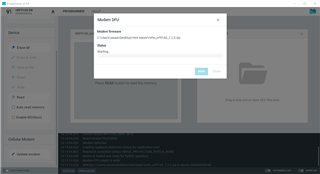
I was following this tutorial: link

Any help is much appreciated.
Thanks,

Parents
  • Hi,

    Could you try downgrading to nRF Connect for Desktop v3.7.1 and see if you are able to upgrade the modem then? When downgrading, you must also install app versions compatible with 3.7.1. Perform the following steps to downgrade:

    1. Download the latest 3.7 version of nRF Connect for Desktop from https://www.nordicsemi.com/Products/Development-tools/nRF-Connect-for-desktop/Download?lang=en#infotabs (for Windows this is 3.7.1)
    2. After starting nRF Connect for Desktop 3.7 a prompt will come up about the 3.8 upgrade. Click “No” on this.
    3. In the Settings, click on “Add source”, enter the URL http://developer.nordicsemi.com/.pc-tools/nrfconnect-apps/3.7-apps/apps.json and click “Add”.
    4. Back in the list of all apps, all apps should show up twice now, one with “official” below them and one with “3.7 compatible apps” below them. If you want to hide the incompatible versions, click on “Filter” and deselect “Official”.
    5. Install the apps you need in the old versions and use them.

    Please let me know if you are still unable to upgrade the modem firmware after downgrading.

    mfw-m1_nrf9160_0.6.8-131.alpha

    Is this the modem firmware that the nRF9160 DK came preprogrammed with, or is this something you have programmed yourself?

    Best regards,

    Marte

  • Thanks for your fast reply.

    I fixed the problem by changing the folder name from "Yeni Klasör" to "file". The issue was happening because of the foreign characters like "ş","ü","ö" are included in file location name as can be seen in the second picture in the main thread.


    Is this the modem firmware that the nRF9160 DK came preprogrammed with, or is this something you have programmed yourself?

    I think it was preprogrammed but because the issue is fixed the ticket can be closed. 

    Have a good day,

Reply
  • Thanks for your fast reply.

    I fixed the problem by changing the folder name from "Yeni Klasör" to "file". The issue was happening because of the foreign characters like "ş","ü","ö" are included in file location name as can be seen in the second picture in the main thread.


    Is this the modem firmware that the nRF9160 DK came preprogrammed with, or is this something you have programmed yourself?

    I think it was preprogrammed but because the issue is fixed the ticket can be closed. 

    Have a good day,

Children
No Data
Related