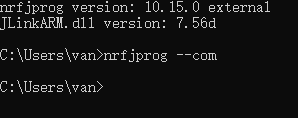
I recently installed the nRF Connect extension for VS Code on my PC(Windows 11, 10700k).
I cannot see my connected boards.
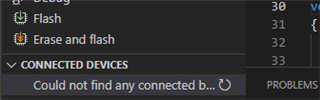
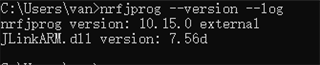
But the "programmer" of the nRF Connect for Desktop can find the board and show the information of the memory.
Run the "nRF Connect: Generate Support Information":
"tools": {
    "C:\\Program Files\\SEGGER\\JLink\\JLink.exe": "7.56d",
    "C:\\Program Files (x86)\\Nordic Semiconductor\\nrf-command-line-tools\\bin\\nrfjprog.exe": "10.15.0",
    "c:\\Users\\van\\ncs\\v1.7.1\\toolchain\\opt\\bin\\cmake.exe": "3.20.5",
    "c:\\Users\\van\\ncs\\v1.7.1\\toolchain\\opt\\bin\\Scripts\\west.exe": "0.11.1",
    "c:\\Users\\van\\ncs\\v1.7.1\\toolchain\\opt\\bin\\python.exe": "3.8.2",
    "c:\\Users\\van\\ncs\\v1.7.1\\toolchain\\opt\\bin\\ninja.exe": "1.9.0",
    "c:\\Users\\van\\ncs\\v1.7.1\\toolchain\\opt\\bin\\gperf.exe": "3.1",
    "c:\\Users\\van\\ncs\\v1.7.1\\toolchain\\opt\\bin\\dtc.exe": "1.4.7",
    "c:\\Users\\van\\ncs\\v1.7.1\\toolchain\\opt\\bin\\arm-none-eabi-gcc.exe": "9-2019-q4-major",
    "c:\\Users\\van\\ncs\\v1.7.1\\toolchain\\opt\\bin\\gn.exe": "1940"
  },
   "environment": {
    "westExe": "c:\\Users\\van\\ncs\\v1.7.1\\toolchain\\opt\\bin\\Scripts\\west.exe",
    "westEnv": {
      "ELECTRON_RUN_AS_NODE": "1",
      "HOMEDRIVE": "C:",
      "HOMEPATH": "\\Users\\van",
      "Path": "c:\\Users\\van\\ncs\\v1.7.1\\toolchain\\mingw64\\bin;c:\\Users\\van\\ncs\\v1.7.1\\toolchain\\mingw64\\libexec\\git-core;c:\\Users\\van\\ncs\\v1.7.1\\toolchain\\opt\\bin;c:\\Users\\van\\ncs\\v1.7.1\\toolchain\\opt\\bin\\Scripts;C:\\Program Files\\NVIDIA GPU Computing Toolkit\\CUDA\\v11.5\\bin;C:\\Program Files\\NVIDIA GPU Computing Toolkit\\CUDA\\v11.5\\libnvvp;C:\\Program Files (x86)\\Razer Chroma SDK\\bin;C:\\Program Files\\Razer Chroma SDK\\bin;C:\\Program Files (x86)\\Razer\\ChromaBroadcast\\bin;C:\\Program Files\\Razer\\ChromaBroadcast\\bin;C:\\Windows\\system32;C:\\Windows;C:\\Windows\\System32\\Wbem;C:\\Windows\\System32\\WindowsPowerShell\\v1.0\\;C:\\Windows\\System32\\OpenSSH\\;C:\\Program Files\\NVIDIA Corporation\\NVIDIA NvDLISR;C:\\Program Files (x86)\\NVIDIA Corporation\\PhysX\\Common;D:\\MATLAB\\bin;C:\\Windows\\system32\\config\\systemprofile\\AppData\\Local\\Microsoft\\WindowsApps;C:\\WINDOWS\\system32;C:\\WINDOWS;C:\\WINDOWS\\System32\\Wbem;C:\\WINDOWS\\System32\\WindowsPowerShell\\v1.0\\;C:\\WINDOWS\\System32\\OpenSSH\\;C:\\Users\\van\\anaconda3\\Scripts;C:\\Users\\van\\anaconda3\\Library\\bin;C:\\workspace\\opencv\\build\\x64\\vc15\\bin;C:\\Program Files\\dotnet\\;C:\\Program Files\\NVIDIA Corporation\\Nsight Compute 2021.3.0\\;C:\\Program Files\\Git\\cmd;C:\\Program Files (x86)\\Nordic Semiconductor\\nrf-command-line-tools\\bin;C:\\Users\\van\\.vscode\\extensions\\metalcode-eu.windows-arm-none-eabi-0.1.6\\bin;C:\\Program Files\\Nordic Semiconductor\\nrf-command-line-tools\\bin\\;C:\\Users\\van\\ncs\\v1.7.1\\toolchain;C:\\Program Files (x86)\\Nordic Semiconductor\\nrf-command-line-tools\\bin\\;C:\\Users\\van\\AppData\\Local\\Programs\\Python\\Python39\\Scripts\\;C:\\Users\\van\\AppData\\Local\\Programs\\Python\\Python39\\;C:\\Users\\van\\AppData\\Local\\Microsoft\\WindowsApps;C:\\Users\\van\\.dotnet\\tools;C:\\Users\\van\\AppData\\Local\\Programs\\Microsoft VS Code\\bin",
      "ZEPHYR_BASE": "c:\\Users\\van\\ncs\\v1.7.1\\zephyr",
      "GNUARMEMB_TOOLCHAIN_PATH": "c:\\Users\\van\\ncs\\v1.7.1\\toolchain\\opt",
      "ZEPHYR_TOOLCHAIN_VARIANT": "gnuarmemb",
      "PYTHONPATH": "c:\\Users\\van\\ncs\\v1.7.1\\toolchain\\opt\\bin;c:\\Users\\van\\ncs\\v1.7.1\\toolchain\\opt\\bin\\Lib;c:\\Users\\van\\ncs\\v1.7.1\\toolchain\\opt\\bin\\Lib\\site-packages",
      "Python3_ROOT": "c:\\Users\\van\\ncs\\v1.7.1\\toolchain\\opt\\bin"
    },