How to call "clock_control_off(const struct device *dev, clock_control_subsys_t sys)" on LFCLK

Hi,

If i need to call zephyr driver API clock_control_off( ) present in zephyr\include\drivers\clock_control.h on LFCLK.
How can I do it,.?

As an example, to populate the argument '*dev' in 

clock_control_off(const struct device *dev, clock_control_subsys_t sys)


Do I Use something like:

	const struct device *clock;
	
	clock = device_get_binding("CLOCK");

Will this give me dev struct to LFCLK..?
And how do I populate for:

clock_control_subsys_t sys

for LFCLK.

Kindly suggest.

Thanks,

Parents Reply Children
  • Hi,

    Could you specify as to what exactly you wish to implement this for? As I mentioned earlier, 

    Priyanka said:
    the LFCLK is normally kept on since it is needed by the Zephyr Scheduler and bluetooth Stack.
  • Hi Priyanka,

    I want to understand which zephyr driver APIs can be used to control clocks, both HFCLK and LFCLK.
    I understand the configurations and also that LFCLK is normally kept on.

    I want to know if needed to to turn off/on, which zephyr APIs can be used.?
    And How.? (how to populate and pass the arguments)

    How do I populate the arguments '*dev' & 'sys' to call
    "clock_control_off(const struct device *dev, clock_control_subsys_t sys)"

    on LFCLK..?

  • Hi,

    1. In order to turn the HFCLK on you could look into this code. I guess this thread could also prove helpful to your query. 

    2. Regarding how to populate the clock_control_off(const struct device *dev, clock_control_subsys_t sys) , *dev is defined the same way as you had mentioned in the ticket. But clock_control_subsys_t is a type with which you can define a clock controller sub-system. You could take a look at this example to understand the format or method better. 

    Moreover, stopping the LFCLK is not supported and doing the clock_control_off( )  on LFCLK will result in the error code -ENOTSUP.

    I hope this was helpful Slight smile

    Kind Regards,

    Priyanka

  • Hello Priyanka,

    Thank you, this helps.
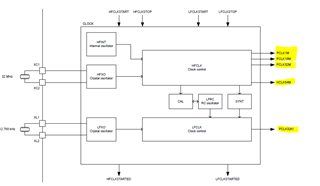
    Please find as in the clock tree for my nRF board:

    Now, moving ahead, suppose that if I want to use PCLK16M from HFCLK for a peripheral, how can I get that..?


    Similarly, if I want to use PCLK32KI from LFCLK for a timer perhaps, how can I get that frequency..?

  • Hi,

    It is possible like we mentioned earlier, to turn on the HFCLK or turn off the LFCLK (which is not recommended as it will result in an error), but you do not specify the frequency requirement. You can only specify or configure the source of your clock, i.e. external crystal, internal RC, etc.

    Depending on your requirement, the system will automatically assign the required, based on your peripheral. 

    The peripherals connected will automatically request the required clock type from the CLOCK peripheral based on the configuration of the peripheral. This can be seen mentioned in the CLOCK chapter

    I hope this answers your doubts related to the ticket and in case of any different queries kindly open a new ticket.

    Kind Regards,

    Priyanka

Related