This discussion has been locked.
You can no longer post new replies to this discussion. If you have a question you can start a new discussion

nRF9160 deactivating network auto connect possible when at+cfun=1 has been sent?

Dear All,

is it possible to configure the nRF9160 modem not to auto connect to a LTE network when at+cfun=1 is sent? I know that with at+cops a specific operator can be selcted but I was not able to keep the modem disconnected by default after power up with +cfun=1.

Thank you,

Peter

Parents
  • Hi Peter,

    Can you share more information about your application-level purposes first?

    I am not sure if I understand your needs correctly. "AT+CFUN=1" is the command designed to active network connection depending on the %XSYSTEMMODE setting. If you want to disable the network connection, you can use "AT+CFUN=0" or "AT+CFUN=4". You can find detailed explanations on this page.

    Best regards,

    Charlie

  • Hello Charlie,

    the reason for my question is the following:

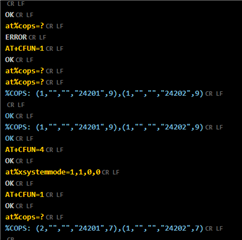
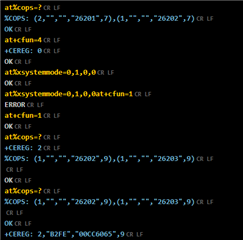
    for debug reasons I want to know which networks are available at my location. Therefore I use the serial modem application an the following commands:

    at+cfun=4

    at%xbandlock=2,"10000000000010000100"

    at%xsystemmode=1,1,0,0

    at+cfun=1

    at%cops=?

    When the modem connects directly after +cfun=1 I will only get the CAT M or the NB networks depending on recent connection. When the modem is not connected to any network when sending at%cops=? I will get both, CAT M and NB networks as a result.

    Best regards,

    Peter 

Reply
  • Hello Charlie,

    the reason for my question is the following:

    for debug reasons I want to know which networks are available at my location. Therefore I use the serial modem application an the following commands:

    at+cfun=4

    at%xbandlock=2,"10000000000010000100"

    at%xsystemmode=1,1,0,0

    at+cfun=1

    at%cops=?

    When the modem connects directly after +cfun=1 I will only get the CAT M or the NB networks depending on recent connection. When the modem is not connected to any network when sending at%cops=? I will get both, CAT M and NB networks as a result.

    Best regards,

    Peter 

Children
  • Might be that it is an mistake on my site. At the moment it looks like the modem does show both CAT M and NB cells also when it is connected to a network.

  • Hi Peter, 

    Thanks for sharing your observation. I did the same experiment on my local network.

    The two operators support both LTE-M and NB-IoT on the same cell. I found LTE-M is connected as the first option when both are enabled. I am not sure when different operators have the different networks, what will happen. Is this your condition? Can you observe all operators are listed?

    Best regards,

    Charlie

  • Hi Charlie,

    at the moment it looks similar to your results. When M and NB are activated at the same time M is connected and only M PLMN's are found with %COPS. When only NB is activated the modem connects to NB and shows the two available NB PLMN's with %COPS. The behaviour is not clear to me because yesterday I also observed both M and NB PLMN's shown when sending %COPS for several times.   

    Therefore it would be interesting to see what happens when the modem is not connected and %COPS is executed with both - M and NB- activated.,

    Best regards,

    Peter

Related