We have been using nrf connect installers 3.3.0 and now 3.7.0. We have recently seen issues with new users encountering this error when installing 3.7.0. Are there any solutions to this right now?
This is installed on a windows 10 64 bit machine.
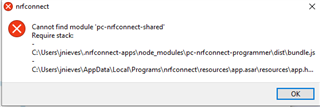
We have been using nrf connect installers 3.3.0 and now 3.7.0. We have recently seen issues with new users encountering this error when installing 3.7.0. Are there any solutions to this right now?
This is installed on a windows 10 64 bit machine.
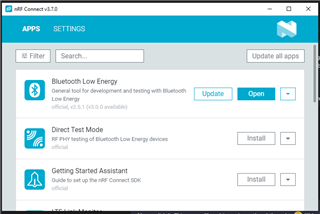
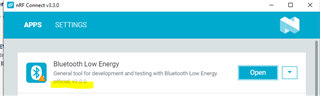
Seems like the issue could be related to the installer using v3.0.0 instead of v2.5.1. Is there a way to revert to this older version?
The screenshot below shows my computer with the installer working.

The screenshot below is my friend's computer with the installer not working.

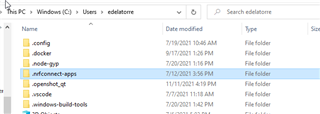
I was able to zip .nrfconnect-apps from my computer running v2.5.1 and paste it to the computer that was not working, and I was able to get it working again.

Seems like the installer pulls the latest tag in git or node grabs the latest version, which is breaking the BLE module. Is there a way to get an installer with a fix?
Hi
I'm sorry, but there is no easy way to revert back to older versions of nRFConnect applications, as generally the newer versions don't remove any features, and only add to them or remove bugs.
If you request a specific version we can probably provide that for you, but we strongly recommend using the latest versions. The installer will indeed pull the latest tag to get the latest app versions.
Best regards,
Simon
Hi Simonr,
Are you saying you no longer support nrf connect installers 3.3.0 and 3.7.0 (and probably all the older versions)? They are both breaking on a clean install because of this compatibility issue with .nrfconnect-apps grabbing the latest tag at v3.0.0 instead of v2.5.1.
We don't have a good/easy way of installing older .nrfconnect-apps unfortunately, but if you let me know what version of what apps you'd like to use, and I'll ask our devs to provide the JSON file(s) necessary to manually download the older versions.
Best regards,
Simon