

Hi nordic,
After I transplanted nrf52832 to nrf52833, the upgrade of nrf52833 failed, or stuck in the bootloader.I tried to use the current method to upgrade nrf52832, it was successful, but it could not be achieved on 833.
Here are some of my attempts. The first one is to use the project in the pca10100_s140_ble folder to upgrade. Although I use Programmer v2.0.0 in nrf connect to download, my app program w cannot be recognized, but it will enter the dfu of the bootloader. I tried to use dfu.zip to upgrade the program in this state, it showed that it was successful, but it was still in the bootloader after restarting.
The second attempt is to use the project under the pca10100_s140_ble_debug folder to obtain the bootloader, and then combine the commands to upgrade, but the program is not up. But my indicator is always on, RTT has the following information:
00> <info> app: Inside main
00>
00> <debug> app: In nrf_bootloader_init
00>
00> <debug> nrf_dfu_settings: Calling nrf_dfu_settings_init()...
00>
00> <debug> nrf_dfu_flash: Initializing nrf_fstorage_nvmc backend.
00>
00> <warning> nrf_dfu_settings: Resetting bootloader settings since neither the settings page nor the backup are valid (CRC error).
00>
00> <debug> nrf_dfu_settings: Writing settings...
00>
00> <debug> nrf_dfu_settings: Erasing old settings at: 0x0007F000
00>
00> <debug> nrf_dfu_flash: nrf_fstorage_erase(addr=0x0x0007F000, len=1 pages), queue usage: 0
00>
00> <debug> nrf_dfu_flash: Flash erase success: addr=0x0007F000, pending 0
00>
00> <debug> nrf_dfu_flash: nrf_fstorage_write(addr=0x0007F000, src=0x200040C0, len=896 bytes), queue usage: 1
00>
00> <debug> nrf_dfu_flash: Flash write success: addr=0x0007F000, pending 0
00>
00> <info> nrf_dfu_settings: Backing up settings page to address 0x7E000.
00>
00> <debug> nrf_dfu_settings: Writing settings...
00>
00> <debug> nrf_dfu_settings: Erasing old settings at: 0x0007E000
00>
00> <debug> nrf_dfu_flash: nrf_fstorage_erase(addr=0x0x0007E000, len=1 pages), queue usage: 1
00>
00> <debug> nrf_dfu_flash: Flash erase success: addr=0x0007E000, pending 0
00>
00> <debug> nrf_dfu_flash: nrf_fstorage_write(addr=0x0007E000, src=0x20004440, len=896 bytes), queue usage: 1
00>
00> <debug> nrf_dfu_flash: Flash write success: addr=0x0007E000, pending 0
00>
00> <debug> app: Enter nrf_bootloader_fw_activate
00>
00> <info> app: No firmware to activate.
00>
00> <info> app: Boot validation failed. No valid app to boot.
00>
00> <debug> app: DFU mode because app is not valid.
00>
00> <info> nrf_bootloader_wdt: WDT is not enabled
00>
00> <debug> app: in weak nrf_dfu_init_user
00>
00> <debug> app: timer_stop (0x20002B04)
00>
00> <debug> app: timer_activate (0x20002B04)
00>
00> <info> app: Entering DFU mode.
00>
00> <error> app: Received a fault! id: 0x00004002, pc: 0x00000000, info: 0x20009330
00>
I have also read the information in this article, but there is no difference in my operation.
This is my script to generate public key and secret key:
::generate private key
nrfutil keys generate priv.pem

::generate public key related with private key: priv.pem
nrfutil keys display --key pk --format code priv.pem --out_file dfu_public_key.c

pause
This is the script that generates the downloader:
::generate settings page for current image: app.hex
nrfutil settings generate --family NRF52 --application app.hex --application-version 1 --bootloader-version 1 --bl-settings-version 2 settings.hex

::merge bootloader and settings
mergehex --merge nrf52833_xxaa_s140.hex settings.hex --output bl_temp.hex

::merge bootloader, app and softdevice
mergehex --merge bl_temp.hex app.hex s140_nrf52_7.3.0_softdevice.hex --output whole.hex

pause
Then use Programmer v2.0.0 to download.
My version of nrfutil is:

I also asked the Nordic technicians that the company cooperated with, and also used his test program to run on my board, and it was the same as my first result.
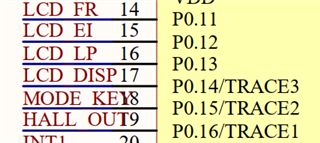
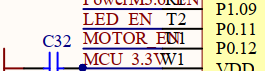
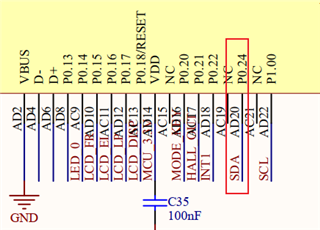
He suspected that some button pins of the chip were pulled up and down.But after I tried it, the result was the same.
This is some pin diagrams of the original nrf52832 button:
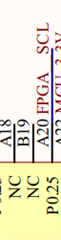
This is the button pin diagram of nrf52833:
I tried to turn off all the pins, and then only use the Bluetooth function, the same is true.
SDK:17.1
softdevice: s140_nrf52_7.3.0_softdevice.hex
Nordic_technician_test_program_nrf52833.rar
Can you give me some suggestions? My project is in urgent need of implementing this function. It was previously available in nrf52832, but it could not be implemented in nrf52833. Can you give me some suggestions? Many thanks! ! !
Thanks and Regards,
wfagly
