
how to do simple data transfer using bluetooth serail terminal?

how to do simple data transfer using bluetooth serail terminal?
Hello,
You could use the BLE NUS peripheral and central examples to do such a transfer between your devices.
The examples will relay anything they receive over UART to their connected peer over BLE, and the peer will output the messages received over BLE out on its UART, and visa versa.
Test this according to the example documentation, and let me know if you encounter any issues or questions.
Best regards,
Karl

i go through the nsu code but which api was used to transfer the data?
nrf uart was not supported for android 10, so can u please send me the app link for uart communication

The NRF UART smartphone application is indeed deprecated.
You can use the nRF Connect application to connect to and communicate with your device running the BLE NUS application.
Best regards,
Karl
static uint8_t data_array[BLE_NUS_MAX_DATA_LEN] = {1234};
uint8_t length = 10;
ble_nus_data_send(&m_nus, data_array, &length, m_conn_handle);
i am not used uart to send the data but just these lines i have used to send the data over bluetooth its not working
venkatesha kj said:i am not used uart to send the data but just these lines i have used to send the data over bluetooth its not working
You said earlier that you tested the example without modification, and that it did not work. Could you confirm that the example works without modification before we continue with this work?
venkatesha kj said:static uint8_t data_array[BLE_NUS_MAX_DATA_LEN] = {1234};
uint8_t length = 10;ble_nus_data_send(&m_nus, data_array, &length, m_conn_handle);
Please also share more complete code. In these 3 lines of code it does not seem like you are checking the returned error code from the ble_nus_data_send function. If you do not check the returned error codes you will not be alerted in the case that the function call is unsuccessful.
Could you confirm for me that you are indeed checking the returned error code?
I suspect that the function call to ble_nus_data_send might not have been successful, which would be the reason why you are not seeing any transfers happening. You will also need to make sure that the other side of the link is prepared to decode the values you are sending. The normal operation of the NUS examples receive bytes for ASCII characters, and will display them as such when they print it to their UART. Therefore, if you just send a number, it will still interpret it as an ASCII character, which might produce unexpected outputs.
Best regards,
Karl
data transmission was not working in the uart example
data transmission was not working in the uart example
Could you download a new instance of the nRF5 SDK v17.1.0, and run the completely unmodified example according to the instructions in the example's documentation? Do this, and let me know if it does not work as detailed in the documentation.
Please detail which specific step of the documentation where the behavior diverges from what you would have expected, and how it did so.
Best regards,
Karl
when i send the data from uart it will trigger uart event handler but in my case it will not trigger that
when i try to debug by putting the break point inside the uart event handle i got nrf break point error can i know the reason?
Please confirm that you have defined DEBUG in your preprocessor defines, like shown in the included image.
This will make the logger output a detailed error message whenever a non-NRF_SUCCESS error code is passed to an APP_ERROR_CHECK.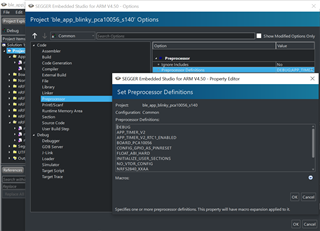
Do this, and check the returned error code from the loggers error message against the API reference of the function that returned the error code that triggered the APP_ERROR_CHECK.
Best regards,
Karl
Also, you may not use breakpoints as normal when working with the SoftDevice, since the breakpoint will halt the CPU which will cause the SoftDevice to assert as soon as it is restarted - since the SoftDevice misses all its timing critical deadlines when the CPU is halted.
Best regards,
Karl