You could use the BLE NUS peripheral and central examples to do such a transfer between your devices. The examples will relay anything they receive over UART to their connected peer over BLE, and the peer will output the messages received over BLE out on its UART, and visa versa. Test this according to the example documentation, and let me know if you encounter any issues or questions.
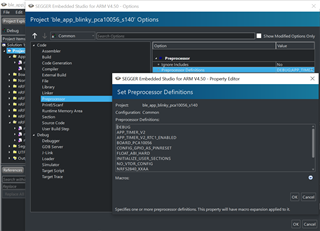
Please confirm that you have defined DEBUG in your preprocessor defines, like shown in the included image. This will make the logger output a detailed error message whenever a non-NRF_SUCCESS error code is passed to an APP_ERROR_CHECK. Do this, and check the returned error code from the loggers error message against the API reference of the function that returned the error code that triggered the APP_ERROR_CHECK.
Also, you may not use breakpoints as normal when working with the SoftDevice, since the breakpoint will halt the CPU which will cause the SoftDevice to assert as soon as it is restarted - since the SoftDevice misses all its timing critical deadlines when the CPU is halted.
The advertising interval only configures the time in between each advertising. The advertising duration or timeout is what determines how long the device will be advertising. The device will be in the low-power SYSTEM_ON idle state in between each advertising, and wake up when an advertising event is upcoming.
The advertising interval only configures the time in between each advertising. The advertising duration or timeout is what determines how long the device will be advertising. The device will be in the low-power SYSTEM_ON idle state in between each advertising, and wake up when an advertising event is upcoming.