
how to do simple data transfer using bluetooth serail terminal?

how to do simple data transfer using bluetooth serail terminal?
Hello,
You could use the BLE NUS peripheral and central examples to do such a transfer between your devices.
The examples will relay anything they receive over UART to their connected peer over BLE, and the peer will output the messages received over BLE out on its UART, and visa versa.
Test this according to the example documentation, and let me know if you encounter any issues or questions.
Best regards,
Karl

i go through the nsu code but which api was used to transfer the data?

Please share the section of the code in which you did this, using the Insert -> Code option.
Best regards,
Karl
void bsp_event_handler(bsp_event_t event)
{
    uint32_t err_code;
   // uint8_t count = 48;
  // uint8_t data_array1 = count;
   // uint8_t len = sizeof(count);
    char count[] = "hi serobit";
    uint8_t len = strlen(count);
    switch (event)
    {
        case BSP_EVENT_SLEEP:
            sleep_mode_enter();
            break;

        case BSP_EVENT_DISCONNECT:
            err_code = sd_ble_gap_disconnect(m_conn_handle, BLE_HCI_REMOTE_USER_TERMINATED_CONNECTION);
            if (err_code != NRF_ERROR_INVALID_STATE)
            {
                APP_ERROR_CHECK(err_code);
            }
            break;

        case BSP_EVENT_WHITELIST_OFF:
            if (m_conn_handle == BLE_CONN_HANDLE_INVALID)
            {
                err_code = ble_advertising_restart_without_whitelist(&m_advertising);
                if (err_code != NRF_ERROR_INVALID_STATE)
                {
                    APP_ERROR_CHECK(err_code);
                }
            }
            break;
         case BSP_EVENT_KEY_2:
            // Set_Count(count-48);
             err_code = ble_nus_data_send(&m_nus, count, &len, m_conn_handle);
           // err_code = ble_nus_data_send(&m_nus, &str, &len, m_conn_handle);


        default:
            break;
    }
}
i try to send the data when ever the button intterupt occured but not be able to see the data on nrf-connect app?
Have you verified that your code ever enters into the BSP_EVENT_KEY_2 case?
Please check the error code returned by your call to ble_nus_data_send. If you do not check the returned error code you will never be alerted if the function call fails unexpectedly.
Please also make sure to have DEBUG defined in your preprocessor defines, like shown in the included image: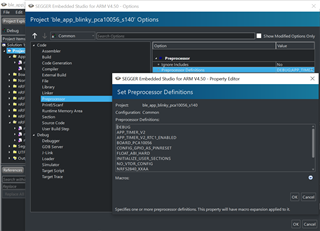
This will make your logger output a detailed error message whenever a non-NRF_SUCCESS error code is passed to an APP_ERROR_CHECK.
Best regards,
Karl
thanks karl its wprking and one more thing what is the minimum data rate i can set in BLE?
i know only 1mbps and 2mbps are the possible but will it be possible to set below 1mbps data rate?
static void advertising_init(void)
{
    int8_t tx_power_level = 8;
    uint32_t               err_code;
    ble_advertising_init_t init;
    ble_gap_adv_params_t adv_params;

    memset(&init, 0, sizeof(init));

    init.advdata.name_type          = BLE_ADVDATA_FULL_NAME;
    init.advdata.include_appearance = false;
   // init.advdata.flags              = BLE_GAP_ADV_FLAGS_LE_ONLY_LIMITED_DISC_MODE;
    init.advdata.flags              = BLE_GAP_ADV_FLAGS_LE_ONLY_GENERAL_DISC_MODE;

    init.srdata.uuids_complete.uuid_cnt = sizeof(m_adv_uuids) / sizeof(m_adv_uuids[0]);
    init.srdata.uuids_complete.p_uuids  = m_adv_uuids;

    init.config.ble_adv_fast_enabled  = true;
    init.config.ble_adv_fast_interval = APP_ADV_INTERVAL;
    //init.config.ble_adv_fast_timeout  = APP_ADV_DURATION;
    init.config.ble_adv_fast_timeout  = 0;
    init.evt_handler = on_adv_evt;

    adv_params.primary_phy = BLE_GAP_PHY_1MBPS;
    adv_params.secondary_phy = BLE_GAP_PHY_1MBPS;
    adv_params.duration = APP_ADV_DURATION;
    adv_params.p_peer_addr = NULL;
    adv_params.filter_policy = BLE_GAP_ADV_FP_ANY;
    adv_params.interval = APP_ADV_INTERVAL;

   // err_code = sd_ble_gap_adv_set_configure(&m_adv_handle, &m_adv_data, &adv_params);
   // APP_ERROR_CHECK(err_code);

     err_code = ble_advertising_init(&m_advertising, &init);
     APP_ERROR_CHECK(err_code);

     ble_advertising_conn_cfg_tag_set(&m_advertising, APP_BLE_CONN_CFG_TAG);

  //  err_code = sd_ble_gap_tx_power_set(BLE_GAP_TX_POWER_ROLE_ADV, m_advertising.adv_handle, tx_power_level);
   // APP_ERROR_CHECK(err_code);
}
i did like this to change the phy rate to 1mbps will this is the right way?
static void advertising_init(void)
{
    int8_t tx_power_level = 8;
    uint32_t               err_code;
    ble_advertising_init_t init;
    ble_gap_adv_params_t adv_params;

    memset(&init, 0, sizeof(init));

    init.advdata.name_type          = BLE_ADVDATA_FULL_NAME;
    init.advdata.include_appearance = false;
   // init.advdata.flags              = BLE_GAP_ADV_FLAGS_LE_ONLY_LIMITED_DISC_MODE;
    init.advdata.flags              = BLE_GAP_ADV_FLAGS_LE_ONLY_GENERAL_DISC_MODE;

    init.srdata.uuids_complete.uuid_cnt = sizeof(m_adv_uuids) / sizeof(m_adv_uuids[0]);
    init.srdata.uuids_complete.p_uuids  = m_adv_uuids;

    init.config.ble_adv_fast_enabled  = true;
    init.config.ble_adv_fast_interval = APP_ADV_INTERVAL;
    //init.config.ble_adv_fast_timeout  = APP_ADV_DURATION;
    init.config.ble_adv_fast_timeout  = 0;
    init.evt_handler = on_adv_evt;

    adv_params.primary_phy = BLE_GAP_PHY_1MBPS;
    adv_params.secondary_phy = BLE_GAP_PHY_1MBPS;
    adv_params.duration = APP_ADV_DURATION;
    adv_params.p_peer_addr = NULL;
    adv_params.filter_policy = BLE_GAP_ADV_FP_ANY;
    adv_params.interval = APP_ADV_INTERVAL;

   // err_code = sd_ble_gap_adv_set_configure(&m_adv_handle, &m_adv_data, &adv_params);
   // APP_ERROR_CHECK(err_code);

     err_code = ble_advertising_init(&m_advertising, &init);
     APP_ERROR_CHECK(err_code);

     ble_advertising_conn_cfg_tag_set(&m_advertising, APP_BLE_CONN_CFG_TAG);

  //  err_code = sd_ble_gap_tx_power_set(BLE_GAP_TX_POWER_ROLE_ADV, m_advertising.adv_handle, tx_power_level);
   // APP_ERROR_CHECK(err_code);
}
i did like this to change the phy rate to 1mbps will this is the right way?
venkatesha kj said:thanks karl its wprking
Great, I am happy to hear that!
venkatesha kj said:one more thing what is the minimum data rate i can set in BLE?
i know only 1mbps and 2mbps are the possible but will it be possible to set below 1mbps data rate?
I am not sure what you are asking about here, are you asking in regards to reducing the power consumption, or to practically send as little as possible? I will assume the former and say that; you will actually save power by using the 2 M PHY over the 1 M PHY because the RADIO will only be used for half the time.
venkatesha kj said:i did like this to change the phy rate to 1mbps will this is the right way?
Yes, this will make your device advertise on the 1 M PHY. When a central scans on the 1 M PHY and initiates a connection with the device the connection will also be on 1 M PHY (it inherits the PHY of the scanner/advertiser).
If you have more questions that diverge from your original ticket I would recommend that you open a new ticket for these questions, to keep the forum tidy and easy to navigate.
Best regards,
Karl