Uart DFU failed

Hi 

I have a project as the follow 
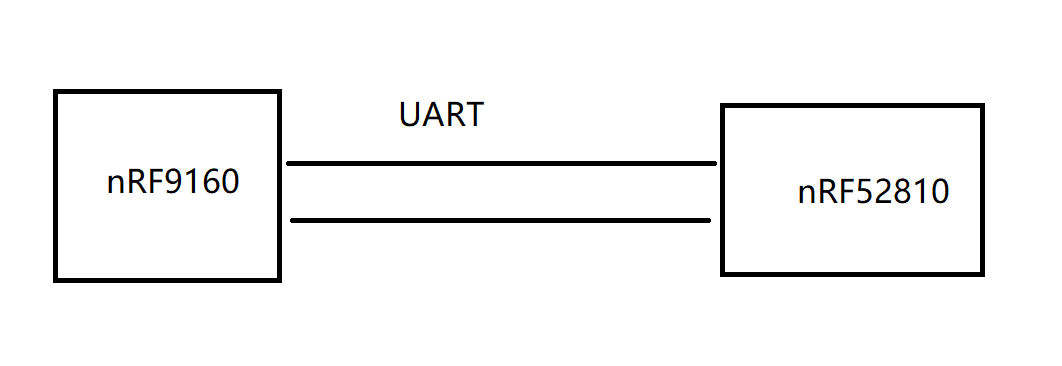
What I have done:

1. Compiled app.hex ( Configured with my board), works fine.

2. Compiled bootloader.hex ( Configured with my board)

3. Generate app_setting with nrfUtil

4. Merge app, app_setting, bootloader and flash to target board

5. Compile app again, and generate zip file with nrfutil.

6. Convert zip file to bin file and upload to web. (xxx.yyy.zzz/app_2_dfu.bin)

7. nRF9160 download app_2_dfu.bin successfully and ready to do DFU

But it failed. Please see the bellow picture
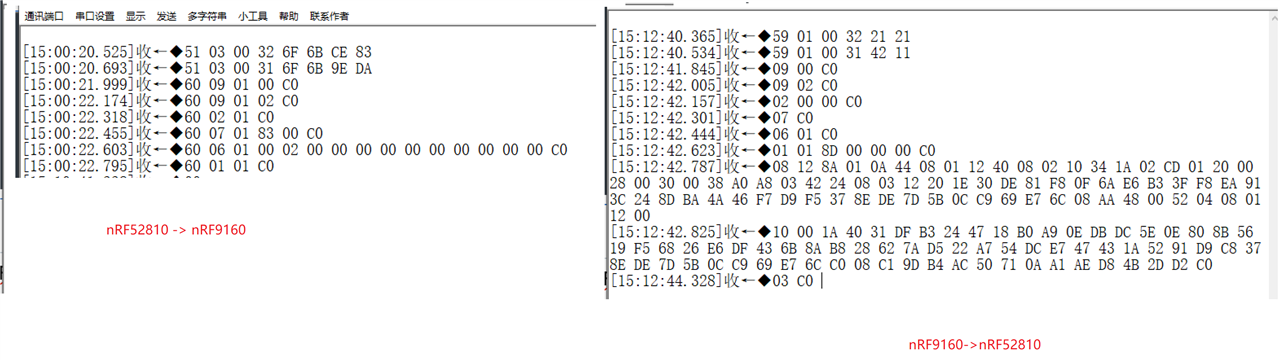
I understand the payload between DFU host(here is nRF91) and target(here is nRF52810)

First, host ping target and get response

Then, send command to target to enter bootloader

Then, wait a moment, host ping target to make sure target is bootloader mode

and then ..... it seem everything is OK,

But, when host send operation 0x03, which means to get CRC check, but the target don't have any response. 

I looked into the source code, if there is error, target should send error code back to host. But unfortunately, nothing, just like the target didn't receive 0x03.

Further, I changed both side hardware flow control ON and OFF, both don't work.

I set breakpoints for all NRF_DFU_OP_CRC_GET in bootloader. But none of them executed.

I set breakpoints for such as NRF_DFU_OP_OBJECT_CREATE in bootloader, it can stop at the breakpoint as expected.

Please help me.

Parents
  • Hi,

    Nordic does not provide any DFU master implementation for running on a nRF device, so I am not sure what you are using here.

    Can you elaborate on which bootloader you use on the nRF52 device (based on what you write I assume it is a nRF5 SDK based)? And then, can you share details about your DFU master implementation and how you test it?  Please elaborate.

  • Hi Einar

    I am afraid I have to re-open this ticket.

    When I reduce the dfu.bin file size to 43K, it can upgrade successfully. But when I did some development for couple weeks, the dfu.bin file size become as 45K. Then the upgrade failed.

    I am confused.

    If the dfu.bin file size is 54K or larger, bootloader will return 0x0B0D error code. which means 

    NRF_DFU_EXT_ERROR_INSUFFICIENT_SPACE        = 0x0D, /**< The available space on the device is insufficient to hold the firmware. */

    I can know clearly that the file size if too big.

    But if the dfu.bin file size is 45K, it doesn't return any error code, just start to DFU, and when the firmware packets are sent 

    about 35K, it time out. i.e. DFU host can not receive response from nrf52810 any more.

    When I reduce the dfu.bin file to 43K. It can upgrade successfully.

    As far as I know, My app size should have 60K - 8K(reserved app data size) = 52K space available. Am I right?

    How can I know exactly how many bytes space for my application? Or there is other reason that I don't know?

    Thank you very much!

  • Hi,

    ClarkChu said:
    As far as I know, My app size should have 60K - 8K(reserved app data size) = 52K space available. Am I right?

    We need to look at your memory layout to know this:

    1. What is the start address of the application (that will be the same as the size of the SoftDevice)?
    2. And what is the start address of the bootloader?
    3. How many reserved bytes do you have in the bootloader, configured with NRF_DFU_APP_DATA_AREA_SIZE in the bootloader's sdk_config.h? This typically should match whatever is configured for persistent data in the application.
    ClarkChu said:
    How can I know exactly how many bytes space for my application? Or there is other reason that I don't know?

    By finding the numbers I listed above we can know exactly how much space there is for the application, and can visualize the memory layout as is done in the bootloader documentation.

Reply Children
No Data
Related