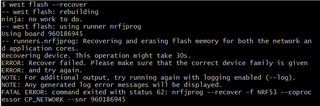

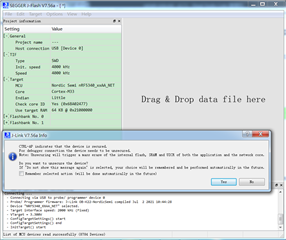
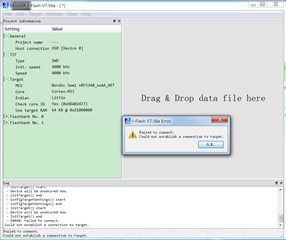
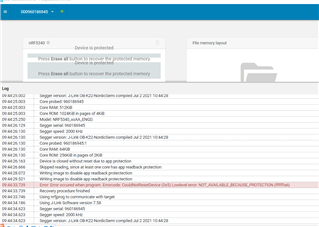
error log
the version is nRF5340-DK 1.0.0。 i buy anohter one ,but the net also is locked .I hope you can give me a concrete solution

Hi,
spring.liu said:the version is nRF5340-DK 1.0.0。 i buy anohter one ,but the net also is locked .I hope you can give me a concrete solution
I'm sorry to hear that the new kit also behaves like this.
Could you try the very latest version of nrfjprog? That can be downloaded from here:
This is the recover commands that we use internally in tech support:
nrfjprog --recover --coprocessor CP_NETWORK && nrfjprog --recover --coprocessor CP_APPLICATION
Does it still misbehave?
Kind regards,
Håkon

I need three boards to do it now. I need to fix it
At the first ,I use the nrfconnect ---->erase all ,but failure
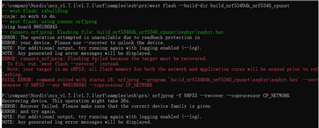
I've tried this before " nrfjprog -f NRF53 --recover --coprocessor CP_NETWORK "
Hi,
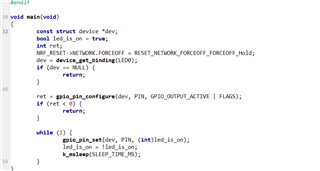
As the application core controls the network core, via this register:
It is important that you recover the application core as well. Can you try to recover the app core first?
"nrfjprog --recover --coprocessor CP_APPLICATION --log" - if that still fails, it will generate a log.log file, which you can attach to this thread.
Kind regards,
Håkon
NRF_RESET->NETWORK.FORCEOFF = RESET_NETWORK_FORCEOFF_FORCEOFF_Hold;?
Hi,
spring.liu said:NRF_RESET->NETWORK.FORCEOFF = RESET_NETWORK_FORCEOFF_FORCEOFF_Hold;?
Yes, this is the register that controls the network cpu state, from the application cpu.
Could you share the log (log.log file created after calling "nrfjprog") from recovering both application core and network core?
Hi,
Compile that example for board nrf5340dk_nrf5340_cpuapp, but set this in prj.conf instead to power up the net core:
Then try to program a bluetooth example (which generates a project for both cores), or any other example that utilizes the network core.
Kind regards,
Håkon
Didn't work ,The network core is still locked
Q1: Can you please attach the .log file from the recovery / program process?
Q2: Can you try this process?
1. recover network core (nrfjprog --recover --coprocessor CP_NETWORK)
2. recover application core (nrfjprog --recover)
3. power cycle the board (unplug board, wait 5 seconds, plug in board again)
4. program network core (nrfjprog --program <netcore_application.hex> --verify --coprocessor CP_NETWORK)
5. program application core (nrfjprog --program <appcore_application.hex> --verify)
Q3: Could you please update to newer segger driver? Can be downloaded from here (v7.60b at this time):
https://www.segger.com/downloads/jlink/
Q4: Can you try to program the device on another computer?
Kind regards,
Håkon