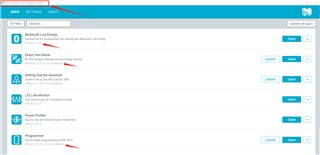
nrf connect desktop can't find PPK2 and nrf52dk

Hi

      The power profiler app can't find PPK2 after update nrf connect desktop and power profiler.

      The programmer and Bluetooth Low Energy app also can't find nrf52dk  after update nrf connect desktop and programmer.

Below is my PC information and nrf connect desktop information.

This issue likes link below. 

(+) Cannot find PPK2 after upgrade to nRF Connect for Desktop v3.8.0 - Nordic Q&A - Nordic DevZone - Nordic DevZone (nordicsemi.com)

Parents
  • Hi

    Yes, unfortunately we are having some issues with v3.8.0 and 3.9.0 releases of the nRFConnect for Desktop application, and we are currently working on a fix release. Have you tried rolling back to v3.7 as described in the case you linked to to check if that fixes this issue?

    1. Download the latest 3.7 version of nRF Connect for Desktop from https://www.nordicsemi.com/Products/Development-tools/nRF-Connect-for-desktop/Download?lang=en#infotabs (for macOS this is 3.7.2, for Windows and Linux 3.7.1).
    2. After starting nRF Connect for Desktop 3.7 a prompt will come up about the 3.8 upgrade. Click “No” on this.
    3. In the Settings, click on “Add source”, enter the URL http://developer.nordicsemi.com/.pc-tools/nrfconnect-apps/3.7-apps/apps.json and click “Add”.
    4. Back in the list of all apps, all apps should show up twice now, one with “official” below them and one with “3.7 compatible apps” below them. If you want to hide the incompatible versions, click on “Filter” and deselect “Official”.
    5. Install the apps you need in the old versions and use them.

    Unfortunately, we (and Microsoft) no longer support Windows 7, as it at this point is deprecated, so we can't guarantee that it works even if you roll back, although it most likely will. Either way we generally recommend updating your OS to the most recent one if possible.

    Best regards,

    Simon

Reply
  • Hi

    Yes, unfortunately we are having some issues with v3.8.0 and 3.9.0 releases of the nRFConnect for Desktop application, and we are currently working on a fix release. Have you tried rolling back to v3.7 as described in the case you linked to to check if that fixes this issue?

    1. Download the latest 3.7 version of nRF Connect for Desktop from https://www.nordicsemi.com/Products/Development-tools/nRF-Connect-for-desktop/Download?lang=en#infotabs (for macOS this is 3.7.2, for Windows and Linux 3.7.1).
    2. After starting nRF Connect for Desktop 3.7 a prompt will come up about the 3.8 upgrade. Click “No” on this.
    3. In the Settings, click on “Add source”, enter the URL http://developer.nordicsemi.com/.pc-tools/nrfconnect-apps/3.7-apps/apps.json and click “Add”.
    4. Back in the list of all apps, all apps should show up twice now, one with “official” below them and one with “3.7 compatible apps” below them. If you want to hide the incompatible versions, click on “Filter” and deselect “Official”.
    5. Install the apps you need in the old versions and use them.

    Unfortunately, we (and Microsoft) no longer support Windows 7, as it at this point is deprecated, so we can't guarantee that it works even if you roll back, although it most likely will. Either way we generally recommend updating your OS to the most recent one if possible.

    Best regards,

    Simon

Children
No Data
Related