BLE_GATT_STATUS_ATTERR_REQUEST_NOT_SUPPORTED, when trying a Write Characterisitc?

Part: nrf52833

Soft Device: SD140 (recently switched from SD 122 because SD140 supports more BLE 5.x features)

Application: Replace legacy Central host device with nrf53833.

Problem: One of our production peripherals will make a connection, but the Characteristic writes  fail after to switching from SD 122 to SD 140.

The gstt_status fault code is 0x106.  BLE_GATT_STATUS_ATTERR_REQUEST_NOT_SUPPORTED

One of our peripherals gets an error when a Write Characteristic is requested, type_2 passes the request.

This is a high priority to get working?  Is there any way to tell why SD122 did not have this issue?

Thanks,

Dan

Customer Sensor Peripheral type 1:  gets a gatt_status failure

00> <warning> ble_nus_c: WRITING TO THE AUTH CHAR
00> <debug> app: GATT STATUS FAULT CODE 0x106

Customer sensor Peripheral type 2: no failure, is it possible that sensor 1 does not support the MTU exchange below that sensor 2 shows?

00> <debug> nrf_ble_gatt: Peer on connection 0x0 requested an ATT MTU of 247 bytes.
00> <debug> nrf_ble_gatt: Updating ATT MTU to 23 bytes (desired: 23) on connection 0x0.
00> <info> app: Ble NUS max data length set to 0x14(20)

Parents
  • Vidar,

    Thanks for getting back with this.  It appears that the MTU_SIZE is not directly related to the problem.  The write request still fails when the gatt_central is initialized to NRF_SDH_BLE_GATT_MAX_MTU_SIZE.  

    here are some additinal details.

    1.  the Central makes a connection.

     2. A write request to a characteristic is made.

      NRF_LOG_WARNING("WRITING TO THE AUTH CHAR");

            return sd_ble_gattc_write(p_ble_nus_c->conn_handle, &write_params);

    /* code */


    3.  The response from the write request is a fault 0x106.  (This worked when using SD122?)

    00> <debug> app: GATT WRITE FAILED.

    00> <debug> app: GATT STATUS FAULT CODE 0x106


      case BLE_GATTC_EVT_WRITE_RSP:

            {

               const ble_gattc_evt_write_rsp_t * p_val = &p_ble_evt->evt.gattc_evt.params.write_rsp;


               if ((BLE_GATT_STATUS_SUCCESS != p_ble_evt->evt.gattc_evt.gatt_status))

                {

                  // Handle retry of the write depending upon the error

                  NRF_LOG_DEBUG("GATT WRITE FAILED.");

                  NRF_LOG_DEBUG("GATT STATUS FAULT CODE 0x%X", p_ble_evt->evt.gattc_evt.gatt_status);

                  // handle write failure 

                  cble_nus_c_handleFaultWriteChar(p_val);

                }else{

                  // handles moving to the next step when the write has completed.

                  cble_nus_c_handleWriteChar(p_val);

               }

     Thanks,

    Dan

  • Dan,

    There shouldn't be any difference between the s122 and s140 if you are passing the same write parameters to sd_ble_gattc_write(). Can you post the parameters you have in 'write_params' here?

    Best regards,

    Vidar

  • Don,

    Everyting looks correct. Are you checking the return code from sd_ble_gattc_write(). The packet will only be sent if it returns NRF_SUCCESS. It will return  NRF_ERROR_BUSY if the write request overlap with an ongoing write request procedure or the ATT MTU exchange.

  • Vidar,

    I ran a test again with two target peripherals that my Central app connects to. After a connection the Central will attempt a Write to a characteristic.  Debug and code sections are shown below.

    Both write requests return NRF_SUCCESS.  But, one has no Event response to the write, and the other returns an error code, see below.  Note: The Central does not run the Discovery step after connecting because one of our sensors will not support this. There are many in the feild that cant be changed.

    Thanks for your help, we are under pressure to replace the BLE soc with the nrf52833 for a substantial order.  8^)

    Sensor 1; Qualcomm soc, Multisense Sensor
    00> <info> app: Connecting to target 391A00841A48
    00> <info> app: GAP EVENT =: 0x10
    00> <info> app: CONNECT HANDLE = 0
    00> <info> ble_nus_c: CONNECT TO SENSOR, NEXT STATE...

    00> <info> ble_nus_c: SEND: write
    00> <debug> ble_nus_c: 16 9F DE A3 |....
    00> <warning> ble_nus_c: WRITE AUTH CHAR: 0
    00> <info> ble_nus_c: AUTH WRITE PASSED: 0

    No gap event from the write?

    00> <info> app: GAP EVENT =: 0x1C
    00> <debug> app: RSSI update rssi=-47.
    00> <info> app: Disconnected.
    00> <info> app: GAP EVENT =: 0x11

    SENSOR 2: nrf52840 peripheral camera sensor00> <info> app: Connecting to target 0101FF841A48
    00> <info> app: GAP EVENT =: 0x10
    00> <info> app: CONNECT HANDLE = 0
    00> <info> ble_nus_c: CONNECT TO SENSOR, NEXT STATE...
    00>
    00> <info> ble_nus_c: SEND: write
    00> <debug> ble_nus_c: DE AD BA BA
    00> <warning> ble_nus_c: WRITE AUTH CHAR: 0
    00>
    00> <info> ble_nus_c: AUTH WRITE PASSED: 0
    00> <info> app: GAP EVENT =: 0x1C
    00> <debug> app: RSSI update rssi=-50.

    00> <debug> nrf_ble_gatt: Updating ATT MTU to 32 bytes (desired: 32) on connection 0x0.
    00> <info> app: ATT MTU exchange completed.
    00> <info> app: GAP EVENT =: 0x38

    00> <debug> app: GATT WRITE FAILED.
    00> <debug> app: GATT STATUS FAULT CODE 0x10D == BLE_GATT_STATUS_ATTERR_INVALID_ATT_VAL_LENGTH
    00> <debug> ble_nus_c: GATT write response. len=0

     /***************  Code 

    Write Request

    .write_op = BLE_GATT_OP_WRITE_REQ,
    .flags = 0,

    .handle = p_ble_nus_c->handles.cble_auth_pw_handle,
    .offset = 0,
    .len = length,
    .p_value = p_string
    };

    err_code =sd_ble_gattc_write(p_ble_nus_c->conn_handle, &write_params);
    NRF_LOG_WARNING("WRITE AUTH CHAR: %d", err_code);
    return err_code;

    Event handling

    case BLE_GATTC_EVT_WRITE_RSP:
    {
    const ble_gattc_evt_write_rsp_t * p_val = &p_ble_evt->evt.gattc_evt.params.write_rsp;

    if ((BLE_GATT_STATUS_SUCCESS != p_ble_evt->evt.gattc_evt.gatt_status))
    {
    // Handle retry of the write depending upon the error
    NRF_LOG_DEBUG("GATT WRITE FAILED.");
    NRF_LOG_DEBUG("GATT STATUS FAULT CODE 0x%X", p_ble_evt->evt.gattc_evt.gatt_status);
    // handle write failure
    cble_nus_c_handleFaultWriteChar(p_val);
    }else{
    // handles moving to the next step when the write has completed.
    cble_nus_c_handleWriteChar(p_val);
    }
    }
    break;

  • Don,

    DanPhelan said:
    Note: The Central does not run the Discovery step after connecting because one of our sensors will not support this. There are many in the feild that cant be changed.

    But you know the attribute handle for the characteristic you are trying to write to?

    Have you tried to see if you can perform a write request to the same characteristic if you use the nRF connect on Android or iOS?

    DanPhelan said:
    00> <debug> app: GATT STATUS FAULT CODE 0x10D == BLE_GATT_STATUS_ATTERR_INVALID_ATT_VAL_LENGTH

    Do you know the max. value length for this characteristic? 

  • Vidar,

    I am making some progess.  The handle characteristic values are known.  Both sensors are supposed to have that characteristic's length set to 4.  But, one is set to 4 and the other is set to 1.  The SoftDevice was correct.

    This explains the error code, BLE_GATT_STATUS_ATTERR_INVALID_ATT_VAL_LENGTH.  I corrected the length for that sensor and it is working properly.

    The other sensor still will not respond at all to the Write command?  I will see if I can get its operating code because I suspect that if the values of the Write Characteristic command are not acceptable, so it immediately disconnects.  That is my guess.  I "thought" I had this connection working using SD122.  Not sure now.

    I can connect to the sensor using nrfConnect for a few seconds before the sensor disconnects.

    I will let you now when I get the sensors code.

    Thanks,

    Dan

  • Dan,

    I'm glad to hear that you are making progress.

    DanPhelan said:
    The other sensor still will not respond at all to the Write command?  I will see if I can get its operating code because I suspect that if the values of the Write Characteristic command are not acceptable, so it immediately disconnects. 

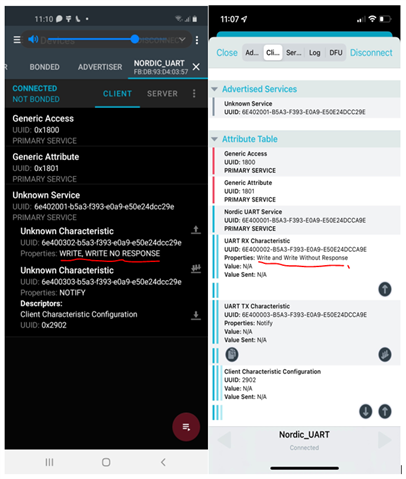
    Are you sure this characteristic includes the write property and not just write without response? Note that you can check what propertise the characteristic has through the nRF connect app.

    Screenshot of GATT server viewed in the nRF connect app. The left one is from an Android phone, and the one to the right is from an iPhone.

    Best regards,

    Vidar

Reply
  • Dan,

    I'm glad to hear that you are making progress.

    DanPhelan said:
    The other sensor still will not respond at all to the Write command?  I will see if I can get its operating code because I suspect that if the values of the Write Characteristic command are not acceptable, so it immediately disconnects. 

    Are you sure this characteristic includes the write property and not just write without response? Note that you can check what propertise the characteristic has through the nRF connect app.

    Screenshot of GATT server viewed in the nRF connect app. The left one is from an Android phone, and the one to the right is from an iPhone.

    Best regards,

    Vidar

Children
No Data
Related