This discussion has been locked.
You can no longer post new replies to this discussion. If you have a question you can start a new discussion

How to update connection parameters using nRF connect mobile application on IOS platform?

Hello,

In nRF Connect desktop application, under Bluetooth Low Energy tool v3.0.0, whenever I connect a peripheral device using this application, I see the option to update connection parameters like connection interval, connection latency...etc (photo attached).

But when I connect using the mobile phone application on IOS, after a connection with peripheral device, I can see all the advertising data like Manufacturer ID, UUID services but I am not able to find the option to update these connection parameters. Is it even possible from the mobile app?
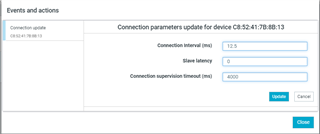
Also note that I am trying to update these parameters from a central device (Bluetooth Low Energy application) to my peripheral device.

Parents
  • Hi. 

    I'm afraid it's not possible to change the connection parameters in nRF Connect for iOS. 

    We would add the functionality if we could, but it's not available through the API. It's locked on the iOS side. 
    That said; iOS is usually good at negotiating connection parameters - it attempts multiple times before the connection fails. 

    Br, 
    Joakim

  • “It is locked on IOS side” - Does this mean that IOS does not allow the change of connection parameters or does this mean Nordic has locked it for the time being? 

    Also, does the nRF connect app on android has this capability? 

Reply Children
No Data
Related