PPK2 trace hangs

Hi,

I am using nRF Connect 3.9.1 and power profiler 3.2.1. I have noticed that if I have a measurement on-going and go away for a while (4mins tested while writing this), e.g. switch to another Windows program, the trace is freezed and not progressing when I return (there is activity though since the indication around the stop button still moves). I assume it is trying to "catch up" with the measurements done while I was away. However, this extends in time and when I get bored of waiting, I click "stop" and then "start" to re-start the measurement. Then the old trace is removed, but there is no new one (the indication around the stop button is there though). I have to close the app, cycle the power on the PPK hardware and start from scratch to get the measurements running again.

/Peter.

Parents
  • Hi,

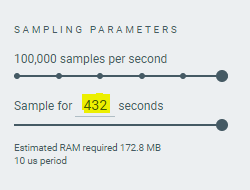
    This is indeed a weird situation as I am unable to reproduce this. I tried running the power profiler application in the background and it did freeze, but resumed automatically without any action after a few seconds.  Are you sure that you are not just hitting the allocated buffer? If you check the sampling parameters in the power profiler, you can see that the maximum time to sample is 432 seconds after which it stops sampling.

    Kindly check and let me know. 

    Regards,

    Swathy

Reply
  • Hi,

    This is indeed a weird situation as I am unable to reproduce this. I tried running the power profiler application in the background and it did freeze, but resumed automatically without any action after a few seconds.  Are you sure that you are not just hitting the allocated buffer? If you check the sampling parameters in the power profiler, you can see that the maximum time to sample is 432 seconds after which it stops sampling.

    Kindly check and let me know. 

    Regards,

    Swathy

Children
Related