nRF Connect Can not Create Project

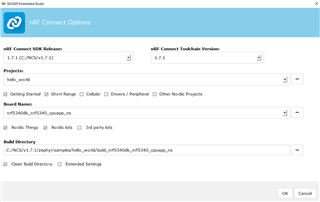
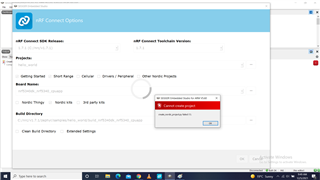
I installed nRF Connect Desktop. Opened Tool Manager. After sucessful installation, I tried to create ny first project by opening SES through nRF. The selections used are shown in attached image. There appears a warning... project not created...
Parents
  • Hi Gulzar,

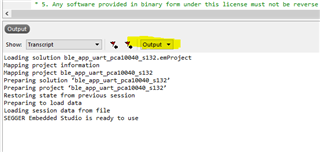
    Could you click "OK" and then share a snippet of your output window? 

    This is a sample of the output window.

    Regards,

    Priyanka

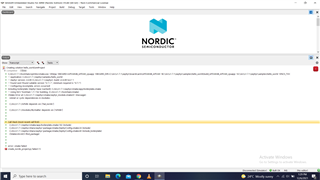
  • Dear.. after clicking the OK button on Dialog box... the output Window is in image. Cmake related error...

  • Dear  PK, Here is the Task Output in image below. I am yetbtetsing "Hello World" sample project as I am new to Nordic. 

    Creating solution hello_world.emProject
    C:/nrc/v1.7.1/toolchain/opt/bin/cmake.exe -GNinja -DBOARD=nrf5340dk_nrf5340_cpuapp -DBOARD_DIR=C:\nrc\v1.7.1\zephyr\boards\arm\nrf5340dk_nrf5340 -BC:\nrc\v1.7.1\zephyr\samples\hello_world\build_nrf5340dk_nrf5340_cpuapp -SC:\nrc\v1.7.1\zephyr\samples\hello_world -DNCS_TOOLCHAIN_VERSION=1.7.1 -DEXTRA_KCONFIG_TARGETS=menuconfig_ses -DEXTRA_KCONFIG_TARGET_COMMAND_FOR_menuconfig_ses=C:\nrc\v1.7.1\toolchain\segger_embedded_studio/html/configure_nordic_project_menuconfig.py
    -- Application: C:/nrc/v1.7.1/zephyr/samples/hello_world
    -- Zephyr version: 2.6.99 (C:/nrc/v1.7.1/zephyr), build: v2.6.99-ncs1-1
    -- Found west (found suitable version "0.11.1", minimum required is "0.7.1")
    -- Configuring incomplete, errors occurred!
    Including boilerplate (Zephyr base (cached)): C:/nrc/v1.7.1/zephyr/cmake/app/boilerplate.cmake
    -- Using NCS Toolchain 1.7.1 for building. (C:/nrc/v1.7.1/toolchain/cmake)
    CMake Error at C:/nrc/v1.7.1/zephyr/cmake/zephyr_module.cmake:61 (message):
    Unmet or cyclic dependencies in modules:

    C:/nrc/v1.7.1/nrfxlib depends on: ['hal_nordic']

    C:/nrc/v1.7.1/modules/lib/matter depends on: ['nrfxlib']

    Call Stack (most recent call first):
    C:/nrc/v1.7.1/zephyr/cmake/app/boilerplate.cmake:182 (include)
    C:/nrc/v1.7.1/zephyr/share/zephyr-package/cmake/ZephyrConfig.cmake:24 (include)
    C:/nrc/v1.7.1/zephyr/share/zephyr-package/cmake/ZephyrConfig.cmake:40 (include_boilerplate)
    CMakeLists.txt:5 (find_package)

    error: cmake failed
    create_nordic_project.py failed (1)

  • Hi,

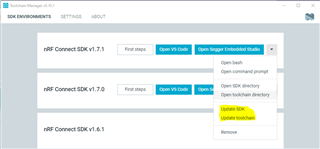
    Could you try removing all the build folders from your hello_world sample and then could you try to update your SDK and Toolchain directory from the Toolchain manager as shown below?

    After this, kindly try to build again, preferably by selecting "clean build directory".

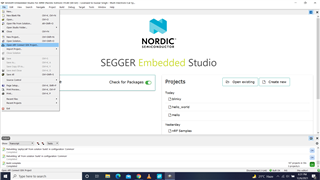
  • Hi PK, thanks for your guidance. The "Hello World" and "Blinky" samples have been successfully build. Now, I want to know: How to create a new Project uisng nRF Project. There is option to open existing nRF project.. pls see image but not option to create new nRF project  in SES.

    Gulzar Singh

  • Hi, 

    For this, you could create a project and save it within your directory location (yours must be c:/nrc/v1.7.1) and then select the "open nrf Connect SDK Project..." and select your project in the "Projects:" section. This will be loaded into SEGGER just like any other project.

    I hope you have found the answer to your query for which this ticket was opened. Slight smile 

    For further queries kindly open a new ticket.

    Regards,

    Priyanka

  • Dear, as you said to create new project in (c:/nrc/v1.7.1) ... is there any restriction to create in same folder and derive where nrc" is installed. May, I create new project in another folder and drive ?

Reply Children
No Data
Related