Hello,
I am trying to update my Nordic nRF52840 via UART, using the bootloader from the examples (SDK 15.2.0). In the my application another MCU (from ST32) will update the Nordic, but to test the procedure I am trying to perform the update with nrfutil first.
So, after generating the signed .zip with the private key (of course I used the related public key to compile the bootloader) I run:
nrfutil.exe dfu serial -pkg out.zip -p COM12 -b 19200
and the output is:
2021-12-10 17:00:07,142 Using board at serial port: COM12
2021-12-10 17:00:07,148 Sending Application image.
2021-12-10 17:00:40,349 Serial: Set Packet Receipt Notification 0
2021-12-10 17:00:40,359 Sending init packet...
2021-12-10 17:00:40,359 Serial: Selecting Object: type:1
2021-12-10 17:00:40,370 Serial: Object selected: max_size:512 offset:141 crc:2892912021
2021-12-10 17:00:40,374 Sending firmware file...
2021-12-10 17:00:40,374 Serial: Selecting Object: type:2
2021-12-10 17:00:40,386 Serial: Object selected: max_size:4096 offset:5 crc:3209681985
2021-12-10 17:00:40,393 Serial: Streaming Data: len:4096 offset:0 crc:0x00000000
Traceback (most recent call last):
File "nordicsemi\dfu\dfu_transport_serial.py", line 123, in send_message
File "site-packages\serial\serialwin32.py", line 323, in write
serial.serialutil.SerialTimeoutException: Write timeout
During handling of the above exception, another exception occurred:
Traceback (most recent call last):
File "nordicsemi\__main__.py", line 1455, in <module>
File "site-packages\click\core.py", line 764, in __call__
File "site-packages\click\core.py", line 717, in main
File "site-packages\click\core.py", line 1137, in invoke
File "site-packages\click\core.py", line 1137, in invoke
File "site-packages\click\core.py", line 956, in invoke
File "site-packages\click\core.py", line 555, in invoke
File "nordicsemi\__main__.py", line 1035, in serial
File "nordicsemi\__main__.py", line 951, in do_serial
File "nordicsemi\dfu\dfu.py", line 127, in dfu_send_images
File "nordicsemi\dfu\dfu.py", line 100, in _dfu_send_image
File "nordicsemi\dfu\dfu_transport_serial.py", line 301, in send_firmware
File "nordicsemi\dfu\dfu_transport_serial.py", line 466, in __stream_data
File "nordicsemi\dfu\dfu_transport_serial.py", line 125, in send_message
pc_ble_driver_py.exceptions.NordicSemiException: Writing to serial port failed: Write timeout. If MSD is enabled on the target device, try to disable it ref. wiki.segger.com/index.php
[7052] Failed to execute script __main__
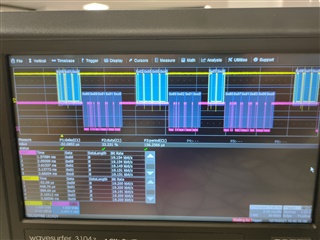
I am also sniffing the TX and RX channels using an oscilloscope and UART decoding, with the result you see in the attached pic. It is clear that the communication starts and the Nordic answers (you can recognize it is SLIP protocol by the characteristic 0xc0 in the end of each message) but after a little (not shown in the pic) the communication stops.
I am sure I set the right baud rate (19200) on both ends (through the sdk_config parameter on Nordic, using the related parameter in nrfutil) and that I enabled the required UART interfaces for DFU. Plus I am not using hardware control, could this represent an issue for the UART DFU, even though I am working at a reduced speed? The error message is related to a "write timeout" and tells me to try to disable MSD (Mass storage control?), not sure what it means though. I am not using iOS (in another thread iOS was quoted as being related to the MSD issue).
Thanks for any help, I am really stuck on this!
Regards,
Stefano