Secure DFU example add interrupt

Good morning/afternoon/evening,

So I am fairly new to nRF system and wanted to know if there is a way to execute an interrupt when one of the buttons on the board is pressed. Using the secure dfu bootloader example. I am working with nRF SDK 16.0v and with a nRF52 DK. 

/**@brief Suspend the CPU until an interrupt occurs.
 */
static void wait_for_event(void)
{
#if defined(BLE_STACK_SUPPORT_REQD) || defined(ANT_STACK_SUPPORT_REQD)
    (void)sd_app_evt_wait();
#else
    // Wait for an event.
    __WFE();
    // Clear the internal event register.
    __SEV();
    __WFE();
#endif
}

/**@brief Continually sleep and process tasks whenever woken.
 */
static void loop_forever(void)
{
    while (true)
    {
        //feed the watchdog if enabled.
        nrf_bootloader_wdt_feed();

        app_sched_execute();

        //======Button event ======================
        bool volatile tempBool = bsp_board_button_state_get(BSP_BUTTON_0);
        NRF_LOG_INFO("The current value of tempBool is:%d", tempBool);
        if(tempBool)
        {
          bsp_board_led_on(BSP_BOARD_LED_1);
        }
        else
        {
          bsp_board_led_off(BSP_BOARD_LED_1);
        }
        //=========================================

        if (!NRF_LOG_PROCESS())
        {
            wait_for_event();
        }
    }
}

The code posted here is from the example. Here I make a call to get the button state, but for some reason it is reading the button as pressed even though I haven't touched. Is There a way to add an event that will cause an interrupt and toggle the button on or off.

Thank you for your help.

Jose

Parents
  • Hi Jose, 

    I would suggest to have a look and test the ble_app_hrs example. In that the button press is handled as an interrupt. When a button is pressed you will received a call back to bsp_event_handler().

    If you don't want to use the bsp module, you can use the nrf_drv_gpiote module directly. Please have a look at the \examples\peripheral\pin_change_int\ example. 


  • I have been able to add the bsp_event_handler but for some reason I get this error.

    1> /usr/share/segger_embedded_studio_for_arm_5.68/gcc/arm-none-eabi/bin/ld: Output/Release/Obj/secure_bootloader_uart_mbr_pca10040/bsp.o: in function `bsp_init':
    1> /home/dex/_ble_central_reference_nrfsdk/nRF5SDK160098a08e2/components/libraries/bsp/bsp.c:504: undefined reference to `app_button_init'
    1> /usr/share/segger_embedded_studio_for_arm_5.68/gcc/arm-none-eabi/bin/ld: /home/dex/_ble_central_reference_nrfsdk/nRF5SDK160098a08e2/components/libraries/bsp/bsp.c:511: undefined reference to `app_button_enable'
    Build failed
    It keeps giving an error saying it can't find app_button_enable. I am not quite sure what is wrong. This error is usually given at the linking stage of building.

  • Hi Jose, 

    You would need to include app_button.c and enable app_button (BUTTON_ENABLED)in the sdk_config.h 

    Please refer to other examples in the SDK for example ble_app_hrs . 

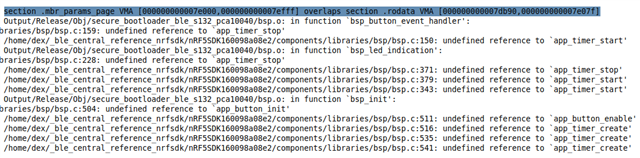
  • I have enabled the button in the sdk_config but now I am getting overlapping sections in the memory. I'm not sure how to fix this issue.

    Output

    EDIT: So I have been able to figure out the issue is the bsp_init() function that I call. Since there is already an existing ISR in the program, I am attempting to override the current one with the new one. But now I do not know how to add an interrupt to the existing ISR or how to replace the current ISR.

  • Hi Jose, 
    I would suggest to get familiar with the bsp library in a simple application before you move to the bootloader. Please try to add button handling in a small easy application for example : examples\peripheral\blinky . 

Reply Children
No Data
Related