Visual studio code nRF connect extension wrong device descriptor for nrf9160

Hello,

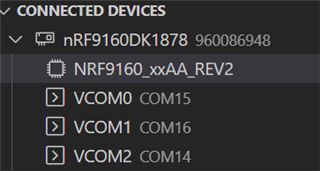
Since yesterday's update of the nRF connect extension the device name of the target in the "connected" devices screen is updated from nrf9160_xxAA to nrf9160_xxAA_REV2.

JLink does not recognize this. It throws an error and pops-up a screen to select the proper device name, namely, nrf9160_xxAA.
In the case one uses no-gui docker images to build, this pop-up has no interface to deploy to, hence, no connecting to the RTT log possible.

Please revert the change to the device name. JLink has not updated their list of device names yet.

Parents
  • Hi Narrowband,

    I am not sure if I understand you correctly. 

    1) You have no problem connecting with the device on VS code with the nRF connect extension.

    If yes, what you see the change from nrf9160_xxAA to nrf9160_xxAA_REV2 should be as expected. As the following picture shows, this means the Jlink has connected to the device and read JLINK OB IF serial number(960086948).

    2) 

    It throws an error and pops-up a screen to select the proper device name, namely, nrf9160_xxAA.

    I assume this error appears when you are running some programing commands, can you provide your operation steps and screenshots of your error?

    Best regards,

    Charlie

Reply
  • Hi Narrowband,

    I am not sure if I understand you correctly. 

    1) You have no problem connecting with the device on VS code with the nRF connect extension.

    If yes, what you see the change from nrf9160_xxAA to nrf9160_xxAA_REV2 should be as expected. As the following picture shows, this means the Jlink has connected to the device and read JLINK OB IF serial number(960086948).

    2) 

    It throws an error and pops-up a screen to select the proper device name, namely, nrf9160_xxAA.

    I assume this error appears when you are running some programing commands, can you provide your operation steps and screenshots of your error?

    Best regards,

    Charlie

Children
No Data
Related