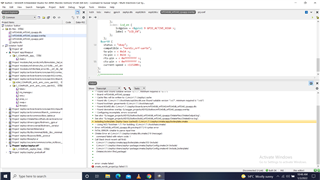
I added the uart overlay as shown in attached file. When, Run CMake is executed, the error is shown as in attached image.

I added the uart overlay as shown in attached file. When, Run CMake is executed, the error is shown as in attached image.
Hi,
Please refer to the format of uart0 at https://github.com/nrfconnect/sdk-zephyr/blob/main/boards/arm/nrf5340dk_nrf5340/nrf5340dk_nrf5340_cpunet.dts#L120 and also have a look this case.
Regards,
Amanda

Dear Amanda, thankful to you for reply. In my project, I need not use of RTS and CTS. May I use the overlay file as shown in bms.overlay ?

Hi,
May I know how you run with the bms.overlay? There are several ways to use it. Which one are you using?
Some theories, (1) You might need to open/import the project again for the overlay to take effect. (2) Might need to check the "Clean Build Directory" when you open the project. or (3) Maybe you used the wrong board name, and therefore the overlay was not applied.
What is the sample or application? Does it run hci_rpmsg on netcore? If so, you can create a child_image and put the nrf5340dk_nrf5340_cpunet.overlay under child_image\hci_rpmsg\boards.
I have modified your overlay, renamed it as nrf5340dk_nrf5340_cpunet.overlay, and tested it with peripheral_uart.
/ {
	aliases {
		bmsserial = &uart0;
	};
};

&uart0{
    current-speed = < 9600 >;
    /delete-property/ rts-pin;
    /delete-property/ cts-pin;
};
You can take a look at how the nrf5340dk_nrf5340_cpunet.overlay is used in this peripheral_uart_280211.zip.
-Amanda
Dear Amanda, I am doing all work in SES and yet have free version of it. SO, please guide accordingly. Most of tutorials are from commnd line pont of view.
Hi,
It's related to how you set the overlay instead of IDE, and I have explained and provided the example in the previous reply. I would suggest you study Devicetree HOWTOs.
-Amanda
Hi, I tried to change the baud rate using overlay file as shown in attache files, but the ovrlay baud does not appear in zupher.dts 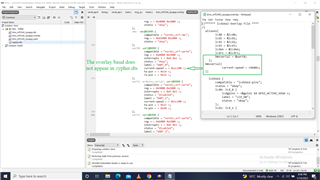 bms_nrf5340_cpuapp.overlay5545.zephyr.dts
Hi,
The modified overlay 3554.nrf5340dk_nrf5340_cpuapp.overlay look like this:
//****** lcd16x2 Overlay File ****
/{
  aliases{
        lcd0 = &lcd0;
        lcd1 = &lcd1;
        lcd2 = &lcd2;
        lcd3 = &lcd3;
        lcden = &lcden;
        lcdrs = &lcdrs;
        bmsserial = &uart0;
    };

    lcd16x2 {
        compatible = "lcd16x2-pins";
        status = "okay";
        lcd0: lcd_0 {
            lcdgpios = <&gpio1 10 GPIO_ACTIVE_HIGH >;
            label = "LCD_D0";
            status = "okay";
        };
        lcd1: lcd_1 {
            lcdgpios = <&gpio1 11 GPIO_ACTIVE_HIGH >;
            label = "LCD_D1";
            status = "okay";
        };
        lcd2: lcd_2 {
            lcdgpios = <&gpio1 12 GPIO_ACTIVE_HIGH >;
            label = "LCD_D2";
            status = "okay";
        };
        lcd3: lcd_3 {
            lcdgpios = <&gpio1 13 GPIO_ACTIVE_HIGH >;
            label = "LCD_D3";
            status = "okay";
        };
        lcdrs: lcd_rs {
            lcdgpios = <&gpio1 14 GPIO_ACTIVE_HIGH >;
            label = "LCD_RS";
            status = "okay";
        };
        lcden: lcd_en {
            lcdgpios = <&gpio1 15 GPIO_ACTIVE_HIGH >;
            label = "LCD_EN";
            status = "okay";
        };
    };

/*
    lcd16x2 {
        compatible = "lcd_pins";

        lcd0: lcd_0 {
            lcdgpios = <&arduino_header 10 GPIO_ACTIVE_HIGH>;
            label = "LCD_D0";
        };
        lcd1: lcd_1 {
            lcdgpios= <&arduino_header 11 GPIO_ACTIVE_HIGH>;
            label = "LCD_D1";
        };
        lcd2: lcd_2 {
            lcdgpios = <&arduino_header 12 GPIO_ACTIVE_HIGH>;
            label = "LCD_D2";
        };
        lcd3: lcd_3 {
            lcdgpios = <&arduino_header 13 GPIO_ACTIVE_HIGH>;
            label = "LCD_D3";
        };
        lcdrs: lcd_rs {
            lcdgpios = <&arduino_header 14 GPIO_ACTIVE_HIGH>;
            label = "LCD_RS";
        };
        lcden: lcd_en {
            lcdgpios = <&arduino_header 15 GPIO_ACTIVE_HIGH>;
            label = "LCD_EN";
        };
    };
*/
  };

&uart0{
    current-speed = <9600>;
};
The UART_0 in the zephyr.dts will be updated like this:
			uart0: uart@8000 {
				compatible = "nordic,nrf-uarte";
				reg = < 0x8000 0x1000 >;
				interrupts = < 0x8 0x1 >;
				status = "okay";
				label = "UART_0";
				current-speed = < 0x2580 >;
				tx-pin = < 0x14 >;
				rx-pin = < 0x16 >;
				rts-pin = < 0x13 >;
				cts-pin = < 0x15 >;
			};
-Amanda
Hi,
The modified overlay 3554.nrf5340dk_nrf5340_cpuapp.overlay look like this:
//****** lcd16x2 Overlay File ****
/{
  aliases{
        lcd0 = &lcd0;
        lcd1 = &lcd1;
        lcd2 = &lcd2;
        lcd3 = &lcd3;
        lcden = &lcden;
        lcdrs = &lcdrs;
        bmsserial = &uart0;
    };

    lcd16x2 {
        compatible = "lcd16x2-pins";
        status = "okay";
        lcd0: lcd_0 {
            lcdgpios = <&gpio1 10 GPIO_ACTIVE_HIGH >;
            label = "LCD_D0";
            status = "okay";
        };
        lcd1: lcd_1 {
            lcdgpios = <&gpio1 11 GPIO_ACTIVE_HIGH >;
            label = "LCD_D1";
            status = "okay";
        };
        lcd2: lcd_2 {
            lcdgpios = <&gpio1 12 GPIO_ACTIVE_HIGH >;
            label = "LCD_D2";
            status = "okay";
        };
        lcd3: lcd_3 {
            lcdgpios = <&gpio1 13 GPIO_ACTIVE_HIGH >;
            label = "LCD_D3";
            status = "okay";
        };
        lcdrs: lcd_rs {
            lcdgpios = <&gpio1 14 GPIO_ACTIVE_HIGH >;
            label = "LCD_RS";
            status = "okay";
        };
        lcden: lcd_en {
            lcdgpios = <&gpio1 15 GPIO_ACTIVE_HIGH >;
            label = "LCD_EN";
            status = "okay";
        };
    };

/*
    lcd16x2 {
        compatible = "lcd_pins";

        lcd0: lcd_0 {
            lcdgpios = <&arduino_header 10 GPIO_ACTIVE_HIGH>;
            label = "LCD_D0";
        };
        lcd1: lcd_1 {
            lcdgpios= <&arduino_header 11 GPIO_ACTIVE_HIGH>;
            label = "LCD_D1";
        };
        lcd2: lcd_2 {
            lcdgpios = <&arduino_header 12 GPIO_ACTIVE_HIGH>;
            label = "LCD_D2";
        };
        lcd3: lcd_3 {
            lcdgpios = <&arduino_header 13 GPIO_ACTIVE_HIGH>;
            label = "LCD_D3";
        };
        lcdrs: lcd_rs {
            lcdgpios = <&arduino_header 14 GPIO_ACTIVE_HIGH>;
            label = "LCD_RS";
        };
        lcden: lcd_en {
            lcdgpios = <&arduino_header 15 GPIO_ACTIVE_HIGH>;
            label = "LCD_EN";
        };
    };
*/
  };

&uart0{
    current-speed = <9600>;
};
The UART_0 in the zephyr.dts will be updated like this:
			uart0: uart@8000 {
				compatible = "nordic,nrf-uarte";
				reg = < 0x8000 0x1000 >;
				interrupts = < 0x8 0x1 >;
				status = "okay";
				label = "UART_0";
				current-speed = < 0x2580 >;
				tx-pin = < 0x14 >;
				rx-pin = < 0x16 >;
				rts-pin = < 0x13 >;
				cts-pin = < 0x15 >;
			};
-Amanda