This discussion has been locked.
You can no longer post new replies to this discussion. If you have a question you can start a new discussion

Peripheral LBS sample 1.8.0 and nRF52DK board, nrf52832 LED outputs configuration

Hi,

how can I change the standard LED_0 output from P0.17 to P0.03? I am using SES, toolchain 1.8.0 and the nRF52DK board and I would like to flash the sample code to a custom nRF52832 board. Is it the nrf52dk_nrf52832.dts or zephyr.dts file that define the LED_0 output? And if both which file has priority? I tried to change the LED_0 from P0.17 to P0.03 on both nrf52dk_nrf52832.dts or zephyr.dts files but on the nRF52DK board still blinking the standard P0.17 led. Last, is it the autoconf.h auto generated file?

  • Hi

    What environment are you building and flashing your project in? I just tested to make sure, and in the nRFConnect for Visual Studio Code by changing the Led 0 from P0.17 to P0.18 or P0.03 in nrf52dk_nrf52832.dts (peripheral_uart example project) I was able to observe LED2 blinking during advertising instead of LED1, so that is the correct (and prioritized) config file you can change assigned pins.

    leds {
    		compatible = "gpio-leds";
    		led0: led_0 {
    			gpios = <&gpio0 3 GPIO_ACTIVE_LOW>;
    			label = "Green LED 0";
    		};
    		led1: led_1 {
    			gpios = <&gpio0 18 GPIO_ACTIVE_LOW>;
    			label = "Green LED 1";
    		};
    		led2: led_2 {
    			gpios = <&gpio0 19 GPIO_ACTIVE_LOW>;
    			label = "Green LED 2";
    		};
    		led3: led_3 {
    			gpios = <&gpio0 20 GPIO_ACTIVE_LOW>;
    			label = "Green LED 3";
    		};
    	};

    autoconf.h is a file that is automatically generated when you build a project, and will be changed if you make changes to the Kconfig and rebuild the project. Please check out this blog post for more detailed information on how to configure projects in nRFConnect SDK.

    Best regards,

    Simon

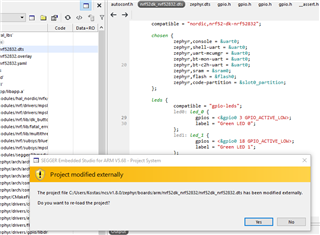
  • I am using Segger Embedded Studio. I changed the GPIO from 17 to 3, compiled and flashed the board but still was the GPIO 17 that was blinking. But after that, I got a message "Project modified externally. Do you want to re-load the project?" even if the change was made from inside the Segger Embedded Studio, I selected "yes" and then "Build and Run" again and this time the output was at the correct GPIO. So something is not 100% correct with SES but I can continue my development now. Thanks.

Related