Softdevice / Whitelist Issues

We are attempting to deploy a system consisting of one nRF52840 devkit running the multi-NUS example app, and over a dozen custom boards based on the nRF52832. It all works fine at my facility, which is very much RF-quiet. When attempting to bring up the system at the customer site, we appear to be getting the custom units captured by other BLE central devices. Attempting to track those down, but only partially successful. The custom board is using the 112 softdevice. What is the difference between 112 and 132? I have a vague recollection that with 132 we could be connected by multiple devices whereas 112 was restricted to a single connection at a time. If that is the case, I want to try to change to the 132 device. Surely there is a straightforward way within SES to do that?

I am also looking for a way to have our device only allow connections from our central device. I remember seeing something like that, though I really don't want to go the full Bonding route (but may have to).

Suggestions very welcome! The customer is in a bit of a panic because we're setting up for a big demonstration to customer's customer this Friday.

Steve Hendrix
Parents
  • Hi,

    What is the difference between 112 and 132? I have a vague recollection that with 132 we could be connected by multiple devices whereas 112 was restricted to a single connection at a time

    There are a number of differences. You can compare the SoftDevice specifications of both to see all. Note that also S112 supports multiple concurrent connections, but it is limited to 4.

    If that is the case, I want to try to change to the 132 device. Surely there is a straightforward way within SES to do that?

    I do not know the details of your application, so I may be wrong, but based on what you wrote I do not see why you want to change SoftDevice. That said, SoftDevices of the same version number is API compatible, so migrating from for instance S112 version 7.2.0 to S132 7.2.0 is quite straight-forward. Primarily, you need to:

    • Change the application start address to match the new SoftDevice size.
    • Change application include path to use the header files for the new SoftDevice
    • Change preprocessor defines that indicate SoftDevice type (so change S112 to S132)
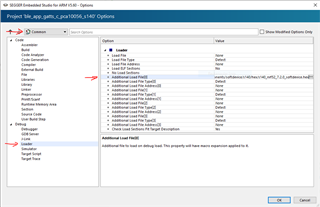
    • Flash the new SoftDevice hex intead of the old (to get this automatically done by SES, adjust the additional load file here:

    Based on the problem description, and assuming you only want to allow connections from a single central it seems like whitelisting is more sensible in this case. If for instance you pair these devices in production, then you could whitelist only the intended central, and only that would be able to connect. Exactly if and how this can and should be done depends on what fits your specific use case.

Reply
  • Hi,

    What is the difference between 112 and 132? I have a vague recollection that with 132 we could be connected by multiple devices whereas 112 was restricted to a single connection at a time

    There are a number of differences. You can compare the SoftDevice specifications of both to see all. Note that also S112 supports multiple concurrent connections, but it is limited to 4.

    If that is the case, I want to try to change to the 132 device. Surely there is a straightforward way within SES to do that?

    I do not know the details of your application, so I may be wrong, but based on what you wrote I do not see why you want to change SoftDevice. That said, SoftDevices of the same version number is API compatible, so migrating from for instance S112 version 7.2.0 to S132 7.2.0 is quite straight-forward. Primarily, you need to:

    • Change the application start address to match the new SoftDevice size.
    • Change application include path to use the header files for the new SoftDevice
    • Change preprocessor defines that indicate SoftDevice type (so change S112 to S132)
    • Flash the new SoftDevice hex intead of the old (to get this automatically done by SES, adjust the additional load file here:

    Based on the problem description, and assuming you only want to allow connections from a single central it seems like whitelisting is more sensible in this case. If for instance you pair these devices in production, then you could whitelist only the intended central, and only that would be able to connect. Exactly if and how this can and should be done depends on what fits your specific use case.

Children
No Data
Related