Visual Studio 1.8.0 can't resolve variable

Can anyone help me with this:

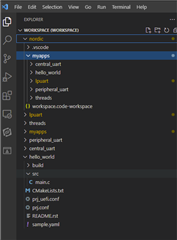
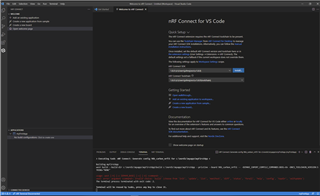
I'm trying out the 'threads' sample under Visual Studio 1.8.0. Not having much luck. I'm a newbie and have followed the Video tutorials to the letter and tried everything, including a complete new install of 1.8.0, but whenever I try to do anything in the ACTIONS list (build, pristine build, flash etc) I get this error.

If I try running commands from 'west', eg west build, west flash, they all work fine.

Parents Reply Children
  • Hi Elfving,

    many thanks for your prompt response.

    I am using WIndows 10

    Yes I've been playing around all morning. I've got lpuart, threads, blinky and a few other samples.

    I get a variety of problems, that all seem to go away if I exit Visual Studio and then restart it.So I can get hello_world, blinky etc working, but not straight away. There are build problems, and often the 'Flash' and 'Erase Flash' ACTIONS are not available. But all this goes away and everything works if I restart after build.

    I think my installation might be a bit flaky. Is there a way of removing  1.8.0 and reinstalling a pristine version ?
    I've notice that if I use toolchain manager to remove VS Code, it doesn't actually remove all the files/directories. So I suspect re-install isn't pristine.

  • Hello!

    Soupdragon said:
    often the 'Flash' and 'Erase Flash' ACTIONS are not available.
    Soupdragon said:
    I get a variety of problems, that all seem to go away if I exit Visual Studio and then restart it.

    It will look a bit more organized when you press the nRF Connect for VS Code extention logo (second from the bottom on the left there).

    That should also make the actions available, and might also explain why the "issues" are gone when you restart it from nRF Connect for Desktop. But in case it doesn't, see my response below.

    Best regards,

    Elfving

  • Hello!

    Yeah I agree that trying a re-installation is a good idea. Though Visual Studio Code itself can be a bit hard to re-install at times - as there is a lot of data being installed in several places. I have had issues with this myself.

    Take a look here and see if any of the suggestions help.

    Best regards,

    Elfving

  • Alas no luck. I've done a full re-installation as per instructions. Then I followed the nFR Connect for VS Code 'to the letter'. Very carefully. The only difference is that I used the latest 1.8.0 instead of 1.6.1. Everything seemed to go well until I tried to build the first example based on 'Blinky'.  See the error below:

    west: error: argument <command>: invalid choice: 'build' (choose from 'init', 'update'.....

    I don't know what else I can do. I'm beginning to feel Nordic products are not for me because the toolchain is too flaky,


Related