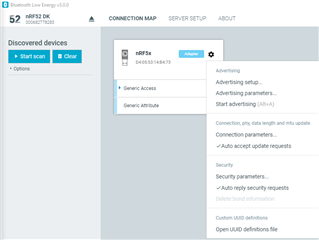
I am trying to set the UUID definitions for the Windows Application Bluetooth Low Energy 3.0.0. The only doc availible is for v2.3.1.
I tried to follow the following steps:
Adding UUID definitions
The nRF Connect Bluetooth Low Energy app comes with a list of predefined names and UUIDs for some well-known profiles. You can extend this list with custom definitions.
To extend the list of known UUIDs, complete the following steps:
- To expand the device options for the local device, click the Device options icon
 .
.
 I see this icon, I assume this the local device.
- Click Open UUID definitions file.
The definitions file is opened in your default application for .json files.
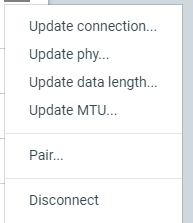 I do not see the open uuid definition file.
I assume that the manual is out of date. Or am I missing something.
Thank you.
BTtester
- Following the examples in the file, add your UUIDs, then save the file.
- To load the changes, reconnect to the adapter or reload the application (CTRL + r).