How to add BLE DFU to a NCS firmware application?

Dear Nordic experts,
 
Considering a Bluetooth Mesh application based on NCS 1.7.1 and running on an nRF52832:
What steps need to be done to add DFU over Bluetooth LE? Is there a user guide somewhere?  
 
Although there's quite some information on Bootloaders and Device Firmware Updates available, I'm still lacking the bigger picture of what exactly needs to be done.
 
Bootloaders:
If I understand it correctly, (and please correct me if I'm wrong) MCUboot is required for DFU over BLE.

If MCUboot is used, is the nRF Secure Immutable Bootloader (NSIB) really needed? Or would MCUboot alone be sufficient?
Available flash space is already getting low, and considering that the device is not connected to the internet (but only controlled through our own smartphone app), the risk of getting compromised is not a concern. Hence the idea to skip NSIB completely in favor of some additional Flash space. Under that circumstance, what bootloader(s) would you choose?

Any advise is very much welcome,
Thank you,
Michael.


Parents
  • Hi BlueMike, 
    I assume you are looking for DFU over BLE for individual node not "Mesh DFU" ? 

    If it's the case you are correct that you would need MCUBoot and the application firmware to receive image via BLE . Please have a look at this guide

    It's possible to not include the NSIB but that means you will not able to update the MCUBoot which can be an issue in the long run. 
    Also please take into account that it's in general not possible to do "single bank" update meaning the new image is always received on an 2nd slot. You would need a flash space that is 2x the size of the application. 

  • Hi Hung Bui,

    Thanks for your help. Yes, it's about DFU over BLE. So let's use both, NSIB and MCUBoot then...

    I've followed the steps from the link. Beside that, I've added a configuration file for mcuboot to CMakeLists.txt:

    if (EXISTS "${CMAKE_CURRENT_SOURCE_DIR}/mcuboot.conf")
        list(APPEND mcuboot_OVERLAY_CONFIG
          "${CMAKE_CURRENT_SOURCE_DIR}/mcuboot.conf"
          )
    endif()


    And then created the matching file mcuboot.conf in the project directory with the following content:

    CONFIG_BOOT_SIGNATURE_KEY_FILE="/home/mike/nrf-dev/projects/utterly_awesome_project/signing_keys/utterly_awesome_project_key.pem"
    CONFIG_MCUBOOT_DOWNGRADE_PREVENTION=y


    Build now fails because s1_image.hex isn't found. The error message is:

    ninja: error: 'zephyr/s1_image.hex', needed by 'zephyr/nrf/subsys/bootloader/generated/s1_image_firmware.signature', missing and no known rule to make it
    FATAL ERROR: command exited with status 1: /home/mike/.local/bin/cmake --build /home/mike/nrf-dev/projects/utterly_awesome_project/build_debug


    Question now is, how do you get the s1_image.hex? Shouldn't that be built automatically?

    About Partition Manager:

    Beside that, another thing I'm uncertain about is the Partition Manager. According to the docs, it's necessary to include it, so I've added these lines to Cmakelists.txt:

    set(PM_STATIC_YML_FILE
    	${CMAKE_CURRENT_SOURCE_DIR}/boards/pm_static_${BOARD}.yml
    )


    And copied (and renamed) pm_static{Board}.yml from the peripheral_lbs example.

    Is this all that needs to be done to setup Partition Manager? Now when building a few messages like this one show up:

    Partition 'mcuboot_primary_app' is not included in the dynamic resolving since it is statically defined.

    The "dynamic resolving" at the above message sounds as if partition manager is able configure the partitions itself. Is that the case? Can the partition manager configuration be skipped?

    I'm still missing the bigger picture, so any clarification is welcome,
    Thanke you,
    Michael.

  • Hi Michael, 

    I assume you want to test only the MCUBoot, not with the immutable bootloader ? 
    If it's the case you just need to follow what described in the guide. 
    Please make sure you don't have something like this CONFIG_SECURE_BOOT=y in your prj.conf or in the script when you call west. 
    Note that if you create an overlay mcuboot.conf you would need to put it in the child_image folder of your application project folder. 
    You shouldn't see any s1_image.hex because the S0 should not be included so there shouldn't be S1. 

    Regarding Partition Manager, it will be generated dynamically and automatically in your build folder. I would suggest to test with that first before you move on and add the pm_static.yml to your application (As far as I know you just need to leave it in the application folder without changing configuration, see here.

  • Hi Hung Bui,

    Again, thanks for your help.

    I assume you want to test only the MCUBoot, not with the immutable bootloader?

    THB, I'd prefer to test with both, immutable bootloader and MCUBoot.

    Good to know that partition manager is generated automatically. However, when adding DFU to my project by just following the examples from the link you've provided, linking fails because FLASH seems to overflow. The output is:

    [254/254] Linking C executable zephyr/zephyr.elf
    Memory region         Used Size  Region Size  %age Used
               FLASH:       32864 B        48 KB     66.86%
                SRAM:       23680 B        64 KB     36.13%
            IDT_LIST:          0 GB         2 KB      0.00%
    [289/304] Linking C executable zephyr/zephyr_prebuilt.elf
    FAILED: zephyr/zephyr_prebuilt.elf zephyr/zephyr_prebuilt.map /*exact command removed for simplicity...*/
    
    /home/mike/nrf-dev/tools/gnuarmemb/gcc-arm-none-eabi-9-2019-q4-major/bin/../lib/gcc/arm-none-eabi/9.2.1/../../../../arm-none-eabi/bin/ld.bfd: zephyr/zephyr_prebuilt.elf section `text' will not fit in region `FLASH'
    /home/mike/nrf-dev/tools/gnuarmemb/gcc-arm-none-eabi-9-2019-q4-major/bin/../lib/gcc/arm-none-eabi/9.2.1/../../../../arm-none-eabi/bin/ld.bfd: region `FLASH' overflowed by 136676 bytes
    collect2: error: ld returned 1 exit status
    ninja: build stopped: subcommand failed.
    FATAL ERROR: command exited with status 1: /home/mike/.local/bin/cmake --build /home/mike/nrf-dev/projects/awesome_project/build_debug
    The terminal process terminated with exit code: 1.


    Which lead to the partition manager configuration... Question now is, what's wrong, and how to fix it?

Reply
  • Hi Hung Bui,

    Again, thanks for your help.

    I assume you want to test only the MCUBoot, not with the immutable bootloader?

    THB, I'd prefer to test with both, immutable bootloader and MCUBoot.

    Good to know that partition manager is generated automatically. However, when adding DFU to my project by just following the examples from the link you've provided, linking fails because FLASH seems to overflow. The output is:

    [254/254] Linking C executable zephyr/zephyr.elf
    Memory region         Used Size  Region Size  %age Used
               FLASH:       32864 B        48 KB     66.86%
                SRAM:       23680 B        64 KB     36.13%
            IDT_LIST:          0 GB         2 KB      0.00%
    [289/304] Linking C executable zephyr/zephyr_prebuilt.elf
    FAILED: zephyr/zephyr_prebuilt.elf zephyr/zephyr_prebuilt.map /*exact command removed for simplicity...*/
    
    /home/mike/nrf-dev/tools/gnuarmemb/gcc-arm-none-eabi-9-2019-q4-major/bin/../lib/gcc/arm-none-eabi/9.2.1/../../../../arm-none-eabi/bin/ld.bfd: zephyr/zephyr_prebuilt.elf section `text' will not fit in region `FLASH'
    /home/mike/nrf-dev/tools/gnuarmemb/gcc-arm-none-eabi-9-2019-q4-major/bin/../lib/gcc/arm-none-eabi/9.2.1/../../../../arm-none-eabi/bin/ld.bfd: region `FLASH' overflowed by 136676 bytes
    collect2: error: ld returned 1 exit status
    ninja: build stopped: subcommand failed.
    FATAL ERROR: command exited with status 1: /home/mike/.local/bin/cmake --build /home/mike/nrf-dev/projects/awesome_project/build_debug
    The terminal process terminated with exit code: 1.


    Which lead to the partition manager configuration... Question now is, what's wrong, and how to fix it?

Children
  • Hi Mike, 
    How large is your application in flash size ? 
    I can see in the linking log the FLASH size is 32864B, but in the error log it says `FLASH' overflowed by 136676 bytes. It's quite strange. Could you check the generated partition file in $BUILD_DIR/partitions.yml 

    Have you tried to test with one of our example ? for example the peripheral_hr ? 

  • Hi Hung,

    I've reverted the project and started to add DFU again from scratch, following the Bootloaders and Device Firmware Updates, but again the same. The way this looks, I've omitted some (most likely very basic) crucial step.

    Lets have a quick look at the project - just in case:
    It's a Bluetooth Mesh application running a custom mesh model. It was originally built on the chat example from NCS 1.7.1. NCS has been updated to 1.8.0 since. It's running on a nRF52832, which is connected through an nRF52840 DK. Is there any special treatment needed if the target (nRF52832) is connected through the DK?

    I haven't played with any of the DFU examples, but will do so now...

    The partitions.yml file (release configuration) looks like this:

    EMPTY_0:
      address: 0x14200
      end_address: 0x15000
      placement:
        before:
        - s1_pad
      region: flash_primary
      size: 0xe00
    EMPTY_1:
      address: 0x15200
      end_address: 0x16000
      placement:
        before:
        - s1_image
      region: flash_primary
      size: 0xe00
    app:
      address: 0x22200
      end_address: 0x50000
      region: flash_primary
      size: 0x2de00
    b0:
      address: 0x0
      end_address: 0x7000
      placement:
        after:
        - start
      region: flash_primary
      size: 0x7000
    b0_container:
      address: 0x0
      end_address: 0x8000
      orig_span: &id001
      - b0
      - provision
      region: flash_primary
      size: 0x8000
      span: *id001
    mcuboot:
      address: 0x8200
      end_address: 0x14200
      placement:
        before:
        - mcuboot_primary
      region: flash_primary
      sharers: 0x1
      size: 0xc000
    mcuboot_pad:
      address: 0x22000
      end_address: 0x22200
      placement:
        align:
          start: 0x1000
        before:
        - mcuboot_primary_app
      region: flash_primary
      sharers: 0x2
      size: 0x200
    mcuboot_primary:
      address: 0x22000
      end_address: 0x50000
      orig_span: &id002
      - mcuboot_pad
      - app
      region: flash_primary
      sharers: 0x1
      size: 0x2e000
      span: *id002
    mcuboot_primary_app:
      address: 0x22200
      end_address: 0x50000
      orig_span: &id003
      - app
      region: flash_primary
      size: 0x2de00
      span: *id003
    mcuboot_secondary:
      address: 0x50000
      end_address: 0x7e000
      placement:
        after:
        - mcuboot_primary
        align:
          start: 0x1000
      region: flash_primary
      share_size:
      - mcuboot_primary
      size: 0x2e000
    provision:
      address: 0x7000
      end_address: 0x8000
      placement:
        after:
        - b0
        align:
          start: 0x1000
      region: flash_primary
      size: 0x1000
    s0:
      address: 0x8000
      end_address: 0x14200
      orig_span: &id004
      - s0_pad
      - mcuboot
      region: flash_primary
      size: 0xc200
      span: *id004
    s0_image:
      address: 0x8200
      end_address: 0x14200
      orig_span: &id005
      - mcuboot
      region: flash_primary
      size: 0xc000
      span: *id005
    s0_pad:
      address: 0x8000
      end_address: 0x8200
      placement:
        after:
        - b0_container
        align:
          start: 0x1000
      region: flash_primary
      share_size:
      - mcuboot_pad
      size: 0x200
    s1:
      address: 0x15000
      end_address: 0x21200
      orig_span: &id006
      - s1_pad
      - s1_image
      region: flash_primary
      size: 0xc200
      span: *id006
    s1_image:
      address: 0x16000
      end_address: 0x22000
      placement:
        after:
        - s1_pad
        - s0
        align:
          start: 0x1000
      region: flash_primary
      share_size:
      - mcuboot
      size: 0xc000
    s1_pad:
      address: 0x15000
      end_address: 0x15200
      placement:
        after:
        - s0
        align:
          start: 0x1000
      region: flash_primary
      share_size:
      - mcuboot_pad
      size: 0x200
    settings_storage:
      address: 0x7e000
      end_address: 0x80000
      placement:
        align:
          start: 0x1000
        before:
        - end
      region: flash_primary
      size: 0x2000
    spm_app:
      address: 0x22200
      end_address: 0x50000
      orig_span: &id007
      - app
      region: flash_primary
      size: 0x2de00
      span: *id007
    sram_primary:
      address: 0x20000000
      end_address: 0x20010000
      region: sram_primary
      size: 0x10000
    

    Again thanks for your help,
    Michael.

  • Hi Michael, 

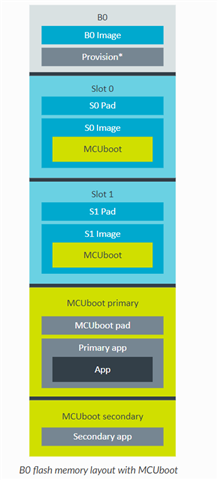
    If you have a look here   you can find the memory layout as follows: 

    In your case, the partition.yml shows mcuboot_primary_app is from 0x22200 to 0x50000 which mean it has only 187904 bytes for the application.


    I did a quick check with the chat application (without SMP_SVR to receive image via BLE) the application size is already  292616 kB. 


    The problem is that MCUBoot is made to only support dual bank update (unless it's in UART recovery mode) so the primary bank and the secondary bank have to have the same size. 
    In this case the nRF52832 may not have enough flash size. You may want to consider the nRF52840.

  • Oh ***! Switching to the nRF52840 is unfortunately not an option....

    After disabling those nice to have but not strictly necessary features (assert, stack sentinel, log, console, etc), it's still 88KB too much. A few more KB could be freed by reverting back to NCS 1.7.1. Should I go for an even earlier version to squeeze a few more bytes out?

    How about disabling secure boot? How much memory would that free?

    Just out of intuition, do you think it is possible to get a custom model that includes SMP_SRV and BLE DFU onto a nRF52832?

    You know, what puzzles me is that the firmware application is rather trivial: 100 bytes of data are sent between the firmware and the (Android) app through the GATT proxy. That is way too simple to exceed half a megabyte of flash...

    The first version of the firmware was based on the Mesh SDK, and if somehow possible I'd like to avoid reverting back to it. But anyway, how does the NCS compare to the Mesh SDK in terms of size? What would be the size difference of, let's say a Generic ON/OFF or LEVEL model, supporting mesh relay, GATT provisioning and GATT proxy?

    And finally there's the yet to tackle task of replacing the old Mesh SDK based firmware application with the new NCS version... Do you think that's technically possible?

    Sorry for all these question, but my decision to switch from the mesh sdk to ncs got me into a rather desperate situation...

    BTW., thanks for your help!

  • Hi Mike, 

    Have you tried the prj_minimal.conf in the mcu_boot project ? It will reduce the size of the MCUBoot down to 31kB.
    With that and without the immutable bootloader, I can see that the application primary slot is defined from address 0x8000 to 0x44000 meaning you have 240kB for the application. Would your application fit in ? 

    I don't thinking going for an earlier version of the SDK is a good idea. It doesn't sound future proof to me. 


    We can think about reducing the size of the mesh stack and the BLE stack (this is one of the advantages of Zephyr compare to softdevice that you can choose which features to include in the stack). 
    For example you can think of removing any feature related to 2Mbps, Data length extension? 

    I understand the challenge of moving from nRF5 SDK to nRF Connect SDK. It's really a stiff learning curve that get frustrated sometimes. 

Related