This discussion has been locked.
You can no longer post new replies to this discussion. If you have a question you can start a new discussion

SPI slave configuration & overlay

Hi,

I am using BL653 dvk to write an application for SPI,

In my prj.conf, I added below parameters:

CONFIG_SPI=y
CONFIG_SPI_ASYNC=y

Now when I am debugging SPI master code, execution enters the file "spi_nrfx_spi.c", and transfers data & rest is fine.

But when I try to use SPI slave configuration, execution enters the same file "spi_nrfx_spi.c", into the function:

static inline nrf_spi_bit_order_t get_nrf_spi_bit_order(uint16_t operation)
{
	if (operation & SPI_TRANSFER_LSB) {
		return NRF_SPI_BIT_ORDER_LSB_FIRST;
	} else {
		return NRF_SPI_BIT_ORDER_MSB_FIRST;
	}
}

static int configure(const struct device *dev,
		     const struct spi_config *spi_cfg)
{
	struct spi_nrfx_data *dev_data = get_dev_data(dev);
	const struct spi_nrfx_config *dev_config = get_dev_config(dev);
	struct spi_context *ctx = &dev_data->ctx;
	nrfx_spi_config_t config;
	nrfx_err_t result;

	if (dev_data->initialized && spi_context_configured(ctx, spi_cfg)) {
		/* Already configured. No need to do it again. */
		return 0;
	}

	if (SPI_OP_MODE_GET(spi_cfg->operation) != SPI_OP_MODE_MASTER) {
		LOG_ERR("Slave mode is not supported on %s", dev->name);
		return -EINVAL;
	}

& logs an error saying "Slave mode is not supported on".

I understand that I need to make changes to prj.conf &  also write an overlay file for bl653.

1. But I do not know how to write overlay for this case, I am using SPI_1 and wrote an overlay as:

&spi1 {
	compatible = "nordic,nrf-spis";
	status = "okay";
	sck-pin = <41>;
	mosi-pin = <40>;
	miso-pin = <4>;
	cs-gpios = <&gpio1 23 0>;
};

But is still not working,

2. Kindly also help me on what changes to be done in prj.conf to have SPI_0 in slave mode.


Thanks,

Parents
  • Hi,

    Did you set this?

    CONFIG_SPI_SLAVE=y

    and 

    .slave = 1 in spi_config ? Snippet:

    static const struct spi_config spi_cfg = {
    	.operation = SPI_WORD_SET(8) | SPI_TRANSFER_MSB | SPI_OP_MODE_SLAVE |
    		     SPI_MODE_CPOL | SPI_MODE_CPHA,
    	.frequency = 4000000,
    	.slave = 1,
    };

    Some sample code: https://github.com/sigurdnev/ncs-playground/blob/master/samples/spis_thread_test/src/main.c

  • Hello ,


    .slave = 1 in spi_config ?

    .slave =1 i have set.

    Yet it execution is entering to  the same file "spi_nrfx_spi.c":

    xecution enters the same file "spi_nrfx_spi.c


    I also noticed that, maybe something is wrong with my overlay, my overlay name is "bl653_dvk.overlay" & it is placed in project directory with the configuration as:

    &spi1 {
    	compatible = "nordic,nrf-spis";
    	status = "okay";
    	sck-pin = <41>;
    	mosi-pin = <40>;
    	miso-pin = <4>;
    };

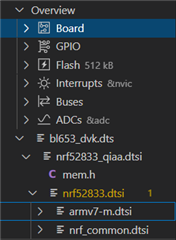
    1. I am saying this as I do not see overlay being included, in project dts structure as in below, is the name "bl653_dvk.overlay" proper..?

    2. In "prj.conf", I have the following configurations, do I need to add anything more..?

    #SPI
    CONFIG_SPI=y
    CONFIG_SPI_ASYNC=y
    CONFIG_SPI_SLAVE=y
    

    Kindly suggest where I am mistaken.

    Attaching the bl653_dvk.dts & bl653_dvk.overlay for your reference.bl653_dvk.dts

    bl653_dvk.overlay

    Thanks,

    Ubaid

  • Also, I am wondering about including overlay in CMakeLists.txt, Do i need to add "DTC_OVERLAY_FILE"..?
    Because whenever I am trying to include overlay file, I am getting boiler plate error,

  • Please find build errors when i include overlay file:

    [0/1] Re-running CMake...
    Including boilerplate (Zephyr base (cached)): D:/Nordic_Sample_App/Nordic_SDK/v1.8.0/zephyr/cmake/app/boilerplate.cmake
    -- Application: D:/PXZ_Sample_App
    -- Zephyr version: 2.7.0 (D:/Nordic_Sample_App/Nordic_SDK/v1.8.0/zephyr), build: v2.7.0-ncs1
    -- Found west (found suitable version "0.12.0", minimum required is "0.7.1")
    -- Board: bl653_dvk
    -- Cache files will be written to: D:/Nordic_Sample_App/Nordic_SDK/v1.8.0/zephyr/.cache
    -- Found dtc: D:/Nordic_Sample_App/Nordic_SDK/v1.8.0/toolchain/opt/bin/dtc.exe (found suitable version "1.4.7", minimum required is "1.4.6")
    -- Found toolchain: gnuarmemb (d:/Nordic_Sample_App/Nordic_SDK/v1.8.0/toolchain/opt)
    -- Found BOARD.dts: D:/Nordic_Sample_App/Nordic_SDK/v1.8.0/zephyr/boards/arm/bl653_dvk/bl653_dvk.dts
    -- Found devicetree overlay: D:/PXZ_Sample_App/bl653_dvk.overlay
    devicetree error: 'def-char' is marked as required in 'properties:' in D:/Nordic_Sample_App/Nordic_SDK/v1.8.0/zephyr/dts/bindings\spi\nordic,nrf-spis.yaml, but does not appear in <Node /soc/spi@40004000 in 'bl653_dvk.dts.pre.tmp'>
    CMake Error at D:\Nordic_Sample_App\Nordic_SDK\v1.8.0\zephyr\cmake\dts.cmake:251 (message):
      gen_defines.py failed with return code: 1
    Call Stack (most recent call first):
      D:\Nordic_Sample_App\Nordic_SDK\v1.8.0\zephyr\cmake\app\boilerplate.cmake:545 (include)
      D:\Nordic_Sample_App\Nordic_SDK\v1.8.0\zephyr\share\zephyr-package\cmake\ZephyrConfig.cmake:24 (include)
      D:\Nordic_Sample_App\Nordic_SDK\v1.8.0\zephyr\share\zephyr-package\cmake\ZephyrConfig.cmake:40 (include_boilerplate)
      d:\PXZ_Sample_App\build\CMakeLists.txt:4 (find_package)
    

  • Hi ,

    Sorry for the chain of updates, I was able to solve it,
    Now execution is entering the slave driver file "spi_nrfx_spis.c"

    I had to define extra properties in spi1 node in bl653_dvk.dts as:

    &spi1 {
    	compatible = "nordic,nrf-spis";
    	status = "okay";
    	sck-pin = <41>;
    	mosi-pin = <40>;
    	miso-pin = <4>;
    	cs-gpios = <&gpio1 23 0>;
    	csn-pin = <23>; #extra property defined
    	def-char = <0xFF>;#extra property defined
    };


    Now Please help me with

    1. what do csn-pin & def-char attributes do..?
    2. I need to define slave chip select on gpio0, pin:23.,

        csn-pin = <23>;
        def-char = <0xFF>;

    so is my definition right..?

Reply Children
  • Hello Sigurd,

    Thanks for the kind help,

    Now the code execution is on track on bl653 running spi slave driver.

    But the spi_read always returns -116, that is  -ETIMEDOUT.

    But I do not understand why slave driver always returns -ETIMEDOUT. Master board is sending data, i checked on USB logic analyzer for the same.

    I traced the flow of execution all the way to the source of the error and here is what I found

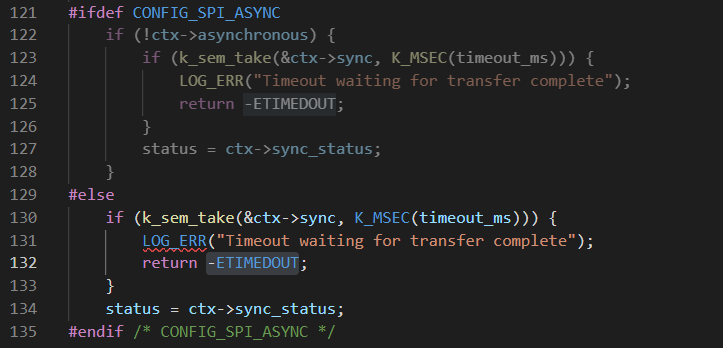
    spi_read( ) -> transceive (in file "spi_nrfx_spis.c") -> spi_context_wait_for_completion( in file "spi_context.h") -> and the source of error is as attached in the below snap in #else part

    Without debug mode as well I am getting the same -ETIMEDOUT.

    Kindly suggest on if I have missed out on configuring something.

    adding my overlay file details for your reference:

    &spi1 {
    	compatible = "nordic,nrf-spis";
    	status = "okay";
    	sck-pin = <41>;
    	mosi-pin = <40>;
    	miso-pin = <4>;
    	cs-gpios = <&gpio1 23 0>;
    	csn-pin = <23>;
    	def-char = <0xFF>;
    };

    Kindly suggest

Related