Configuring Multicell Location Without Building an App

Hello,

My company is evaluating the Thingy:91, we're interested in Multicell location lookups. My question is regarding the SDK, specifically if it's possible to configure the location provider without having to write/build/flash a custom program.

Thanks

Parents Reply Children
  • Thanks for providing this information. This is correct. 

    ricanontherun said:
    The firmware update process has been smooth

    What do you mean firmware update has been smooth?

    ricanontherun said:
    flash to the device since nrfjprog --ids returns nothing

    Do you have a external JLink debugger? Remember that nrfjprog will only see devices connected through a JLink device.

  • What do you mean firmware update has been smooth?

    Meaning I've been able to connect my Thingy:91 to my Macbook and update it's firmware using the Programmer tool.

    Do you have a external JLink debugger? Remember that nrfjprog will only see devices connected through a JLink device.

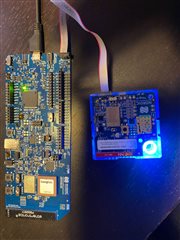
     Interesting. I have a nrf9160 development kit, does that count as an external debugger? If so, do you have documentation available for how to configure the devices? You can see in the linked image that I can connect them like so:

    When I run nrfjprog --ids, I get the following output ... which is that of the development kit I believe.

    nrfjprog --ids
    960069774

  • ricanontherun said:
    When I run nrfjprog --ids, I get the following output ... which is that of the development kit I believe.

    Yes, this should reflect the number on the sticker on the back of the DK. When connected to the Thingy:91 with a debug cable, it will automatically program the Thingy:91. Make sure to set SW2 - SWD SELECT to either nR91 or nRF52. 

    ricanontherun said:
    I have a nrf9160 development kit, does that count as an external debugger?

    Yes it does. The onboard interface MCU allows you to program the Thingy:91 as an external debugger. There is more information on the debug out in the nRF9160 DK Hardware guide

    Hope this helps with your development

  • Okay, thanks for that information. I see that the PROG/DEBUG switch must be switched to the right target platform (nrf9160 in my case). What about the build target when running west build? Are these arguments appropriate?

    west build --pristine -b nrf9160dk_nrf9160_ns

    I'm asking because yesterday I tried this exact setup (before you confirmed it would work) and now 1 of my 2 Thingy:91 devices is completely unresponsive.

  • is completely unresponsive.

    Adding some detail here. I had the DK hooked up to the Thingy:91. The DK was receiving power via a UDB cable, the Thingy:91 was NOT receiving external power. I ran the following commands, which resulted in the Thingy:91 showing the red error light, and I haven't been able to use it since. It no longer is recognized by my laptop.

    west build -b nrf9160dk_nrf9160

    west flash erase

    *Thingy:91 displays red LED*

Related