This discussion has been locked.
You can no longer post new replies to this discussion. If you have a question you can start a new discussion

nRF52-DK as CENTRAL to discover services on peripheral

Hello Nordic team!

I'm working on a BLE app with the nRF52-DK and an armband(M6) that has a heart rate sensor. My goal is to discover this service and read those values from the nRF52 as a central.

So far I'm able to connect to the armband, and using the ble_app_hrs_c example, I'm able to read the battery service, but not the heart rate service.
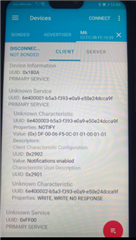
I understand that the armband is advertising the heart rate service in a custom fashion and that I must use the Discovery Service module. 

I'm a beginner on BLE, so it's being hard to develop the code to find the custom service. I have checked several examples and documentation about the nRF SDK 17, but I haven't been able to understand how to develop the code for the Discovery Service module, nor I have found a clear example of this.

I would appreciate it if someone can guide me on this, thanks in advance :) 

Parents
  • Hi Hung, thanks a lot for your quick response!

    I used the ble_app_hrs_c and I was able to find the battery service from my peripheral because it is advertising it with a standard UUID. But, since the heart rate service is a custom UUID, the example doesn't work out of the box. I tried this:

    #define PERIPHERAL_SERVICE_BASE_UUID { 0x6E, 0x40, 0x00, 0x03, 0xb5, 0xa3, 0xf3, 0x93, 0xe0, 0xa9, 0xe5, 0x0e, 0x24, 0xdc, 0xca, 0x9f } 
    
    #define TARGET_UUID                   PERIPHERAL_SERVICE_BASE_UUID
    
    //inside scan_init()
        ble_uuid_t uuid =
        {
            .uuid = TARGET_UUID,
            .type = BLE_UUID_TYPE_VENDOR_BEGIN,
        };

    I don't understand which variable do I need to check in order to know if the discovery handler found this UUID, nor where do I have to write that code. Is there a function for a custom uuid discovery event that I should add to db_disc_hanlder()?

    I also worked on the ble_app_uart_c but this one is more complicated for me, since it is not connecting :( 

    #define PERIPHERAL_SERVICE_BASE_UUID { 0x6E, 0x40, 0x00, 0x03, 0xb5, 0xa3, 0xf3, 0x93, 0xe0, 0xa9, 0xe5, 0x0e, 0x24, 0xdc, 0xca, 0x9f } 
    #define PERIPHERAL_SERVICE_CHAR_UUID {0x0003}
    
    // changed the nus_uuid in the example
    static ble_uuid_t const m_nus_uuid =
    {
        .uuid = PERIPHERAL_SERVICE_BASE_UUID,
        .type = BLE_UUID_TYPE_VENDOR_BEGIN
    };
    
    //inside ble_nus_c_on_db_disc_evt not sure what do I need to change here
        // Check if the NUS was discovered.
        if (    (p_evt->evt_type == BLE_DB_DISCOVERY_COMPLETE)
            &&  (p_evt->params.discovered_db.srv_uuid.uuid == BLE_UUID_NUS_SERVICE)
            &&  (p_evt->params.discovered_db.srv_uuid.type == p_ble_nus_c->uuid_type))

    Since neither worked for me, I created a simple example to scan and do a discovery service. The scan part is working great and I'm connecting to my peripheral, so the question is: If I would like to add simple discovery code how would I proceed?

    I followed the Bluetooth low energy central tutorial from Nordic but I get lost on points 3 and 4

    1. BLE_DB_DISCOVERY_DEF(m_db_disc);

    2. ble_db_discovery_init() in main()

    3. callback function to handle events and forward the event to their respective service

    4. Register a service UUID which the db_discovery module shall look 

    5.Start a service discovery using ble_db_discovery_start() 

    In point 3 the example uses the NUS, but since I'm looking for a custom service, this part is really confusing for me. In point 4, this is done with sd_ble_uuid_vs_add()? if so, where should I add this code? 

    Thanks again in advance Hung!

  • Hi again, 

    Please follow the documentation of the database discovery module here. Please attention to the message sequence chart and try to look for the function described in the ble_app_hrs_c 

    - The HRM service in ble_app_hrs and ble_app_hrs_c is not custom service, it's almost the same as the battery service. Unless you are modifying the heart rate service to create your own ? 

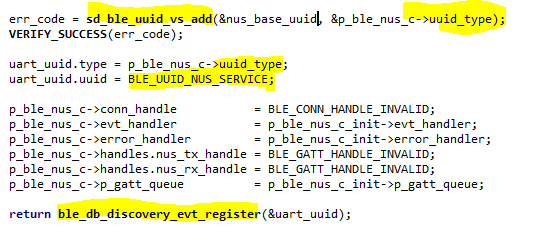
    - If you are doing custom service, you should study ble_nus_c_init(), in that you can see the uuid base is added to the database using sd_ble_uuid_vs_add(). The output of this function is  &p_ble_nus_c->uuid_type. This is the index of the base UUID in the database. You then use this "uuid_type" (the index) as the input to the uart_uuid.type and then add the 2 bytes (which will be bytes 13th and 14th on top of the base UUID) into     uart_uuid.uuid

    Then you register the uuid with ble_db_discovery_evt_register(). 

    When the service discovery is completed, ble_nus_c_on_db_disc_evt() will be called and from there you check if the service you are looking for is found or not. If not you can ignore it and there may be another BLE_DB_DISCOVERY_COMPLETE event will come.

Reply
  • Hi again, 

    Please follow the documentation of the database discovery module here. Please attention to the message sequence chart and try to look for the function described in the ble_app_hrs_c 

    - The HRM service in ble_app_hrs and ble_app_hrs_c is not custom service, it's almost the same as the battery service. Unless you are modifying the heart rate service to create your own ? 

    - If you are doing custom service, you should study ble_nus_c_init(), in that you can see the uuid base is added to the database using sd_ble_uuid_vs_add(). The output of this function is  &p_ble_nus_c->uuid_type. This is the index of the base UUID in the database. You then use this "uuid_type" (the index) as the input to the uart_uuid.type and then add the 2 bytes (which will be bytes 13th and 14th on top of the base UUID) into     uart_uuid.uuid

    Then you register the uuid with ble_db_discovery_evt_register(). 

    When the service discovery is completed, ble_nus_c_on_db_disc_evt() will be called and from there you check if the service you are looking for is found or not. If not you can ignore it and there may be another BLE_DB_DISCOVERY_COMPLETE event will come.

Children
  • Hello Hung, thanks a lot for your answer, it really helped me a lot!

    I tested the ble_app_hrs_c and indeed it doesn't find my custom Heart Rate Service because it is being advertised with a custom 128 UUID.

    I understood how to add the custom 128 UUID using the sd_ble_uuid_vs_add() and I implemented it in the  ble_app_uart_c, but it is not connecting to my device, so ble_db_discovery_start() never happens.

    I believe this is a scan problem, so I used the scan functions that worked for me in the past:

    static char const m_target_periph_name[] = "M6";  
    
    //inside scan_init
    
    err_code = nrf_ble_scan_filters_enable(&m_scan, NRF_BLE_SCAN_NAME_FILTER, false);
    APP_ERROR_CHECK(err_code);
    
    err_code = nrf_ble_scan_filter_set(&m_scan, SCAN_NAME_FILTER, m_target_periph_name);
    APP_ERROR_CHECK(err_code);

    Unfortunately, this is generating an <error> app: Fatal error :( 

    So:

    1. if I add my custom 128 UUID which I'm pretty sure I did it correctly, it doesn't connect to any device, discovery never happens

    2. if I change the filters_enable and filter_set functions to look for the device name, it generates an error

    The actual functions causing the error seem to be nrf_ble_scan_filter_set(), but if I comment it, it won't find my peripheral name. 

    How should I proceed from here? or what should I be looking at?

    Thanks a lot in advance

  • Hi Juan, 

    1. The ble_app_hrs_c use heart rate UUID as the filter so it's normal that it doesn't connect to your device if your device doesn't have the UUID of the heart rate service. But in that example we also have filter by name or by address, please look for this code: 

        if (strlen(m_target_periph_name) != 0)
        {
            err_code = nrf_ble_scan_filter_set(&m_scan,
                                               SCAN_NAME_FILTER,
                                               m_target_periph_name);
            APP_ERROR_CHECK(err_code);
        }
    
        if (is_connect_per_addr)
        {
           err_code = nrf_ble_scan_filter_set(&m_scan,
                                              SCAN_ADDR_FILTER,
                                              m_target_periph_addr.addr);
           APP_ERROR_CHECK(err_code);
        }
    

    You can implement something similar in your code. 

    When you see an error, you need to figure out which error code it is. You can do that by adding DEBUG into the preprocessor symbols in the solution setting in SES. You can either see that in the log or add a breakpoint that the function failed and check the error code. 
    Please pay attention to what Olaf asked in the other case, there could be a chance that the name was too long. 

Related