This discussion has been locked.
You can no longer post new replies to this discussion. If you have a question you can start a new discussion

problems downgrading nrf connect desktop mac os

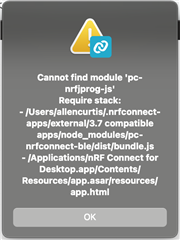
I followed the instructions to downgrade the desktop application and add the URL for the older tools. Installed the 3.7 compatible BLE app and get the error below.
Parents Reply Children
  • Actually, that is how I got the message. I was trying to downgrade. Already uninstalled the old NRF connect. Downloaded and installed the previous version. When the old version wanted to install the newer plugin versions.

    Then I uninstalled NRF Connect. Deleted the ~/.nrfconnect and ~/Library/Application Support/nrfconnect directories. Installed the older NrfConnect application. Updated the URLs to find the older plugins. Installed the older plugins.

    Now it seems like the desktop application is not performing a full installation. Error messages refer to files that do not exist...

    How do you completely remove nrfConnect Desktop on OS X? I can not get the new version to install either.

  • Hi,

    Are you getting a different error now, or is it the same as in the original post?

    It should work without uninstalling the old version first. Did you get any errors during the installation?

    Make sure that you are opening the apps marked '3.7 compatible apps'.

    Best regards,

    Marte

  • MacOS just updated again. Reinstalled Nrf Connect Tools and they seem to be working. Will close this until I find that it isn't working.

Related