This discussion has been locked.
You can no longer post new replies to this discussion. If you have a question you can start a new discussion

Open nrf_desktop application with nRF Connect SDK VS Code extension

Hello everyone,

I'm testing the nRF Connect SDK VS Code extensions and I was wondering how would I open such applications as nrf_desktop or asset_tracker_v2 in VS Code?

I tried these two approaches:

  • If I use this directory as path in "nrf-connect-applications" and add a build configuration I can select the compatible boards but no prj.conf are available.

<path-to-sdk>/nrf/applications/nrf_desktop"

  • If I use this directory as path in "nrf-connect-applications" and add a build configuration I can select the prj.conf files but building is not working because no CMakeLists file is found.

<path-to-sdk>/nrf/applications/nrf_desktop/configuration/nrf52840dk_nrf52840"

Is there a way to get the extension to detect the prj.conf files as well as the CMakeLists when the project has a similar structure to the nrf_desktop application?

So far my .vscode/settings.json looks like this (${workspaceFolder} is the NCS SDK v1.8.0 root directory):

"terminal.integrated.defaultProfile.windows": "nRF Connect",
"nrf-connect.topdir": "${workspaceFolder}",
"nrf-connect.toolchain.path": "${workspaceFolder}\\toolchain",
"nrf-connect.applications": [
    "${workspaceFolder}\\nrf\\applications\\nrf_desktop",
    "${workspaceFolder}\\nrf\\applications\\nrf_desktop\configuration\nrf52840dk_nrf52840"
]

Thanks in advance!

Parents
  • Hi,

    Could you please provide more information on what is "nrf-connect-applications" in your case?
    Which directory is "this directory"?
    How do you set up this directory as a path?
    Could you also please explain the sequence of steps that you took?

    Best regards,
    Dejan

Reply
  • Hi,

    Could you please provide more information on what is "nrf-connect-applications" in your case?
    Which directory is "this directory"?
    How do you set up this directory as a path?
    Could you also please explain the sequence of steps that you took?

    Best regards,
    Dejan

Children
  • Hi Dejan,

    thanks for your reply.

    Could you please provide more information on what is "nrf-connect-applications" in your case?

    I meant the "nrf-connect.applications" option in the VS Code settings.json.

    Which directory is "this directory"?

    The directory below the text passage of my original post.

    How do you set up this directory as a path?

    I open VS Code click on the nRF Connect extension and click on "Add Application" and select one of the two directories of my original post.

    Could you also please explain the sequence of steps that you took?
    1. Download the nRF Connect SDK v1.8.0 with Toolchain Manager on Windows 10.
    2. Open VS Code from the Toolchain Manager.
    3. Open the nRF Connect SDK folder in VS Code.
    4. Go to the nRF Connect extension section.
    5. Click on "Add Application" and select the directory below.
      <path-to-sdk>/nrf/applications/nrf_desktop
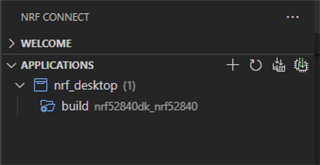
    6. The nRF Connect extension in VS Code should look like this:
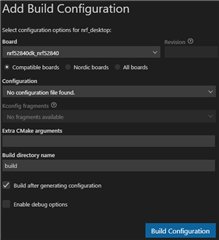
    7. Now I click on "nrf_desktop" in the "APPLICATIONS" area and then on "Add Build Configuration" and I get a tab that looks like the picture below. In the picture you can see the compatible boards are detected but no configuration files are found.
    8. When I click "Build Configuration" even though it says "No configuration file found" the "configuration/nrf52840dk_nrf52840/prj.conf" is used.

    So my problem is that it isn't possible to select the project configuration in the "Add Build Configuration" tab. I found a workaround for the issue. You can put -DCONF_FILE="<project-config>.conf" with the desired project configuration in the "Extra CMake arguments" field.

  • Hi David,

    The procedure you described in the last paragraph is the correct one. nRF_desktop application can have three different configurations: prj.conf (gaming mouse, default for nRF52840 DK), prj_keyboard.conf (keyboard) and prj_dongle.conf (dongle). One of these configurations should be chosen and added in "Extra CMake arguments".

    You can find more information in nRF_desktop_on_dk guide.

    Best regards,
    Dejan

  • Thank you Dejan!

    This guide is exactly what I was looking for.

    Best regards,
    David

Related