Cannot perform DFU for Thingy52

I'm trying to follow the instructions to perform an OTA DFU for the Thingy 52.

https://nordicsemiconductor.github.io/Nordic-Thingy52-FW/documentation/dfu_generating.html

I'm using tag 2.2.0 of the Thingy firmware from https://github.com/NordicSemiconductor/Nordic-Thingy52-FW

I generated the public key and compiled the bootloader using the Makefile in project/bootloader_secure/pca20020/armgcc.  

I then flashed the softdevice:

nrfjprog --program ../../../sdk_components/softdevice/s132/hex/s132_nrf52_4.0.2_softdevice.hex -f nrf52 --chiperase

Then flashed the bootloader:

nrfjprog --program _build/nrf52832_xxaa_s132.hex -f nrf52 --sectorerase

However, at this point I can't see the Thingy in a scan using nRF Connect on Mobile.  It doesn't seem to be advertising and the LED is off.

I've also tried flashing the Thingy application as well, but get the same result.

I'm able to flash just the softdevice+application and that works properly.  I'm using a nRF52833 DK and connecting a ribbon cable from its Debug Out port to the Thingy.  The problem seems to come from using the bootloader.  Is there something I'm missing?

Parents Reply
  • It looks like there's no "armgcc" project in the pca20020_debug folder (I'm using Linux).  I tried setting up a new environment on a Windows machine and downloaded Keil, but it seems like the linker refuses to create the image while i'm using the evaluation license.

    I tried porting the armgcc Makefile from pca20020 to pca20020_debug to the best of my ability, and saw this in the log:

    :INFO:Inside main
    :ERROR:Single: Invalid bank

Children
  • However, at this point I can't see the Thingy in a scan using nRF Connect on Mobile.  It doesn't seem to be advertising and the LED is off.

    I did nrfjprog --recover, and followed your steps. I see the same thing as you describe, but, if I add a nrfjprog --reset afterwards, "ThingyDfu" started to advertise.

  • I was able to make a merged hexfile containing the softdevice, bootloader, bootloader settings, and application.

    #!/usr/bin/sh
    
    APP_PATH=../../../pca20020_s132/armgcc/_build/nrf52832_xxaa_s132.hex
    BL_SETTING=bootloader_setting.hex
    
    nrfutil settings generate --family NRF52 --application $APP_PATH --application-version 0 --bootloader-version 0 --bl-settings-version 1 $BL_SETTING
    
    mergehex -m _build/nrf52832_xxaa_s132.hex ../../../pca20020_s132/armgcc/_build/nrf52832_xxaa_s132.hex ../../../../external/sdk13/components/softdevice/s132/hex/s132_nrf52_4.0.2_softdevice.hex $BL_SETTING -o merged.hex

    Now the application launches on power-up, and the device is visible when scanning from nRF Connect.  Presumably this is good?

    :INFO:Inside main
    :DEBUG:In nrf_bootloader_init
    drv_ext_light :DEBUG:Initialized 
    :DEBUG:In real nrf_dfu_init
    :DEBUG:running nrf_dfu_settings_init
    :DEBUG:Enter nrf_dfu_continue
    :DEBUG:Valid App
    :DEBUG:Enter nrf_dfu_app_is_valid
    :DEBUG:Return true. App was valid
    :DEBUG:Enter nrf_dfu_app_is_valid
    :DEBUG:Return true. App was valid
    :DEBUG:Enter nrf_dfu_app_is_valid
    :DEBUG:Return true. App was valid
    :DEBUG:Jumping to: 0x0001f000
    :DEBUG:Running nrf_bootloader_app_start with address: 0x0001f000
    :DEBUG:Disabling interrupts
    :DEBUG:Setting SD vector table base: 0x0001f000
    

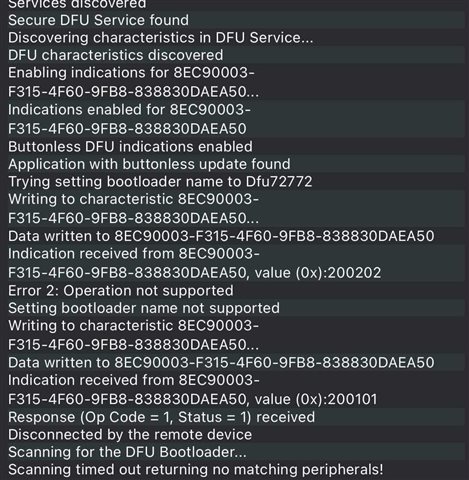
    However, I'm not sure how to actually perform the DFU from nRF Connect Mobile.  It seems like the app has changed since the documentation was written.  If I connect to my device and go to the DFU tab and attempt to upload my .zip, it fails with this error:

  • nrfjprog --recover, and followed your steps. I see the same thing as you describe, but, if I add a nrfjprog --reset afterwards, "ThingyDfu" started to advertise.

    Unfortunately that didn't work for me - I didn't see ThingyDfu advertising.

  • Hi,

    What command did you use to generate the DFU package? nrfutil pkg generate <something>

    This is the nRF Connect for iOS mobile app? Do you see in the log how long time it used between "Scanning for DFU Bootloader" until the scanning timeout?

  • I generated the DFU package like this:

    nrfutil pkg generate --application _build/nrf52832_xxaa_s132.hex --application-version 0 --hw-version 52 --sd-req 0x98 --key-file ~/nordic_ota/private-key.pem  dfu-app-3.zip

    Yes, this is the iOS app.  It's not reported in the log, but it takes about 5 seconds for the scanning timeout.

Related