Hi,
As a university we bought several NRF51422 dongles to sniff BLE traffic
Following the installation instruction here: https://infocenter.nordicsemi.com/index.jsp?topic=%2Fug_sniffer_ble%2FUG%2Fsniffer_ble%2Fintro.html
We installed NRF COnnect & uploaded the sniffer_nrf51dongle_nrf51422_4.0.0.hex using NRF Programmer
We then installed the NRF sniffer in the appropriated wireshark location
When we try to use the NRF sniffer python script (with the Dongle In) to check the interface this seems working well
PS C:\Temp\todel\extcap> python.exe .\nrf_sniffer_ble.py --extcap-interfaces
extcap {version=4.0.0}{display=nRF Sniffer for Bluetooth LE}{help=www.nordicsemi.com/.../nRF-Sniffer-for-Bluetooth-LE}
interface {value=COM5-None}{display=nRF Sniffer for Bluetooth LE COM5}
control {number=0}{type=selector}{display=Device}{tooltip=Device list}
control {number=1}{type=selector}{display=Key}{tooltip=}
control {number=2}{type=string}{display=Value}{tooltip=6 digit passkey or 16 or 32 bytes encryption key in hexadecimal starting with '0x', big endian format.If the entered key is shorter than 16 or 32 bytes, it will be zero-padded in front'}{validation=\b^(([0-9]{6})|(0x[0-9a-fA-F]{1,64})|([0-9A-Fa-f]{2}[:-]){5}([0-9A-Fa-f]{2}) (public|random))$\b}
control {number=3}{type=string}{display=Adv Hop}{default=37,38,39}{tooltip=Advertising channel hop sequence. Change the order in which the siffer switches advertising channels. Valid channels are 37, 38 and 39 separated by comma.}{validation=^\s*((37|38|39)\s*,\s*){0,2}(37|38|39){1}\s*$}{required=true}
control {number=7}{type=button}{display=Clear}{tooltop=Clear or remove device from Device list}
control {number=4}{type=button}{role=help}{display=Help}{tooltip=Access user guide (launches browser)}
control {number=5}{type=button}{role=restore}{display=Defaults}{tooltip=Resets the user interface and clears the log file}
control {number=6}{type=button}{role=logger}{display=Log}{tooltip=Log per interface}
value {control=0}{value= }{display=All advertising devices}{default=true}
value {control=1}{value=0}{display=Legacy Passkey}{default=yes}
value {control=1}{value=1}{display=Legacy OOB data}
value {control=1}{value=2}{display=Legacy LTK}
value {control=1}{value=3}{display=SC LTK}
value {control=1}{value=4}{display=SC Private Key}
value {control=1}{value=5}{display=LE address}
But when we try to capture some traffic this does not work
PS C:\Temp\todel\extcap> python.exe .\nrf_sniffer_ble.py --capture
An interface must be provided or the selection must be displayed
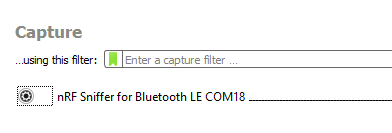
In Wireshark the Nrf is not recognized
We tried on wondows 10 & windows 7 Pro both 64 bits
On windows-10 python is 3.9.1, on windows 7 python is 3.8.10
pyserial was installed successfully
We don't understand how to troubleshoot this issue
We will appreciate a quick support to solve this problem and deliver the lab to the students
Best regards
Vincent Planat