

Hello, i'm using the example ble app uart and I would like to know the maximum data that I cand send to my putty and my phone. Could I have to procedure? I would like to send a lot of data
Thank you in advance
Hello, i'm using the example ble app uart and I would like to know the maximum data that I cand send to my putty and my phone. Could I have to procedure? I would like to send a lot of data
Thank you in advance
Hello,
To increase your throughput you will need to modify your connection parameters.
Please see the throughput documentation for the SoftDevice you are using for details about which parameters you should use for maximum throughput.
Best regards,
Karl

Hello Karl, i saw this document but i'm going to explain to you my goal : send unlimited data/informations (maybe 100k of data) how can i do this? because for now I have a limit of 244 bytes/data and it is not useful for me. Thank you in advance
Okay, thank you for your fast reply. I'm using the Ble app uart and I don't know about the kbps...
What I can see for now is that I can have 244 characters on my phone or putty and I would like to have a lot more.
and I actually saw the MTU size and data length etc in this code but Do I have to increase this?
Do I have to create different packets?
I'm actually lost because I don't know the limits of characters that I can send. What I meant before was to send a ton of characters without any limitation because we have frames that are big.
Thank you :)

lm said:Okay, thank you for your fast reply.
No problem at all, I am happy to help!
lm said:I'm using the Ble app uart and I don't know about the kbps...
How much will you be needing to send?
I recommend that you try to make an estimate, to see if it is feasible for BLE transfer.
For example, if you intend on sampling the SAADC with 12 bit resolution every 1 ms you will need 2 kbps throughput.
lm said:What I can see for now is that I can have 244 characters on my phone or putty and I would like to have a lot more.
244 is the limit for a single packet. You can however send multiple notifications back to back, to transfer more data. If the connection interval is long enough to accommodate additional packets, and there are additional packets queued for sending, the SoftDevice will send them in the same connection event.
What types of measurements / data will you be transferring?
lm said:What I meant before was to send a ton of characters without any limitation because we have frames that are big.
You can send bigger frames, but this will be fragmented by the SoftDevice and sent in multiple packets. How big is the frames you need to transfer?
Best regards,
Karl
Hello, How can i do that?
"244 is the limit for a single packet. You can however send multiple notifications back to back, to transfer more data. If the connection interval is long enough to accommodate additional packets, and there are additional packets queued for sending, the SoftDevice will send them in the same connection event.
What types of measurements / data will you be transferring? "
My frames are 1000 long and some more
The send packets is not happening to me and I don't know why when I send 250 bytes it blocked and don't have nothing on the computer with putty and I have a gatt error
Hello Karl,
How much will you be needing to send?
is I want to send 1000 data bytes what data throughput do i need? Thank you :)
244 is the limit for a single packet. You can however send multiple notifications back to back, to transfer more data. If the connection interval is long enough to accommodate additional packets, and there are additional packets queued for sending, the SoftDevice will send them in the same connection event.
What types of measurements/data will you be transferring?
i will transfer frames and commands of a product that will send me information.
You can send bigger frames, but this will be fragmented by the SoftDevice and sent in multiple packets. How big is the frames you need to transfer?
I can say between 1000 and 10k of length.
Hello Karl,
How much will you be needing to send?
is I want to send 1000 data bytes what data throughput do i need? Thank you :)
244 is the limit for a single packet. You can however send multiple notifications back to back, to transfer more data. If the connection interval is long enough to accommodate additional packets, and there are additional packets queued for sending, the SoftDevice will send them in the same connection event.
What types of measurements/data will you be transferring?
i will transfer frames and commands of a product that will send me information.
You can send bigger frames, but this will be fragmented by the SoftDevice and sent in multiple packets. How big is the frames you need to transfer?
I can say between 1000 and 10k of length.
Hello,
lm said:is I want to send 1000 data bytes what data throughput do i need? Thank you :)
1000 bytes is an ok payload, but how fast do you need this transfer to happen?
For example, does it need to happen within 5 seconds of its generation, or perhaps within 200 ms? This is how you determine your required throughput, since throughput takes into account both the data and transfer speed.
lm said:I can say between 1000 and 10k of length.
If you mean that you will need to send 10 kB of data as a single frame then this data will need to be fragmented over multiple packets and connection events.
lm said:The send packets is not happening to me and I don't know why when I send 250 bytes it blocked and don't have nothing on the computer with putty and I have a gatt error
Please elaborate on exactly what the error message says.
What you do mean when you say that 'it blocked'?
Does your application abruptly reset, for example?
Please make sure to have DEBUG defined in your preprocessor defines, like shown in the included image: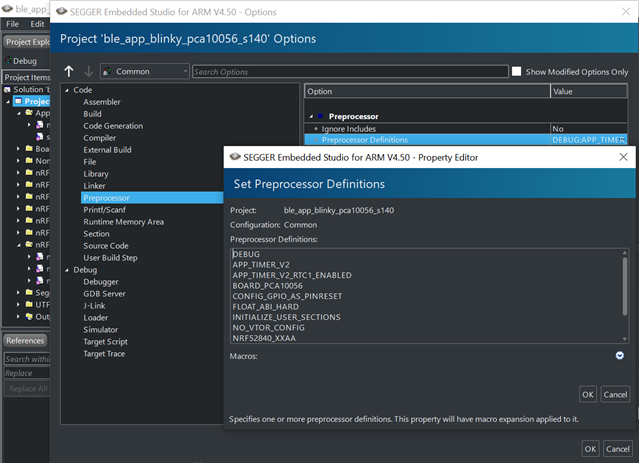
This will make your logger output a detailed error message whenever a non-NRF_SUCCESS error code is passed to an APP_ERROR_CHECK.
Best regards,
Karl
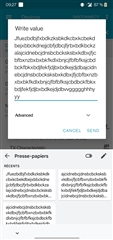
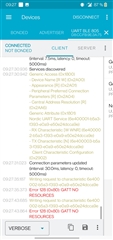 I'm showing what I have when I try to send more than 244 bytes
Hello, I would like to have a fast transfer, 5seconds is okay for 10k data.
could you explain to me how to chunk the bytes? I'm new with dev...
and yes I put the debug options thank you :)
lm said:I'm showing what I have when I try to send more than 244 bytes
This is likely because the application does not have the reserved space to hold the entire sending.
Do I understand it correctly that you would like to send the 10 kB data from your mobile phone to the connected peripheral device?
lm said:I would like to have a fast transfer, 5seconds is okay for 10k data.
10 kB in 5 seconds is 16 kbps, which is not regarded as a fast transfer when you look at what is possible with the throughput documentation - 16 kbps is absolutely do-able! :)
lm said:could you explain to me how to chunk the bytes? I'm new with dev...
The answer to this will depend on if you need to send the 10 kB from the peripheral to the central, or the other way around.
Best regards,
Karl
hello,
I want to send the information from my phone to the computer so yes the peripheral device.
okay for 16Kbps and I have to add this
define MIN_CONN_INTERVAL               MSEC_TO_UNITS(20, UNIT_1_25_MS)
#define MAX_CONN_INTERVAL               MSEC_TO_UNITS(75, UNIT_1_25_MS)

//16k
I need a 10k data from my phone to the computer so the write value. Thank you :)
lm said:I want to send the information from my phone to the computer so yes the peripheral device.
Do you intend to create an application for your computer that communicates and works with the peripheral device? Is there anything more than the 10 kB one-way transfer that needs to happen?
If so, you might instead want to look into using the pc-ble-driver or any of its ports (python or nodejs), since this lets you better control the central device and integrate it into your application.
If I have misunderstood, please elaborate on the use-case for the 10 kB transfer so that I may better advice.
The nRF Connect Bluetooth Low Energy application is made to easily visualize the GATT table of a device, and confirm that it is operating as expected - so it is not well suited for use in operations.
For example in the case we are discussing now using the NUS service you would have to fragment the 10 kB data yourself, and send them sequentially, which is a massive endeavor using the nRF Connect BLE GUI.
lm said:okay for 16Kbps and I have to add this
I do not understand what you mean when you say this. The MIN_ and MAX_CONN_INTERVAL defines are used to set the peripherals connection parameter preferences. These two in particular denotes which range the peripheral would like the connection interval to be in.
Either way, it is also entirely up to the central device to decide which connection parameters that are actually used - it may disregard the preferences of the peripheral device completely, it if chooses to.
Best regards,
Karl