NRF9160 NCS v1.7.0 CAT M1 Data Issue

Hello,

We are currently certifying our module for Verizon in the US.  As such, we are updating our software to work with MFW v1.3.0 and the corresponding NCS version v1.7.0.  The upgrade went relatively smoothing and things are generally working as we'd expect.  Our device will connect either over the CATM1 or NBIOT network (configurable) and then connect to an MQTT broker and send data up.  However, we have encountered an issue and require some assistance in troubleshooting it.

When we connect specifically over Vodafone (AT&T in my area) using CATM1 (using SYSTEMMODE set to both CATM1/NBIOT supported w/ LTE Preference = M1 Preferred), we will see our device successfully register to roaming.  It will then successfully open the TCP connection to the MQTT broker and send an MQTT Connect message.  However we never hear back from the server with the CONNACK.  Our device currently waits ~20 seconds before it gives up after not receiving a CONNACK.  Now running the EXACT same code and just swapping out the LTEPreference to "NB Preferred", we can successfully get a CONNACK and send/receive MQTT data.  When using the SAME MFW version (v1.3.0) and the older NCS version (v1.4.2) we can successfully connect over MQTT using CATM1.  This tells me its specifically something with the NCS version, likely something in the nrfxlib Modem Library.  I'm not sure if its necessarily a bug, but it could be some subtle way in which the modem library interacts with the Vodafone network while on CAT M1.

I've got some modem trace pcap files below that may help diagnose this issue.  In both tests, my device (IP 10.49.0.225) is connecting to server w/ IP 192.168.4.13.   You will need to filter the MQTT broker server pcap w/ "ip.src_host == 10.49.0.225 or ip.dst_host == 10.49.0.225". 

I've run two tests:

  1. Connect over NBIOT and successfully use MQTT
    1. Modem Trace = /cfs-file/__key/communityserver-discussions-components-files/4/VZW_5F00_AT130_5F00_NB_5F00_Success_5F00_AT130.pcapng
    2. PCAP from MQTT Broker Server = /cfs-file/__key/communityserver-discussions-components-files/4/VZW_5F00_AT130_5F00_NB_5F00_Success_5F00_DemoServer.pcap
  2. Connect over M1 and FAIL to use MQTT
    1. Modem Trace = /cfs-file/__key/communityserver-discussions-components-files/4/VZW_5F00_AT130_5F00_M1_5F00_Failure_5F00_AT130.pcapng
    2. PCAP from MQTT Broker Server = /cfs-file/__key/communityserver-discussions-components-files/4/VZW_5F00_AT130_5F00_M1_5F00_Failure_5F00_DemoServer.pcap

You can see in the NBIOT pcap files they connection and CONNACK happen as expected.  However with the M1 logs, you can see a couple things:

  1. The TCP SYN Handshake occur successfully. 
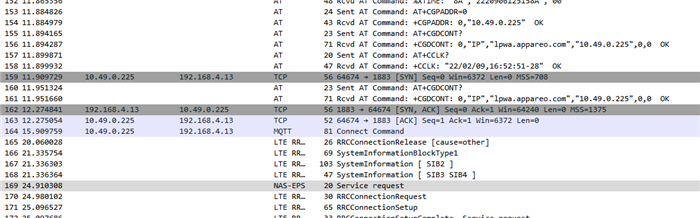
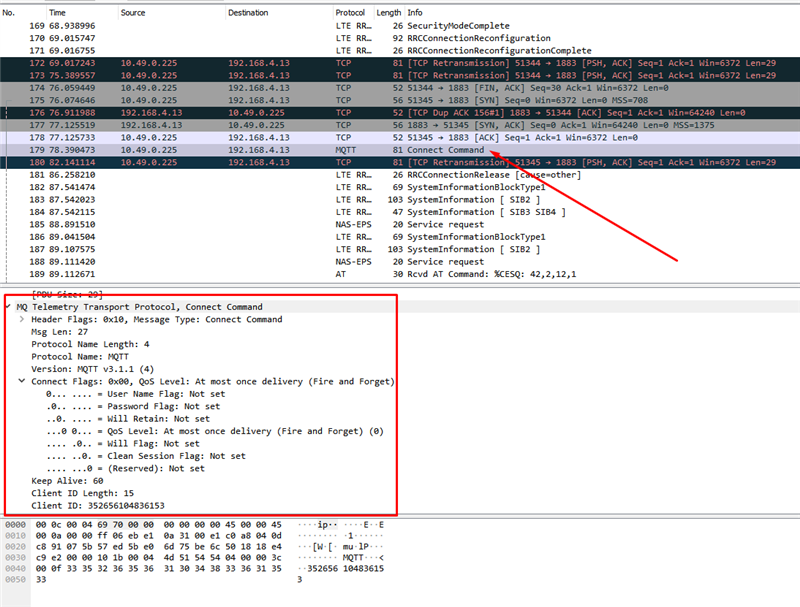
  2. The NRF9160 will send the MQTT Connect packet and it looks like i'd expect (screenshot 1). 
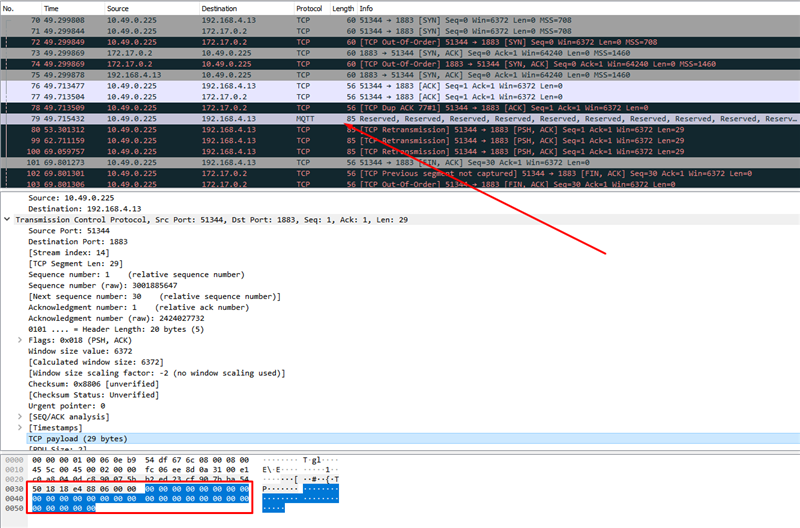
  3. Server logs (screenshot 2) looks like the TCP Payload is all zeros.  The other difference I could note is that when its received the "Differentiated Services Field" is set differently on the server side and looks invalid (or unknown).  

It ultimately seems like the NRF Modem Library version in conjunction with the Vodafone CATM1 network is causing us problems.  However I'm not sure how or why this could be happening.  I was hoping your team might have some insight on the issue?  Any insight or recommendations would be much appreciated!

SCREENSHOT 1
SCREENSHOT 2
Parents
  • Hi,

    I'll need the modem team to take a look at this, but I have a few questions first:

    Do you also have the raw modem traces? They contain more information than what is available in the .pcaps, and I wouldn't be surprised if the modem team requests raw traces.

    You say that you are working on Verizon certification, but from what I could see, you are using a Vodafone SIM card?

    Are you using the carrier library?

    You are also using modem fw v1.3.0 with rev1 HW, while the modem fw only has been certified with rev2 HW.

    If you also have traces where you change the NCS version, that would also be great, so that we can compare what happens in them.

    Best regards,

    Didrik

Reply
  • Hi,

    I'll need the modem team to take a look at this, but I have a few questions first:

    Do you also have the raw modem traces? They contain more information than what is available in the .pcaps, and I wouldn't be surprised if the modem team requests raw traces.

    You say that you are working on Verizon certification, but from what I could see, you are using a Vodafone SIM card?

    Are you using the carrier library?

    You are also using modem fw v1.3.0 with rev1 HW, while the modem fw only has been certified with rev2 HW.

    If you also have traces where you change the NCS version, that would also be great, so that we can compare what happens in them.

    Best regards,

    Didrik

Children
  • Hello Didrik,


    I've attached a raw modem trace of both the issue on NCS v1.7.0 and of a successfully connection on NCS v1.4.2.  Hopefully that gets you the info you need to do a comparison.

    You are correct, I am currently testing using a Vodafone SIM card.  I'm currently waiting on my VZW device, so I'm currently just testing out on the Vodafone network.  We'll have a common software between both our Verizon and Vodafone variants, so ultimately it needs to work for both network types, hence why I'm testing on Vodafone.

    Correct, we are building using the carrier lib.

    Correct, we are using rev1 HW in combination with the mfw v1.3.0.  We were given a waiver by Nordic to use Rev1 HW with this certified version of firmware, so we should be covered.

    Let me know if there's any other info you require.  This is a high priority issue, as it affects our Verizon certification deadline so any information you can provide would be much appreciated!  Thanks!

  • The modem team noticed that you set the APN differently in the working and non-working application:

    In the success log: AT Command: +CGDCONT=1,"IPV4V6","lpwa.appareo.com" 

    In the failure log: AT Command: AT+CGDCONT=0,"IP","lpwa.appareo.com"

    How are you setting the APN in your new application?

    With the PDN library? If so, what config options have you set?

  • I apologize, I may have configured the device to point to a different server.  This different server is accessed via different APNs, hence the difference.  We are currently using the SO_BINDTODEVICE to connect to our secondary APN  We know that this is deprecated and will eventually need to be updated, but it hasn't been removed in this version.

    I've uploaded the two new modem traces that should give a true comparison between the two.  These two are both connecting to the same servers using the same APNs.  We can still see that the everything appears the same, but the NCS 1.4.2 connects successfully and NCS 1.7.0 doesn't.  Please let us know if you see anything that could explain this issue.

  • I've looked at the AT commands and socket calls in the two traces, and I've noticed some differences.

    First, both traces contains a lot of AT commands. The sequence is mostly the same, and I don't think the differences should have any meaningfull effect.

    However, when the application starts doing socket operations, things starts to differ.

    While the old application opens a socket, connects it and starts sending data to the server, the new application opens a socket, connect it, then closes it 20s later without sending any data. This sequence happens another time, before the the application opens the socket a third time, where it finally sends some data (the MQTT Connect command). No response is received in the next 20 seconds, so the application closes the socket. Then, ~6 seconds later, %CESQ reports that the modem has lost the LTE signal, although it is regained shortly after. But, this is enough to disconnect the device from the network. the modem tries to reattach with a Tracking Area Update, but is rejected with EMM reject cause 9 "UE identity cannot be derived by the network". It then tries to connect to other networks, but are rejected with either 15 "no suitable cells in tracking area" or 11 "PLMN not allowed".

    Do you know what causes the application to close the socket without sending any data?

    I don't see the same open/close pattern in the VZW_AT130_M1_Failure modemtrace, but I do a similar situation where %CESQ reports no signal, followed by +CGEV showing the PDN bearer has been deactivated, and a TAU reject with reject cause 9.

    I'll give these traces to the modem team as well, to see if they know the reason for the TAU reject, or if there is something I have missed.

  • Hello Didrik,

    I apologize, but I'm having problems following along.  Specifically I'm looking at the "NEW_NCS_AT130_M1_Failure.pcap" (attached below) generated using the "Trace Collector v2" from the modem trace of the same name above.  What I see is that immediately after the LTE connection is established, the TCP socket is opened and an "MQTT Connect" command is sent to the server.  It then sits there without a response. 

    This is ultimately the problem I'd like to focus on.  When I watched the "Connect"' command be received on the server, it had a "nulled" out payload and an invalid/unknown "Differentiated Services Field".  This explains why we're never getting a CONACK back from the server.  Maybe it has something to do with the "RRCConnectionRelease" that is received ~4 seconds later, but this is where I'd like input as I'm not terribly familiar with that level.  

    Ultimately using the same MQTT socket connection/creation code, it worked on NCS v1.4.2 and not NCS v1.7.0.  Hopefully that can help narrow down possibilities or give some insight into what we might be doing incorrectly. 

    As an FYI, the 20 seconds is the timeout we have for the MQTT connection.  If a CONACK is not received in 20 seconds, the MQTT session is closed.

    I look forward to hearing back from you and any insights you have into this problem.

    /cfs-file/__key/communityserver-discussions-components-files/4/NEW_5F00_NCS_5F00_AT130_5F00_M1_5F00_Failure.pcapng

Related