Hello,
I have been trying to get the thingy:91 up for 3 weeks or more now from Sri Lanka. I have made a lot of progress in getting data connectivity via MQTT to thethings.io successfully. But I still cant get the data connectivity to the nrfcloud. I really need some assistance here.
1. I recompiled the Asset Tracker V2 with nbiot, and changed the URL to an IP address as the DNS translation is not working with my operator. Not sure why that is, but that needs further debug assistance. But for now I put this IP : 34.193.110.244. Is that the correct IP address ? Is that acceptable to change the URL to an IP ?
2. Asset tracker v2 with the changes seems to run fine, and I think it connects with the server. Log file is attached. Can you please help confirm that its connected to the server ?
2022-02-05T13:45:20.339Z INFO Application data folder: C:\Users\Beshan\AppData\Roaming\nrfconnect\pc-nrfconnect-linkmonitor
2022-02-05T13:45:20.483Z INFO Using @nordicsemiconductor/nrf-device-lib-js version: 0.4.3
2022-02-05T13:45:20.484Z INFO Using nrf-device-lib version: 0.10.3
2022-02-05T13:45:20.484Z INFO Using nrfjprog dll version: 10.15.1
2022-02-05T13:45:20.484Z INFO Using JLink version: JLink_V7.58b
2022-02-05T13:45:20.547Z DEBUG App pc-nrfconnect-linkmonitor v2.0.0 official
2022-02-05T13:45:20.547Z DEBUG App path: C:\Users\Beshan\.nrfconnect-apps\node_modules\pc-nrfconnect-linkmonitor
2022-02-05T13:45:20.548Z DEBUG nRFConnect 3.10.0, required by the app is (^3.8.0)
2022-02-05T13:45:20.548Z DEBUG nRFConnect path: C:\Users\Beshan\AppData\Local\Programs\nrfconnect\resources\app.asar
2022-02-05T13:45:20.548Z DEBUG HomeDir: C:\Users\Beshan
2022-02-05T13:45:20.548Z DEBUG TmpDir: C:\Users\Beshan\AppData\Local\Temp
2022-02-05T13:45:25.112Z INFO Modem port is opened
2022-02-05T13:45:25.156Z DEBUG modem >> AT+CFUN?
2022-02-05T13:45:25.210Z DEBUG modem << +CFUN: 1
2022-02-05T13:45:25.221Z DEBUG modem << OK
2022-02-05T13:45:25.280Z DEBUG modem >> AT+CGSN=1
2022-02-05T13:45:25.298Z DEBUG modem << +CGSN: "352656101105xxx"
2022-02-05T13:45:25.312Z DEBUG modem << OK
2022-02-05T13:45:25.336Z DEBUG modem >> AT+CGMI
2022-02-05T13:45:25.358Z DEBUG modem << Nordic Semiconductor ASA
2022-02-05T13:45:25.363Z DEBUG modem << OK
2022-02-05T13:45:25.369Z DEBUG modem >> AT+CGMM
2022-02-05T13:45:25.382Z DEBUG modem << nRF9160-SICA
2022-02-05T13:45:25.386Z DEBUG modem << OK
2022-02-05T13:45:25.404Z DEBUG modem >> AT+CGMR
2022-02-05T13:45:25.417Z DEBUG modem << mfw_nrf9160_1.3.1
2022-02-05T13:45:25.420Z DEBUG modem << OK
2022-02-05T13:45:25.425Z INFO Nordic Semiconductor ASA nRF9160-SICA [mfw_nrf9160_1.3.1] SerNr: 352656101105xxx
2022-02-05T13:45:25.430Z DEBUG modem >> AT+CEMODE?
2022-02-05T13:45:25.442Z DEBUG modem << +CEMODE: 0
2022-02-05T13:45:25.446Z DEBUG modem << OK
2022-02-05T13:45:25.474Z DEBUG modem >> AT%XCBAND=?
2022-02-05T13:45:25.485Z DEBUG modem << %XCBAND: (1,2,3,4,5,8,12,13,17,19,20,25,26,28,66)
2022-02-05T13:45:25.487Z DEBUG modem << OK
2022-02-05T13:45:25.498Z DEBUG modem >> AT+CMEE?
2022-02-05T13:45:25.505Z DEBUG modem << +CMEE: 1
2022-02-05T13:45:25.507Z DEBUG modem << OK
2022-02-05T13:45:25.526Z DEBUG modem >> AT+CNEC?
2022-02-05T13:45:25.535Z DEBUG modem << +CNEC: 24
2022-02-05T13:45:25.537Z DEBUG modem << OK
2022-02-05T13:45:25.542Z DEBUG modem >> AT+CGEREP?
2022-02-05T13:45:25.550Z DEBUG modem << +CGEREP: 1,0
2022-02-05T13:45:25.551Z DEBUG modem << OK
2022-02-05T13:45:25.556Z DEBUG modem >> AT+CIND=1,1,1
2022-02-05T13:45:25.567Z DEBUG modem << OK
2022-02-05T13:45:25.572Z DEBUG modem >> AT+CEREG=5
2022-02-05T13:45:25.584Z DEBUG modem << OK
2022-02-05T13:45:25.587Z DEBUG modem >> AT+CEREG?
2022-02-05T13:45:25.605Z DEBUG modem << +CEREG: 5,1,"3573","000B1E29",9,,,"00100011","11100000"
2022-02-05T13:45:25.613Z DEBUG modem << OK
2022-02-05T13:45:25.641Z DEBUG modem >> AT+COPS=3,2
2022-02-05T13:45:25.651Z DEBUG modem << OK
2022-02-05T13:45:25.662Z DEBUG modem >> AT+COPS?
2022-02-05T13:45:25.679Z DEBUG modem << +COPS: 0,2,"41301",9
2022-02-05T13:45:25.683Z DEBUG modem << OK
2022-02-05T13:45:25.707Z DEBUG modem >> AT%XCBAND
2022-02-05T13:45:25.718Z DEBUG modem << %XCBAND: 8
2022-02-05T13:45:25.720Z DEBUG modem << OK
2022-02-05T13:45:25.748Z DEBUG modem >> AT+CGDCONT?
2022-02-05T13:45:25.766Z DEBUG modem << +CGDCONT: 0,"IP","Nbiot","10.106.222.xxx",0,0
2022-02-05T13:45:25.778Z DEBUG modem << OK
2022-02-05T13:45:25.811Z DEBUG modem >> AT+CGACT?
2022-02-05T13:45:25.827Z DEBUG modem << +CGACT: 0,1
2022-02-05T13:45:25.836Z DEBUG modem << OK
2022-02-05T13:45:25.863Z DEBUG modem >> AT%CESQ=1
2022-02-05T13:45:25.880Z DEBUG modem << OK
2022-02-05T13:45:25.900Z DEBUG modem >> AT+CESQ
2022-02-05T13:45:25.917Z DEBUG modem << +CESQ: 99,99,255,255,255,255
2022-02-05T13:45:25.923Z DEBUG modem << OK
2022-02-05T13:45:25.949Z DEBUG modem >> AT%XSIM=1
2022-02-05T13:45:25.967Z DEBUG modem << OK
2022-02-05T13:45:25.981Z DEBUG modem >> AT%XSIM?
2022-02-05T13:45:25.997Z DEBUG modem << %XSIM: 1
2022-02-05T13:45:26.001Z DEBUG modem << OK
2022-02-05T13:45:26.019Z DEBUG modem >> AT+CPIN?
2022-02-05T13:45:26.032Z DEBUG modem << +CPIN: READY
2022-02-05T13:45:26.035Z DEBUG modem << OK
2022-02-05T13:45:26.054Z DEBUG modem >> AT+CPINR="SIM PIN"
2022-02-05T13:45:26.066Z DEBUG modem << +CME ERROR: 0
2022-02-05T13:46:16.329Z DEBUG modem >> AT+CFUN=1
2022-02-05T13:46:16.357Z DEBUG modem << OK
2022-02-05T13:46:17.424Z DEBUG modem >> AT+CFUN?
2022-02-05T13:46:17.433Z DEBUG modem << +CFUN: 1
2022-02-05T13:46:17.445Z DEBUG modem << OK
2022-02-05T13:46:17.451Z DEBUG modem >> AT+CGSN=1
2022-02-05T13:46:17.460Z DEBUG modem << +CGSN: "352656101105xxx"
2022-02-05T13:46:17.462Z DEBUG modem << OK
2022-02-05T13:46:17.466Z DEBUG modem >> AT+CGMI
2022-02-05T13:46:17.474Z DEBUG modem << Nordic Semiconductor ASA
2022-02-05T13:46:17.475Z DEBUG modem << OK
2022-02-05T13:46:17.480Z DEBUG modem >> AT+CGMM
2022-02-05T13:46:17.487Z DEBUG modem << nRF9160-SICA
2022-02-05T13:46:17.488Z DEBUG modem << OK
2022-02-05T13:46:17.491Z DEBUG modem >> AT+CGMR
2022-02-05T13:46:17.499Z DEBUG modem << mfw_nrf9160_1.3.1
2022-02-05T13:46:17.500Z DEBUG modem << OK
2022-02-05T13:46:17.501Z INFO Nordic Semiconductor ASA nRF9160-SICA [mfw_nrf9160_1.3.1] SerNr: 352656101105xxx
2022-02-05T13:46:17.503Z DEBUG modem >> AT+CEMODE?
2022-02-05T13:46:17.510Z DEBUG modem << +CEMODE: 0
2022-02-05T13:46:17.511Z DEBUG modem << OK
2022-02-05T13:46:17.517Z DEBUG modem >> AT%XCBAND=?
2022-02-05T13:46:17.527Z DEBUG modem << %XCBAND: (1,2,3,4,5,8,12,13,17,19,20,25,26,28,66)
2022-02-05T13:46:17.530Z DEBUG modem << OK
2022-02-05T13:46:17.536Z DEBUG modem >> AT+CMEE?
2022-02-05T13:46:17.546Z DEBUG modem << +CMEE: 1
2022-02-05T13:46:17.547Z DEBUG modem << OK
2022-02-05T13:46:17.552Z DEBUG modem >> AT+CNEC?
2022-02-05T13:46:17.558Z DEBUG modem << +CNEC: 24
2022-02-05T13:46:17.560Z DEBUG modem << OK
2022-02-05T13:46:17.563Z DEBUG modem >> AT+CGEREP?
2022-02-05T13:46:17.569Z DEBUG modem << +CGEREP: 1,0
2022-02-05T13:46:17.571Z DEBUG modem << OK
2022-02-05T13:46:17.574Z DEBUG modem >> AT+CIND=1,1,1
2022-02-05T13:46:17.582Z DEBUG modem << OK
2022-02-05T13:46:17.585Z DEBUG modem >> AT+CEREG=5
2022-02-05T13:46:17.592Z DEBUG modem << OK
2022-02-05T13:46:17.600Z DEBUG modem >> AT+CEREG?
2022-02-05T13:46:17.613Z DEBUG modem << +CEREG: 5,1,"3573","000B1E29",9,,,"00100011","11100000"
2022-02-05T13:46:17.616Z DEBUG modem << OK
2022-02-05T13:46:17.627Z DEBUG modem >> AT+COPS=3,2
2022-02-05T13:46:17.633Z DEBUG modem << OK
2022-02-05T13:46:17.637Z DEBUG modem >> AT+COPS?
2022-02-05T13:46:17.646Z DEBUG modem << +COPS: 0,2,"41301",9
2022-02-05T13:46:17.648Z DEBUG modem << OK
2022-02-05T13:46:17.671Z DEBUG modem >> AT%XCBAND
2022-02-05T13:46:17.678Z DEBUG modem << %XCBAND: 8
2022-02-05T13:46:17.680Z DEBUG modem << OK
2022-02-05T13:46:17.687Z DEBUG modem >> AT+CGDCONT?
2022-02-05T13:46:17.697Z DEBUG modem << +CGDCONT: 0,"IP","Nbiot","10.106.222.xxx",0,0
2022-02-05T13:46:17.699Z DEBUG modem << OK
2022-02-05T13:46:17.705Z DEBUG modem >> AT+CGACT?
2022-02-05T13:46:17.713Z DEBUG modem << +CGACT: 0,1
2022-02-05T13:46:17.719Z DEBUG modem << OK
2022-02-05T13:46:17.750Z DEBUG modem >> AT%CESQ=1
2022-02-05T13:46:17.760Z DEBUG modem << OK
2022-02-05T13:46:17.765Z DEBUG modem >> AT+CESQ
2022-02-05T13:46:17.776Z DEBUG modem << +CESQ: 99,99,255,255,255,255
2022-02-05T13:46:17.779Z DEBUG modem << OK
2022-02-05T13:46:17.813Z DEBUG modem >> AT%XSIM=1
2022-02-05T13:46:17.827Z DEBUG modem << OK
2022-02-05T13:46:17.836Z DEBUG modem >> AT%XSIM?
2022-02-05T13:46:17.851Z DEBUG modem << %XSIM: 1
2022-02-05T13:46:17.854Z DEBUG modem << OK
2022-02-05T13:46:17.880Z DEBUG modem >> AT+CPIN?
2022-02-05T13:46:17.894Z DEBUG modem << +CPIN: READY
2022-02-05T13:46:17.898Z DEBUG modem << OK
2022-02-05T13:46:17.919Z DEBUG modem >> AT+CPINR="SIM PIN"
2022-02-05T13:46:17.933Z DEBUG modem << +CME ERROR: 0
2022-02-05T13:46:18.579Z DEBUG modem << [10:49:00.741,851] [0m<inf> event_manager: GPS_EVT_TIMEOUT[0m
2022-02-05T13:46:18.645Z DEBUG modem << [10:49:00.747,924] [0m<inf> event_manager: GPS_EVT_INACTIVE[0m
2022-02-05T13:46:18.647Z DEBUG modem << [10:49:00.754,272] [0m<inf> event_manager: DATA_EVT_DATA_READY[0m
2022-02-05T13:47:18.102Z DEBUG modem << [10:50:00.266,021] [0m<inf> event_manager: APP_EVT_DATA_GET_ALL[0m
2022-02-05T13:47:18.107Z DEBUG modem << [10:50:00.272,766] [0m<inf> event_manager: APP_EVT_DATA_GET - Requested data types (MOD_DYN, BAT, ENV, NEIGHBOR_CELLS, GNSS)[0m
2022-02-05T13:47:18.125Z DEBUG modem << [10:50:00.303,253] [0m<inf> event_manager: GPS_EVT_ACTIVE[0m
2022-02-05T13:47:18.135Z DEBUG modem << [10:50:00.311,096] [0m<inf> event_manager: SENSOR_EVT_ENVIRONMENTAL_DATA_READY[0m
2022-02-05T13:47:18.163Z DEBUG modem << [10:50:00.339,172] [0m<inf> event_manager: MODEM_EVT_MODEM_DYNAMIC_DATA_READY[0m
2022-02-05T13:47:18.186Z DEBUG modem << [10:50:00.362,640] [0m<inf> event_manager: MODEM_EVT_BATTERY_DATA_READY[0m
2022-02-05T13:47:18.584Z DEBUG modem << %CESQ: 65,3,23,3
2022-02-05T13:47:18.651Z DEBUG modem << [10:50:00.824,279] [0m<inf> event_manager: MODEM_EVT_NEIGHBOR_CELLS_DATA_READY[0m
2022-02-05T13:47:18.653Z DEBUG modem << %CESQ: 255,0,255,0
2022-02-05T13:48:18.574Z DEBUG modem << [10:51:00.742,462] [0m<inf> event_manager: GPS_EVT_TIMEOUT[0m
2022-02-05T13:48:18.583Z DEBUG modem << [10:51:00.748,504] [0m<inf> event_manager: GPS_EVT_INACTIVE[0m
2022-02-05T13:48:18.584Z DEBUG modem << [10:51:00.754,882] [0m<inf> event_manager: DATA_EVT_DATA_READY[0m
2022-02-05T13:49:18.098Z DEBUG modem << [10:52:00.266,021] [0m<inf> event_manager: APP_EVT_DATA_GET_ALL[0m
2022-02-05T13:49:18.102Z DEBUG modem << [10:52:00.272,766] [0m<inf> event_manager: APP_EVT_DATA_GET - Requested data types (MOD_DYN, BAT, ENV, NEIGHBOR_CELLS, GNSS)[0m
2022-02-05T13:49:18.120Z DEBUG modem << [10:52:00.303,253] [0m<inf> event_manager: GPS_EVT_ACTIVE[0m
2022-02-05T13:49:18.132Z DEBUG modem << [10:52:00.311,096] [0m<inf> event_manager: SENSOR_EVT_ENVIRONMENTAL_DATA_READY[0m
2022-02-05T13:49:18.158Z DEBUG modem << [10:52:00.338,867] [0m<inf> event_manager: MODEM_EVT_MODEM_DYNAMIC_DATA_READY[0m
2022-02-05T13:49:18.181Z DEBUG modem << [10:52:00.362,213] [0m<inf> event_manager: MODEM_EVT_BATTERY_DATA_READY[0m
2022-02-05T13:49:18.583Z DEBUG modem << %CESQ: 62,3,21,3
2022-02-05T13:49:18.650Z DEBUG modem << [10:52:00.827,667] [0m<inf> event_manager: MODEM_EVT_NEIGHBOR_CELLS_DATA_READY[0m
2022-02-05T13:49:18.653Z DEBUG modem << %CESQ: 255,0,255,0
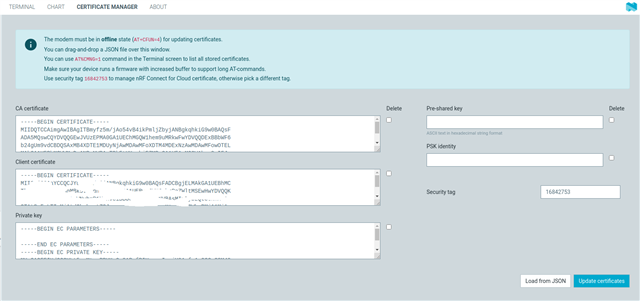
3. I think I have the certificates properly loaded to the device. I used the following command to create the CA , in windows using the scripts from your site
python3 create_ca_cert.py -cn nrf-352656101105xxx -c US
4. I used the following command to program the certificates to the device and create the provisions.csv file. The certificates loaded in to the device via UART without an issue
python device_credentials_installer.py -d --ca .\0x58d12fc065468e1e1f81d14e6a88d316236744d7_ca.pem --ca_key .\0x58d12fc065468e1e1f81d14e6a88d316236744d7_prv.pem --csv provision.csv -s -v --id_str nrf-352656101105xxx
5. Finally I provisioned the device using this command
python3 .\nrf_cloud_provision.py --apikey db7cec7b98573fe55f29eb21c1d28525d2c73xxx --chk --csv .\provision.csv
6. The provisioning happened correctly also. I see this when I login. Do I need to do anything else that the provisioning, like add a device using the yellow button on the left ?
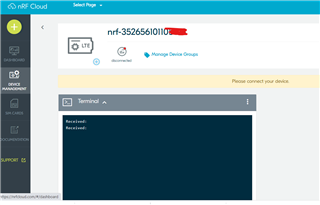
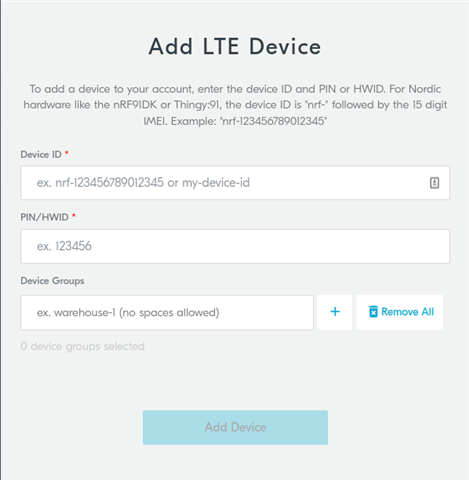
7. If do try to use the yellow button and try to add a device it gives me this error. After provisioning via the python script, do I need to do this step ? 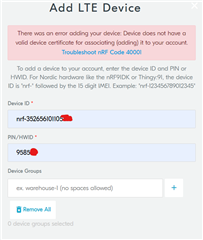
thank you in advance, really need to get this step solved so we can get to the next stage of the projects.
thank you !