nRF52833 power consumption after upgrade to SDK 1.7.1

Hi,

After upgrade from nRF Connect SDK 1.4.1 to SDK 1.7.1 we have seen an increase of the current consumption with about 100uA.

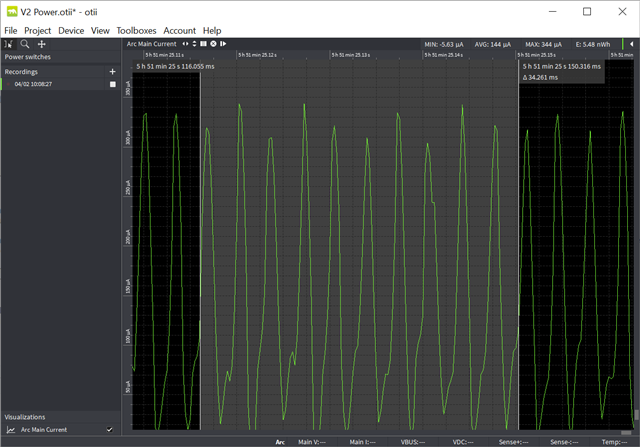
Before with SDK 1.4.1 the idle current was about ~60uA, but now we see peaks with about 300uA at about 300Hz (see included picture).

I have tested both with our main application as well with a simple test application (that just initialize all pins then goes into idle).

I have also tested on two different product samples, and the scenario is the same, but the frequency differs from 2.7ms to 3.4ms (290-370Hz).

At this stage we are not using BLE, and the test application just initialize all pins, powers off all external sensors etc and just goes into idle. We just rebuild our applications with the API changes that was needed between 1.4.1 and 1.7.1 so our code is the "same" in both scenarios.

Any ideas why this differs between the two SDK's? Could it be something that we have missed to configure when upgrading from 1.4.1 to 1.7.1 that causes these 300Hz power peaks?

Best regards,
Thomas
  • Hi Thomas

    The picture resolution is fine when I click it, no problem there.

    I see. You can check out the "official" fix to this issue here, which I guess would be preferred. Just disabling the RC oscillator calibration will likely cause the crystal to drift, and that will likely affect BLE connections if you're using the radio peripheral at all, and might lead to disconnects and some "off" timers I believe.

    Best regards,

    Simon

  • Hi Simon,

    Thanks for your reply!

    But, I'm not sure how to use this information ...
    If I merge the fix you mentioned, I get compile errors if I enable the new configs, and if I leave them default I still get the 100uA extra current consumption.

    With the fix merged - what would you say should be the correct way to configure (if the configuration below is not preferred) to get rid of the extra 100uA?

    Again, the only configuration I have found so far that removes the extra 100uA (which we only see in SDK 1.7.1 and not in 1.4.1) is the following:

        CONFIG_CLOCK_CONTROL_NRF_K32SRC_RC_CALIBRATION=n

    Best regards,
    Thomas

  • Hi

    What kind of compile errors are you seeing? I have asked the devs what they recommend for configurations here and will get back to you as soon as I hear from them.

    Best regards,

    Simon

  • Hi Simon!

    I added the new configuration to my prj.conf file:

    CONFIG_CLOCK_CONTROL_NRF_DRIVER_CALIBRATION=y

    I then get the following error during compiling:

    error: CLOCK_CONTROL_NRF_DRIVER_CALIBRATION (defined at drivers/clock_control/Kconfig.nrf:68) is
    assigned in a configuration file, but is not directly user-configurable (has no prompt). It gets its
    value indirectly from other symbols. See docs.zephyrproject.org/.../CONF
    IG_CLOCK_CONTROL_NRF_DRIVER_CALIBRATION.html and/or look up CLOCK_CONTROL_NRF_DRIVER_CALIBRATION in
    the menuconfig/guiconfig interface. The Application Development Primer, Setting Configuration
    Values, and Kconfig - Tips and Best Practices sections of the manual might be helpful too.

    So, I'm just using "CONFIG_CLOCK_CONTROL_NRF_K32SRC_RC_CALIBRATION=n", in which case the new configuration is not used (but maybe I interpret this wrongly?):

      if CLOCK_CONTROL_NRF_K32SRC_RC_CALIBRATION

        config CLOCK_CONTROL_NRF_DRIVER_CALIBRATION
          bool
          depends on !CLOCK_CONTROL_NRF_FORCE_ALT
          default y
          help
            Enabling indicates that calibration is perfomed by the clock control driver.

    Again, only with the setting "CONFIG_CLOCK_CONTROL_NRF_K32SRC_RC_CALIBRATION=n" (placed in the mcuboot overlay file) will I see an improvement regarding current consumption (dropping ~100uA), removing it will return the consumption to ~145uA from ~50uA.

    So, any help in how I should configure correctly would be helpful!

    Best regards,
    Thomas

  • Hi

    As you can see from the link provided from the Zephyr in the error log, the CONFIG_CLOCK_CONTROL_NRF_DRIVER_CALIBRATION is not user-configurable, but is set from other symbols (that would be the direct dependencies). I assume these (at least CLOCK_CONTROL_NRF_K32SRC_RC_CALIBRATION) are already enabled in your application. Did you check the details from the commit to this issue?

    Best regards,

    Simon

Related