Beware that this post is related to an SDK in maintenance mode
More Info: Consider nRF Connect SDK for new designs

How to handle Time Consuming Function Calls in Application Having SoftDevice?

Hello everybody,

I am working on a nRF52832 DK  and implemented libuarte (on a nRF52832) to communicate with another uC on said board.
I am using sdk 17.0.2. The goal is to receive data from the other uC and transmit it via BLE to a connected device using notifications/Indication via Characteristics.

I need To handle some state application handle functions that consume more time in execution. I'm not aware of where to call these functions, so that softdevice communication timing remain maintained.  Currently, I'm calling these functions in idle_state_handle(); and i'm not pretty sure that it is correct way to call here.

  • Hi,

    The softdevice runs in interrupt context, in order to handle timing-critical BLE events. The softdevice will always have higher priority than the application, so the application will be preempted if the softdevice needs to handle its tasks.

    See Interrupt model and processor availability and Scheduling for more details about how this works. Make sure that you call the time consuming function from main context, to prevent blocking softdevice or other peripheral interrupts.

    In case you need to perform a task in the application without being interrupted by the softdevice, you can use the Timeslot API to request a timeslot.

    Best regards,
    Jørgen

  • Thanks for reply Jørgen Holmefjord,

    nRF52832 stuck at "NRF_BREAKPOINT_COND;" and get hanged when sending data via  libuarte continuously..so I just want to know the proper place to call "nrf_libuarte_async_tx()"  function or how to handle Continuous sending routine, so that I am able to send data without processor reset.

    void Send_Uarte_Data(uint8_t  msg[], size_t length)
    {
        ret_code_t err_code;         
        err_code = nrf_libuarte_async_tx(&libuarte, msg,length);
        APP_ERROR_CHECK(err_code);
        bsp_board_led_invert(1);
    
    }
    static void idle_state_handle(void)
    {
        
        if (NRF_LOG_PROCESS() == false)
        {
            nrf_pwr_mgmt_run();
        }
        if(sendUart)
        {
            uint8_t test_Text[]="Button_Pressed.\r\n";
            Send_Uarte_Data(test_Text,sizeof(test_Text));
            sendUart =0;
        }
    }
    /**@brief Application main function.
     */
    int main(void)
    {
        //bool erase_bonds;
    
        //Initialize.
        uart_init();
        log_init();
        timers_init();
        //User_timer_Init(APP_TIMER_MODE_REPEATED,user_timer_handle);
    
        //buttons_leds_init();
        bsp_configuration();
    
        power_management_init();
        ble_stack_init();
        gap_params_init();
        gatt_init();
        services_init();
        advertising_init();
        conn_params_init();
    
        //Start execution.
        NRF_LOG_INFO("Debug logging for UART over RTT started.");
        advertising_start();
    
        // Enter main loop.
        for (;;)
        {
            idle_state_handle();
        }
    }

  • Hi,

    You will get an error from nrf_libuarte_async_tx() if you have already started one transfer, and you call the function again before the transfer is completed. You need to wait for the NRF_LIBUARTE_ASYNC_EVT_TX_DONE event in the event handler before calling this function again.

    In general, you can build the application in debug configuration (or with DEBUG preprocessor symbol defined), and read out the error code and file/line that caused the error from the logger.

    Best regards,
    Jørgen

  • Thanks for reply Jørgen Holmefjord,

    1. Sometimes Getting Error "<error> libUARTE_async: (evt) Failed to allocate buffer for RX." while Transmitting and Receiving data contineouesoly.

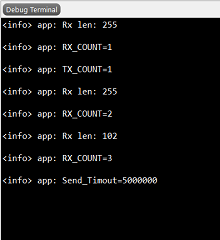
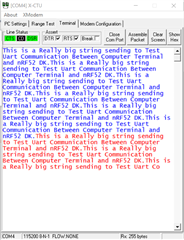
    2. if a big packet of data is transmitted via terminal/PC(like 612 bytes), Partial amount of data received on each "NRF_LIBUARTE_ASYNC_EVT_RX_DATA" event(255 bytes each and remaining on last event).

    NRF_LIBUARTE_ASYNC_DEFINE(libuarte, 0, 1, 2, NRF_LIBUARTE_PERIPHERAL_NOT_USED, 255, 4);

    void uart_event_handler(void *context, nrf_libuarte_async_evt_t *p_evt) {
    
      static uint8_t Tx_Cnt=1,Rx_Cnt=1;
      nrf_libuarte_async_t *p_libuarte = (nrf_libuarte_async_t *)context;
    
      p_libuarte = (nrf_libuarte_async_t *)context;
      ret_code_t ret;
    
      switch (p_evt->type) {
        case NRF_LIBUARTE_ASYNC_EVT_ERROR: {
            NRF_LOG_ERROR("LIBUARTE ERROR");
          break;
        }
        case NRF_LIBUARTE_ASYNC_EVT_RX_DATA: {
           // Receive complete
            memcpy(Rx_Buff, p_evt->data.rxtx.p_data, p_evt->data.rxtx.length);
            Rx_len = p_evt->data.rxtx.length;
            nrf_libuarte_async_rx_free(p_libuarte, p_evt->data.rxtx.p_data, p_evt->data.rxtx.length);
            NRF_LOG_INFO("Rx len: %d\r\n",Rx_len);
            sendUart =1;   //Transmit Received data back to PC
            NRF_LOG_INFO("RX_COUNT=%d\r\n",Rx_Cnt++);
            if(Rx_Cnt > 10)
              Rx_Cnt = 0;
          break;
        }
        case NRF_LIBUARTE_ASYNC_EVT_TX_DONE: {
            NRF_LOG_INFO("TX_COUNT=%d\r\n",Tx_Cnt++);
            // Transmit complete
            Tx_Cplt_Flag = true;
            if(Tx_Cnt > 10)
              Tx_Cnt =0;
          break;
        }
      }
    }


    but i just want to receive whole data on single event or How i can handle these multiple packets. also i am not able to capture data of last "NRF_LIBUARTE_ASYNC_EVT_RX_DATA" event.


    3. My Application requirements is to send some data from Uc(Renesas RL78) to nrf52832 and vice versa continuously using UART, so where to call "Send_Uart_Data()" function in ble stack or how to handle these blocking function so that softdevice doesn't get disturbed?

    ret_code_t Send_Uarte_Data(uint8_t  msg[], size_t length)
    {
        uint32_t Tx_Timout =0;
        static uint32_t Send_Skip_Count=0;
        ret_code_t err_code;     
        if(Tx_Cplt_Flag) 
        { 
            Tx_Cplt_Flag = false;
            err_code = nrf_libuarte_async_tx(&libuarte, msg,length);
            //Wait Till Tx not Done
            while(Tx_Cplt_Flag!=true)
            {
                Tx_Timout++;
                if(Tx_Timout >= TX_TIMEOUT)
                {
                    NRF_LOG_INFO("Send_Timout=%d\r\n",Tx_Timout);
                    Tx_Timout = 0; 
                    return 0;
                }
            }
            APP_ERROR_CHECK(err_code);
            bsp_board_led_invert(1);
            NRF_LOG_INFO("Transmitted Length =%d\r\n",length);
            return 1;  
        }
        else
        {
          if(Send_Skip_Count++ > 500)
            Send_Skip_Count =0;
          NRF_LOG_INFO("Send_Skip_Count = %d\r\n",Send_Skip_Count);
          return 0;
        }
    }
    

        // Enter main loop.
        for (;;)
        {
            idle_state_handle();
            if(sendUart)
            {
                (void)Send_Uarte_Data(Rx_Buff,Rx_len);
                sendUart =0;
            }
        }

    log snipped 

    Blue Color is Transmitted data and Red Color Received.


  • Hi,

    1. If you are not able to free the libUARTE RX buffers fast enough in the NRF_LIBUARTE_ASYNC_EVT_RX_DATA event, you may get this error when there is no available buffer for the library to use. You can try to increase the buffer count (last parameter passed to NRF_LIBUARTE_ASYNC_DEFINE(). Alternatively, you need to either handle the events faster, reduce the baudrate, or add HW flow control pins.

    2. The transfer length for UARTE peripheral is limited to 255 bytes in nRF52832. There is no way to increase the receive buffer size beyond this on nRF52832 (nRF52840/nRF52833 can support longer transfers). The library will provide the data to the application through the NRF_LIBUARTE_ASYNC_EVT_RX_DATA event when one buffer is full/reached buffer edge, or when a timeout occurs. There is no support in the library for concatenating data from multiple buffers, this needs to be handled in the application, for instance by using a ring buffer or similar.

    3. As long as you call the blocking function from main context/function, there is nothing to worry about. The softdevice runs in interrupt context, meaning it will take over execution from the blocking function whenever it needs to handle its tasks.

    Best regards,
    Jørgen

Related