How to DECLARE - ATT_MTU, PHY, LE Data Length, LE Connection interval for nRF5340 DK?

The board is nRF5340 DK.

nRF Connect SDK1.8.0 / Windows

Example Peripheral UART.


I want to DECLARE them, not change them with different types of functions. There are examples for the second. I want to compile the project directly with these values. I know that then the individual devices will be understood each other, for the specific values. Everywhere in the examples are used functions that change in the process of work, I do not want that. I don't care how this happens in the different SoftDevices.


I want to change the default ones.

BT_LE_CONN_PARAM_DEFAULT

Default LE connection parameters: Connection Interval: 30-50 ms Latency: 0 Timeout: 4 s

Enable LE Data Packet Length Extension.


How and where to declare them?

Parents
  • Hi Stefan,

    Could you let me know if you have control over both sides of the connection or not ? (central and peripheral) 
    I assume you want to just use the configuration and don't want to change the configuration in run time ? 

    Note that most of the parameter of a connection is dictated by the central device. For example the connection parameter need to be configured (for example: connection parameters) and feed to the stack via bt_conn_le_create() function. 

    Have you looked at the configuration in prj.conf of the throughput example ? 

  • I have been studying this example for 3 days, this is not my case. That's why I wrote that I don't want that. I have two kits, nRF5340 DK, the communication for the test will be between them. I want to see what speed I can get. I changed the software inside the central and peripheral (UART) to be completely binary. It exchanges commands up to 40 bytes long.

    The situation is as follows. / If I call them briefly like this:/

    1/ Central is s wireless port on a machine. Send/Receives commands through uart.

    CU(central uart), CP(central processor/ nRF5340), CB(central Bluetooth)

    2/ The peripheral is a remote control, there is a version with a display. In this case, a second processor (Big) is connected to the serial port, which controls the display. It turns on about twice a second and paints the screen. nRF5340 (it is actually the remote) reads all inputs (buttons, switches, joystick, etc.) and controls some LEDs/outputs.

    PU(peripheral uart), PP(peripheral processor/ nRF5340), PB(peripheral Bluetooth)


    Several cases.

    1. The machine sends status to the remote.

    CU>CB>>PB>PU or PP. The indication is on the display or on something on the remote control (LED)

    1. The machine reads the status of all inputs on the remote control.

    CU>CB>>PB>PP>PB>>CB>CU - Returns an answer.

    1. The machine exchanges data directly with the second processor with the display.

    CU>CB>>PB>PU> Display>PU>PB>>CB>CU - Returns an answer.

    ….

    And so many options.


    I need to achieve about 5-6 commands (* 40 bytes) with return response !! , 5-10 times per second.

    At the moment I have tried all this and it works, but the times are very big.


    I even did such a test:

    CU>CB>>PB>PP>PB>>CB>CP>CB>>PB>PP>PU for one command.

    At the moment, all this works on cable (RS-485), the idea is not to get worse. If it gets better, even better. :)

Reply
  • I have been studying this example for 3 days, this is not my case. That's why I wrote that I don't want that. I have two kits, nRF5340 DK, the communication for the test will be between them. I want to see what speed I can get. I changed the software inside the central and peripheral (UART) to be completely binary. It exchanges commands up to 40 bytes long.

    The situation is as follows. / If I call them briefly like this:/

    1/ Central is s wireless port on a machine. Send/Receives commands through uart.

    CU(central uart), CP(central processor/ nRF5340), CB(central Bluetooth)

    2/ The peripheral is a remote control, there is a version with a display. In this case, a second processor (Big) is connected to the serial port, which controls the display. It turns on about twice a second and paints the screen. nRF5340 (it is actually the remote) reads all inputs (buttons, switches, joystick, etc.) and controls some LEDs/outputs.

    PU(peripheral uart), PP(peripheral processor/ nRF5340), PB(peripheral Bluetooth)


    Several cases.

    1. The machine sends status to the remote.

    CU>CB>>PB>PU or PP. The indication is on the display or on something on the remote control (LED)

    1. The machine reads the status of all inputs on the remote control.

    CU>CB>>PB>PP>PB>>CB>CU - Returns an answer.

    1. The machine exchanges data directly with the second processor with the display.

    CU>CB>>PB>PU> Display>PU>PB>>CB>CU - Returns an answer.

    ….

    And so many options.


    I need to achieve about 5-6 commands (* 40 bytes) with return response !! , 5-10 times per second.

    At the moment I have tried all this and it works, but the times are very big.


    I even did such a test:

    CU>CB>>PB>PP>PB>>CB>CP>CB>>PB>PP>PU for one command.

    At the moment, all this works on cable (RS-485), the idea is not to get worse. If it gets better, even better. :)

Children
  • Hi, 
    I think for that you just need to configure the connection interval as low as possible (but not too low as it will draw more current). 
    Please set the INTERVAL_MIN and INTERVAL_MAX on the central side to 0x28 (50ms) to test. 

    This intervals should be used in the .conn_param when you scan or when you connect. 

    Also in the project configuration please set: 


    CONFIG_BT_BUF_ACL_RX_SIZE=251
    CONFIG_BT_ATT_PREPARE_COUNT=2
    CONFIG_BT_CONN_TX_MAX=10
    CONFIG_BT_L2CAP_TX_BUF_COUNT=10
    CONFIG_BT_L2CAP_TX_MTU=247
    CONFIG_BT_CTLR_RX_BUFFERS=2
    CONFIG_BT_BUF_ACL_TX_COUNT=10
    CONFIG_BT_BUF_ACL_TX_SIZE=251
    CONFIG_BT_CTLR_DATA_LENGTH_MAX=251

    In the child_image\hci_rpmsg.conf please set:

    CONFIG_BT_BUF_ACL_TX_SIZE=251
    CONFIG_BT_CTLR_DATA_LENGTH_MAX=251
    CONFIG_BT_BUF_ACL_RX_SIZE=251

  • I'm not sure I understood what needed to be done.

    1. About INTERVAL_MIN and INTERVAL_MAX.

    In central main.c ONLY:

     // ADDED *****

    #define INTERVAL_MIN   0x28     

    #define INTERVAL_MAX  0x28     

    static struct bt_le_conn_param *conn_param =

                    BT_LE_CONN_PARAM(INTERVAL_MIN, INTERVAL_MAX, 0, 400);

    // ADDED *****


    In

    static int scan_init(void)

    {

                    int err;

                    struct bt_scan_init_param scan_init = {

                                   .connect_if_match = 1,

                                   .conn_param = conn_param // ADDED ****

                    };

    ….


    Something else somewhere ??


    No difference. Sending and returning a command between the two boards is about 100ms.

    CU>CB>>PB>PP>PB>>CB>CU

    I tried to change the values (MIN/MAX), nothing different. Something else needs to be set somewhere.


    1. CONFIG..

     This need to add ONLY in central or and in peripheral?(I tried both options. no difference.)

    As far as I understand this only changes the buffers, without affecting the times.

    In prj.conf file.

    CONFIG_BT_BUF_ACL_RX_SIZE=251

    ….

    CONFIG_BT_CTLR_DATA_LENGTH_MAX=251


    In central ONLY child_image\hci_rpmsg.conf is missing.

    The only file inside is this rpc_host.conf. (\SDK\ncs\v1.8.0\nrf\samples\bluetooth\central_uart\child_image)

    In it I added:

    CONFIG_BT_BUF_ACL_TX_SIZE=251

    CONFIG_BT_CTLR_DATA_LENGTH_MAX=251

    CONFIG_BT_BUF_ACL_RX_SIZE=251

    From VSC:

    CONFIG_BT_CONN_TX_MAX=10
    CONFIG_BT_L2CAP_TX_BUF_COUNT=10

    meaningless, these are the default values

    CONFIG_BT_CTLR_RX_BUFFERS=2

    CONFIG_BT_CTLR_RX_BUFFERS couldn't be set. Missing dependencies:BT_CTLR

    CONFIG_BT_CTLR_DATA_LENGTH_MAX=251

    CONFIG_BT_CTLR_DATA_LENGTH_MAX couldn't be set. Missing dependencies:

    BT_CTLR_DATA_LENGTH && BT_CTLR

    From my first post:

    BT_LE_CONN_PARAM_DEFAULT -> Connection Interval: 30-50 ms

    That is, setting 50 ms should not affect. But obviously the set does not affect, because when reducing to 10ms, the times are the same.

    Somewhere I'm wrong in principle.:(

  • Hi, 
    To be able to know what wrong, I would suggest to capture a sniffer trace. 
    With that we will be able to see very easily what caused the issue and why it take a long time for the returning command

    (Note that if it require a packet back and forth then it may take 2 connection interval meaning 50x2  = 100ms) 

    Please download the sniffer software here and use a DK as the sniffer. Please follow the documentation on how to track a connection.

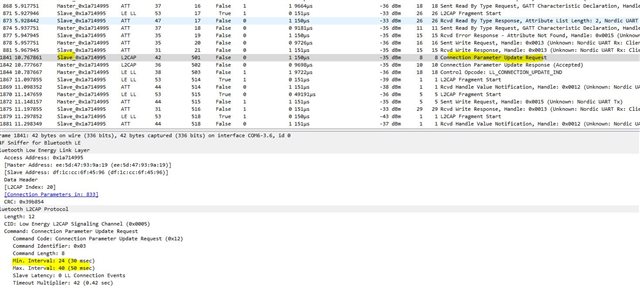
  • As far as I can see, for some reason the standard times of 30-50 ms are returning.

    q_00.zip

  • Hi Stefan ,

    It was because the peripheral requested the connection parameter. ...


    If you configure this: 

    CONFIG_BT_GAP_AUTO_UPDATE_CONN_PARAMS=n
    on the peripheral side it will not request that again. 
Related