Problems detecting nRF52 in visual studio

Hello!

I have a problem where visual studio code is really unstable with detecting the nRF52DK nRF52832 in the connected devices tab. After setting up the IDE and SDK it worked, but after swapping the kit once, it won't show anymore. It works others systems, but just not this computer. So the chip isn't faulty.

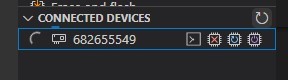
I try to press the refresh button, but nothing happens. Sometimes there is a sequence of numbers showing up, like in the setup video tutorial. But if I press expand, it just loads forever. I can't show a picture of this because I can't recreate it. Now it just doesn't show anything.
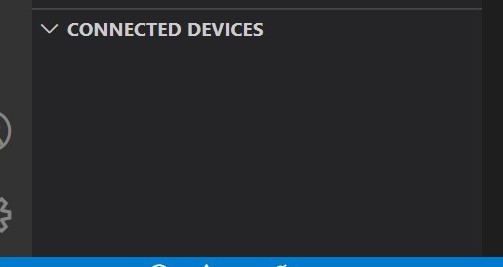
How it looks when I plug in the development kit.

Using visual studio code on Windows computer. Also nRF Connect sdk 18

Thank you for help.

Parents Reply Children
  • Hi Filip,

    Which version of nRF Connect for Desktop are you using? (the latest is v3.10.0) 

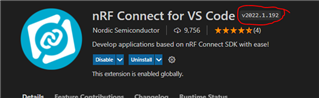
    Could you also tell me your nRF Connect VS Code extension version?

    Also, could you provide the Support Information?

    (Ctrl + Shift + P) -> type "Generate Support Information"

    Regards,

    Priyanka

  • IMPORTANT: The data below could contain sensitive or confidential information about your environment.
    If you do not wish this to be seen by others, please make sure to remove it before sharing.
    
    For help and support, visit the Nordic DevZone at https://devzone.nordicsemi.com/.
    
    {
      "platform": {
        "os": "win32",
        "osVersion": "Windows 10 Pro",
        "osKernel": "10.0.19043",
        "vscode": "1.64.1",
        "electron": "13.5.2",
        "node": "v14.16.0"
      },
      "system": {
        "date": "2022-02-10T15:09:00.017Z",
        "nrfConnectForDesktopInstalled": true,
        "vscodeUptime": "00:03:02",
        "osUptime": "168:15:17",
        "cpu": {
          "model": "Intel(R) Core(TM) i7-6600U CPU @ 2.60GHz",
          "speed": "2808 MHz",
          "count": 2
        },
        "memory": {
          "total": "7.92 GB",
          "free": "0.65 GB"
        }
      },
      "workspace": {
        "name": "Untitled (Workspace)",
        "workspaceFile": "1644325212993",
        "folders": [
          "c:\\dev\\NordicApps\\GPIOTest",
          "c:\\dev\\NordicApps\\GPIOPWMTest",
          "c:\\dev\\NordicApps\\buttonTestt",
          "c:\\dev\\NordicApps\\ServoMotorTest",
          "c:\\dev\\NordicApps\\ServoTestTo",
          "c:\\dev\\NordicApps\\gpio_input_no_dts",
          "c:\\dev\\NordicApps\\gpio_input_using_dts\\gpio_input_using_dts"
        ]
      },
      "extensions": {
        "internal": {
          "nordic-semiconductor.nrf-connect": {
            "version": "2022.1.192",
            "isActive": true
          },
          "nordic-semiconductor.nrf-terminal": {
            "version": "2022.1.30",
            "isActive": true
          },
          "nordic-semiconductor.devicetree": null,
          "nordic-semiconductor.kconfig": null
        },
        "external": {
          "marus25.cortex-debug": "1.2.2",
          "ms-vscode.cpptools": "1.8.4",
          "ms-vscode-remote.remote-wsl-recommender": "0.0.12",
          "ms-vscode.js-debug": "1.64.2",
          "ms-vscode.js-debug-companion": "1.0.15",
          "ms-vscode.references-view": "0.0.81",
          "ms-vscode.vscode-js-profile-table": "0.0.18",
          "trond-snekvik.gnu-mapfiles": "1.1.0",
          "twxs.cmake": "0.0.17"
        }
      },
      "tools": {
        "C:\\Program Files (x86)\\SEGGER\\JLink\\JLink.exe": "7.58b",
        "C:\\Program Files (x86)\\Nordic Semiconductor\\nrf-command-line-tools\\bin\\nrfjprog.exe": "10.15.2",
        "c:\\dev\\NordicSDK\\v1.8.0\\toolchain\\opt\\bin\\cmake.exe": "3.20.5",
        "c:\\dev\\NordicSDK\\v1.8.0\\toolchain\\opt\\bin\\Scripts\\west.exe": "0.12.0",
        "c:\\dev\\NordicSDK\\v1.8.0\\toolchain\\opt\\bin\\python.exe": "3.8.2",
        "c:\\dev\\NordicSDK\\v1.8.0\\toolchain\\opt\\bin\\ninja.exe": "1.9.0",
        "c:\\dev\\NordicSDK\\v1.8.0\\toolchain\\opt\\bin\\gperf.exe": "3.1",
        "c:\\dev\\NordicSDK\\v1.8.0\\toolchain\\opt\\bin\\dtc.exe": "1.4.7",
        "c:\\dev\\NordicSDK\\v1.8.0\\toolchain\\opt\\bin\\arm-none-eabi-gcc.exe": "9-2019-q4-major",
        "c:\\dev\\NordicSDK\\v1.8.0\\toolchain\\opt\\bin\\gn.exe": "1959",
        "c:\\dev\\NordicSDK\\v1.8.0\\toolchain\\mingw64\\bin\\git.exe": "2.26.2.windows.1"
      },
      "connectedDevices": [],
      "config": {
        "nordic-semiconductor.nrf-connect": {
          "topdir": "${nrf-connect.sdk:1.8.0}",
          "toolchain": {
            "path": "${nrf-connect.toolchain:1.8.0}"
          },
          "ozonePath": "",
          "applications": [
            "${workspaceFolder}",
            "c:\\dev\\NordicApps\\GPIOTest",
            "c:\\dev\\NordicApps\\GPIOPWMTest",
            "c:\\dev\\NordicApps\\buttonTestt",
            "c:\\dev\\NordicApps\\ServoMotorTest",
            "c:\\dev\\NordicApps\\ServoTestTo",
            "${workspaceFolder:gpio_input_no_dts}",
            "${workspaceFolder:gpio_input_using_dts}"
          ],
          "jlink": {
            "rtosPlugin": ""
          },
          "kconfig": {
            "interface": "kconfig"
          },
          "welcome": {
            "showOnStartup": false
          },
          "west": {
            "env": {
              "$base": "terminal"
            }
          },
          "boardRoots": [],
          "enableTelemetry": false
        },
        "nordic-semiconductor.nrf-terminal": {
          "terminalMode": "character"
        },
        "nordic-semiconductor.devicetree": {
          "modules": [
            "${zephyrBase}",
            "${zephyrBase}/../nrf",
            "."
          ],
          "zephyr": "",
          "ctxFile": "",
          "defaultBoard": ""
        },
        "nordic-semiconductor.kconfig": {
          "root": "",
          "env": {},
          "cfiles": true,
          "disable": false,
          "zephyr": {
            "base": ""
          },
          "python": "",
          "liveValue": true
        },
        "marus25.cortex-debug": {
          "armToolchainPath": null,
          "armToolchainPrefix": "arm-none-eabi",
          "gdbPath": null,
          "objdumpPath": null,
          "JLinkGDBServerPath": null,
          "openocdPath": null,
          "pyocdPath": null,
          "PEGDBServerPath": null,
          "stutilPath": null,
          "stlinkPath": null,
          "stm32cubeprogrammer": null,
          "enableTelemetry": true,
          "flattenAnonymous": false,
          "registerUseNaturalFormat": true,
          "variableUseNaturalFormat": true,
          "dbgServerLogfile": null,
          "showDevDebugOutput": "none"
        }
      },
      "environment": {
        "westExe": "c:\\dev\\NordicSDK\\v1.8.0\\toolchain\\opt\\bin\\Scripts\\west.exe",
        "westEnv": {
          "ELECTRON_RUN_AS_NODE": "1",
          "HOMEDRIVE": "C:",
          "ZEPHYR_BASE": "c:\\dev\\NordicSDK\\v1.8.0\\zephyr",
          "GNUARMEMB_TOOLCHAIN_PATH": "c:\\dev\\NordicSDK\\v1.8.0\\toolchain\\opt",
          "ZEPHYR_TOOLCHAIN_VARIANT": "gnuarmemb",
          "PYTHONPATH": "c:\\dev\\NordicSDK\\v1.8.0\\toolchain\\opt\\bin;c:\\dev\\NordicSDK\\v1.8.0\\toolchain\\opt\\bin\\Lib;c:\\dev\\NordicSDK\\v1.8.0\\toolchain\\opt\\bin\\Lib\\site-packages",
          "Python3_ROOT": "c:\\dev\\NordicSDK\\v1.8.0\\toolchain\\opt\\bin"
        },
        "toolchainPath": "c:\\dev\\NordicSDK\\v1.8.0\\toolchain",
        "toolchainBinPath": "c:\\dev\\NordicSDK\\v1.8.0\\toolchain\\opt\\bin",
        "toolchainVersion": "1.8.0"
      },
      "terminal": {
        "shell": null,
        "defaultProfile": null
      }
    }


    I am using the latest version, v3.10.0

    And the  nRF Connect VS Code extention version i v2022.1.192

    I attached the support information too.

    Edit:

    I got the loading error, it looks like this. Just constant spinning and never fully loads. I can see the content on the chip in windows explorer, but not interact with it in VSCode

    Thanks!

    Filip

  • Hi Filip,

    Could try running 'nrfjprog --ids' in the command line in order to list out the ID of all the connected boards?

    Regards,

    Priyanka

Related