This discussion has been locked.
You can no longer post new replies to this discussion. If you have a question you can start a new discussion

nRF52805 OTA DFU not working

Hi 

I'm using nRF52805 to realize the DFU function using the buttonless_dfu example project. I follow the instruction of this and use commands in this discussion

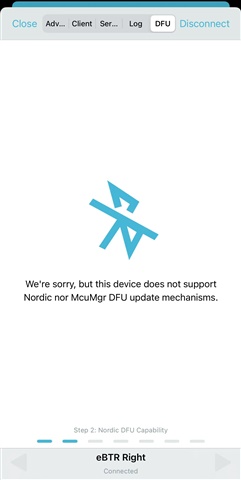
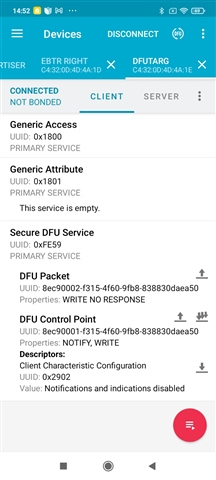
After flashing the hex file into the nRF52805, I can see the Bluetooth signal on the nRF Connect app. But in iOS, it shows this device does not support DFU (attached image below). In Android, it allows me to do the DFU but when I upload the program zip file, it just connects to DFUTARG and stops there. 

I have attached my hex file for OTA and commands used for creating these files. Can anyone please help me with this? I am not sure which step is wrong. Thanks in advance
        

OTA_DFU.zip

  • Hi Edvin,

    I turned off the bluetooth for couple of minutes just as you instructed.

    I have connected the nRF52 DK to my computer and use the SWDIO & SWDCLK to program my nRF52805 customized board. I have tried the commands you mentioned above and have the results shown below when I tried to perform the DFU from command prompt.

    C:\Users\JeremyWu\Desktop\OTA_pass_version\OTA_1.0>nrfutil dfu ble -pkg dfu_test.zip -ic NRF52 -p COM4 -n "Nordic_Buttonless_" -f
    Flashing connectivity firmware...
    Traceback (most recent call last):
      File "c:\users\jeremywu\appdata\local\programs\python\python38\lib\site-packages\pc_ble_driver_py\ble_driver.py", line 3201, in call_cmd
        return subprocess.check_output(argstr, stderr=subprocess.STDOUT, shell=True)
      File "c:\users\jeremywu\appdata\local\programs\python\python38\lib\subprocess.py", line 415, in check_output
        return run(*popenargs, stdout=PIPE, timeout=timeout, check=True,
      File "c:\users\jeremywu\appdata\local\programs\python\python38\lib\subprocess.py", line 516, in run
        raise CalledProcessError(retcode, process.args,
    subprocess.CalledProcessError: Command 'nrfjprog --snr 682956030 --program c:\users\jeremywu\appdata\local\programs\python\python38\lib\site-packages\pc_ble_driver_py\hex\sd_api_v5\connectivity_4.1.4_1m_with_s132_5.1.0.hex --family NRF52' returned non-zero exit status 52.
    
    During handling of the above exception, another exception occurred:
    
    Traceback (most recent call last):
      File "C:\Users\JeremyWu\AppData\Local\Programs\Python\Python38\Scripts\nrfutil-script.py", line 33, in <module>
        sys.exit(load_entry_point('nrfutil==6.1.3', 'console_scripts', 'nrfutil')())
      File "c:\users\jeremywu\appdata\local\programs\python\python38\lib\site-packages\click\core.py", line 1128, in __call__
        return self.main(*args, **kwargs)
      File "c:\users\jeremywu\appdata\local\programs\python\python38\lib\site-packages\click\core.py", line 1053, in main
        rv = self.invoke(ctx)
      File "c:\users\jeremywu\appdata\local\programs\python\python38\lib\site-packages\click\core.py", line 1659, in invoke
        return _process_result(sub_ctx.command.invoke(sub_ctx))
      File "c:\users\jeremywu\appdata\local\programs\python\python38\lib\site-packages\click\core.py", line 1659, in invoke
        return _process_result(sub_ctx.command.invoke(sub_ctx))
      File "c:\users\jeremywu\appdata\local\programs\python\python38\lib\site-packages\click\core.py", line 1395, in invoke
        return ctx.invoke(self.callback, **ctx.params)
      File "c:\users\jeremywu\appdata\local\programs\python\python38\lib\site-packages\click\core.py", line 754, in invoke
        return __callback(*args, **kwargs)
      File "c:\users\jeremywu\appdata\local\programs\python\python38\lib\site-packages\nordicsemi\__main__.py", line 1172, in ble
        flasher.fw_flash()
      File "c:\users\jeremywu\appdata\local\programs\python\python38\lib\site-packages\pc_ble_driver_py\ble_driver.py", line 3166, in fw_flash
        self.program(hex_file)
      File "c:\users\jeremywu\appdata\local\programs\python\python38\lib\site-packages\pc_ble_driver_py\ble_driver.py", line 3194, in program
        self.call_cmd(args)
      File "c:\users\jeremywu\appdata\local\programs\python\python38\lib\site-packages\wrapt\decorators.py", line 469, in _synchronized
        return wrapped(*args, **kwargs)
      File "c:\users\jeremywu\appdata\local\programs\python\python38\lib\site-packages\pc_ble_driver_py\ble_driver.py", line 3206, in call_cmd
        raise RuntimeError(f"{e.__str__()}\n{e.output}")
    RuntimeError: Command 'nrfjprog --snr 682956030 --program c:\users\jeremywu\appdata\local\programs\python\python38\lib\site-packages\pc_ble_driver_py\hex\sd_api_v5\connectivity_4.1.4_1m_with_s132_5.1.0.hex --family NRF52' returned non-zero exit status 52.
    b'Parsing image file.\r\nERROR: The file specified is not a valid hex file, has data outside valid areas\r\nERROR: or does not have data in valid areas.\r\nNOTE: For additional output, try running again with logging enabled (--log).\r\nNOTE: Any generated log error messages will be displayed.\r\n'

    However, the OTA DFU function is enabled when I use your commands as below to flash into the chip. It works fine and I can upload the firmware successfully.

    nrfjprog --program bootloader-settings.hex --verify
    nrfjprog --program nordic_buttonless_dfu.hex --verify
    nrfjprog --program s112_nrf52_7.2.0_softdevice.hex --verify
    nrfjprog --program secure_bootloader.hex --verify
    nrfjprog --reset

    In addition, I found my original command works fine as well somehow! 

    It is great that they are working, but I am a bit confused about why it happened. My guessing is I may be misled by the cached service in iOS. I found it always happens when I change the board function. Is there anything that could prevent such thing? What do you suggest?

    Thank you

    Jeremy

  • Hello Jeremy,

    Jeremy Wu said:
    It is great that they are working, but I am a bit confused about why it happened. My guessing is I may be misled by the cached service in iOS. I found it always happens when I change the board function. Is there anything that could prevent such thing? What do you suggest?

    Good that it is working. Yes, it is a bit annoying to run into these kinds of issues when developing. Luckily, this is rarely an issue in a product, as they rarely add/remove services. The only time this occurs is typically through a DFU update (which you are working on now, ironically). 

    There is a service that is used to tell the central that the service table has been updated, and it is included in the buttonless DFU service sample. It is called "Service Changed" service. Search for PM_SERVICE_CHANGED_ENABLED in sdk_config.h to see that it is enabled. This service is not set up and handled like other services, but it is handled by the SDK.

    The issue, though, and the reason I didn't mention it before, is that if the service changed service wasn't present before the phone cached the services, then it wouldn't see the service changed service either. But since it is included in the buttonless_dfu implementation, it makes it so that whenever you add new services/characteristics through DFU, the phone will be told to check for new services after updates, which sort of solves this issue all together. 

    Another way of forcing the phone to do a service discovery is to change the BLE address. The reason I didn't mention this is because that is a bit more complicated when you are doing a DFU. Acutally, the bootloader is using this to force the phone to discover the bootloader service, so the bootloader and the application uses two different addresses (bootloader addr = application addr+1). So if you change the address in the application, you need to change it equally in the bootloader. 

    But in the end, in a final product where the application doesn't change, this is rarely an issue at all. But during development, if you are bothered by this, you can change the address to force the phone to do a service discovery (it will be seen as a completely new device). Just be aware that you need to implement this in the bootloader as well, if you are working on DFU. 

    One way to change the address is to use this function:

    void change_addr(void)
    {
    	ret_code_t err_code;
    	ble_gap_addr_t my_addr;
    	
    	err_code = sd_ble_gap_addr_get(&my_addr);
    	APP_ERROR_CHECK(err_code);
    	
    	my_addr.addr[0] = 0x54;
    	err_code = sd_ble_gap_addr_set(&my_addr);
    	APP_ERROR_CHECK(err_code);
    	
    	NRF_LOG_INFO("Changed addr");
    }

    Note that 0x54 is just a random number. If you are working with DFU, remember to change the address to 0x54 = 0x55. Search for "sd_ble_gap_addr_set" to find where the bootloader changes the address.

    Best regards,

    Edvin

  • Hi Edvin,

    Thank you so much for the detailed explanation!

    Just one more thing I would like to make clear. So once the PM_SERVICE_CHANGED_ENABLED is active, the service change service will be activated? Or do we have to modify our code to make it activated? Because my program (Nordic UART Service) actually sets the parameter 1(active) as the default setting. And it still cached the old service instead of updating the new service. The service I had before is only UART service and the new service I tried to upload is only DFU service.

    Best regards

    Jeremy

  • Jeremy Wu said:
    So once the PM_SERVICE_CHANGED_ENABLED is active, the service change service will be activated? Or do we have to modify our code to make it activated?

    The softdevice will handle it as long as PM_SERVICE_CHANGED_ENABLED is set to 1 and NRF_SDH_BLE_SERVICE_CHANGED is set to 1 in sdk_config.h (I forgot the NRF_SDH_BLE_SERVICE_CHANGED in the last reply), then the peer manager and softdevice will handle the rest for you. 

    I see that the NRF_SDH_BLE_SERVICE_CHANGED is set to 0 by default in the ble_app_uart example. 

    BR,
    Edvin

  • Thank you Edvin.

    Really helpful!

Related