MCUBOOT Hello world

Hi,

I downloaded the hello_world_with_mcuboot.zip file that Simon provided in one of the ticket few days ago - Case ID: 283917.

I built hello_world_with_mcuboot project in Segger Embedded Studio (SES) and flashed the merged.hex file in the dev board nRF52833DK. Unfortunately, it is not behaving as expected.

1- I am not seeing the "Hello World!" message.

2- Each time I stop the debugger and restart by clicking 'Go' or F5 I get prompted with the message

"The project zephyr/merged.hex is out of date and needs to be built. Build the project before debugging?"

But I am sure nothing has changed in the project since the last build.

Note, I have not changed anything in the project you provided in the zip file. 

Kind regards

Mohamed

Parents
  • I don't have an nRF52833 DK at the moment, so I'm not able to test this myself. Could you try to remove the folder child_image and the file pm_static.yml file and try to build it then? If that works you can ad child_image/mcuboot.conf and one config at the time until it breaks. You don't really need the pm_static.yml file as the partitions will be generated automatically by the Partition Manager.

    What is your final goal? Why do you need to build this exact sample? The project is basically just the zephyr/samples/hello_world sample with CONFIG_BOOTLOADER_MCUBOOT=y added to the prj.conf file, so just start with that instead.

    Best regards,

    Simon

  • Hi Simon,

    What is your final goal? Why do you need to build this exact sample?

    The reason I am interested in this example is because I want to add MCUBOOT to my own project in order to allow me to carry out OTA firmware updates. In fact I have been stuck for the past 3 days so, I have now submitted another ticket related to MCUBOOT but running on our own hardware. 

    Note, the Hello_world_with_mcuboot example runs fine. I can see the printk() line getting executed but it just does not display the "Hello World!" message in the SES Debug Terminal. 

    Thank you.

    Kind regards

    Mohamed

  • Hi Simon,

    This is the content of prj.conf file

    # nothing here
    CONFIG_BOOTLOADER_MCUBOOT=y

    CONFIG_UART_CONSOLE=n
    CONFIG_RTT_CONSOLE=y
    CONFIG_USE_SEGGER_RTT=y

    But it still does not print anything in the SES Debug Terminal.
    Any other config needs adding to the prj.conf file?
    Kind regards
    Mohamed
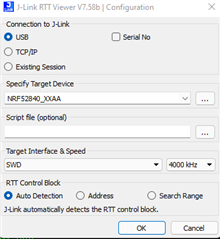
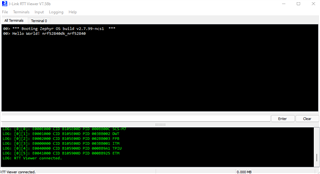
  • I tried using SES and I was not able to see the RTT log either. However, I tested with J-Link RTT Viewer V7.5.8 and that worked fine:

    Could you test that?

    Best regards,

    Simon

  • Thank you Simon.

    Now when I use the nRF52833DK board I can see the debug logs with both J-Link RTT Viewer V7.58B and SES Debug Terminal. However, when I flash it on our target board (based on nRF52833 SoC) I can see the debug logs in RTT Viewer but not in the SES Debug Terminal. Also, when I flash the same .hex file to our board that uses the secure B version of the nRF52833 SoC I don't see any logs in either RTT Viewer nor SES Debug Terminal.

    2- Each time I stop the debugger and restart by clicking 'Go' or F5 I get prompted with the message

    "The project zephyr/merged.hex is out of date and needs to be built. Build the project before debugging?"

    But I am sure nothing has changed in the project since the last build.

    Finally, I would like you to comment on my question 2 above.

    Thank you

    Kind regards

    Mohamed

  • Hello Mohamed,

    Sorry for the delay on this. I don't have an nRF52833 at hand at the moment but I will try to get ahold of it tomorrow and try to reproduce the issues you're seeing.

    Best regards,

    Simon

  • Hi Simon,
    Don't worry. I have managed to sort it out.
    Kind regards
    Mohamed
Reply Children
Related