This discussion has been locked.
You can no longer post new replies to this discussion. If you have a question you can start a new discussion

Error while Linking secure bootloader_ble_s132_pca10040_debug

I am following the instructions to enable micro-ecc support for an example code ( secure bootloader ble s132 pca10040 debug). I am using SDK 17.0.2.

I have successfully executed the Makefile  at   sdk17.0.2/external/micro-ecc/nrf52hf_armgcc/ to create micro_ecc_lib_nrf52.a

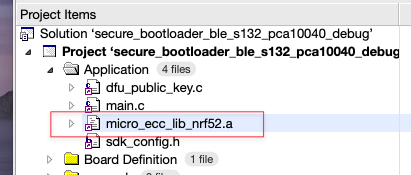
This file has then been added to the project
When I build using SES I get the following error at link time
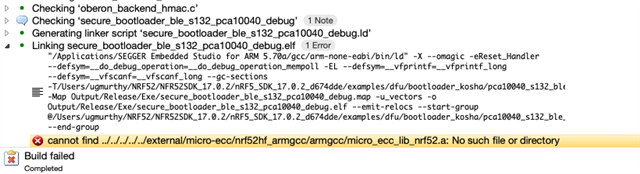
I have double checked the path of the .a file and it is correct.

Looking for pointers as to how I can resolve this.

Parents
  • Hi, 
    Please check if you have copied the bootloader project to any other destination ? 
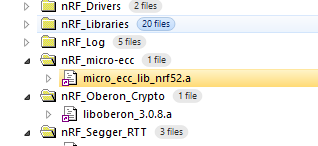
    Note that by default the .a file is already included in the nRF_micro-ecc folder in project, you don't need to add the file in Application folder: 

    I attached my micro_ecc folder that you can paste into your external folder (overwrite your current folder, you may want to back it up before)

    6366.micro-ecc.zip

  • Thanks Hung Bui.

    I removed micro_ecc_lib_nrg52.a from Applcation folder on SES.

    Compared you zip file contents with mine and detected the issue. 

    I was doing all the right things in the wrong directory ../../nrg52nf_argcc/armgcc  instead of ../../nrf52hf_armgcc/armgcc

    oversight on my part.

    felt silly once I found the difference - lost half a day!

    Please close the ticket

    Thanks

Reply
  • Thanks Hung Bui.

    I removed micro_ecc_lib_nrg52.a from Applcation folder on SES.

    Compared you zip file contents with mine and detected the issue. 

    I was doing all the right things in the wrong directory ../../nrg52nf_argcc/armgcc  instead of ../../nrf52hf_armgcc/armgcc

    oversight on my part.

    felt silly once I found the difference - lost half a day!

    Please close the ticket

    Thanks

Children
No Data
Related