App list empty after nRF Connect for Desktop updating

Hi All

A few times ago,  I installed the nRF Connect for Desktop v.3.8.0 on my PC.

Getting started assistant, Programmer, Toolchain manager apps were installed  and everything worked properly.

Today launching the nRF Connect for Desktop 3.8.0 I was asked if I wanted to update to v3.10.0.

I confirmed the updating but when the operatino was completed, the apps page was completed empty.

I coudn't see any apps, all of them seem disappeared.

Clicking on Filters, the souces is black. If I remember properly, there should be 'Official' field
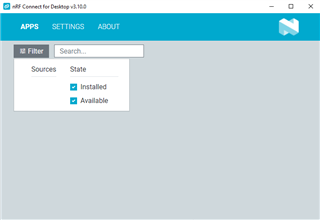
Trying uninstalling the nRF Connect for Desktop v3.10.0 and installing again the v 3.8.0, the apps page is still empty

Same condition even trying to restore Windows to yesterday i.e. before updating nRF Connect for Desktop to version v3.10.0

Any hints to solve the issue?

Thanks in advance


Cristian

Parents
  • I'm facing a similar issue, but the problem is that the installed apps only show after performing a "check for updates". This is problematic for me for a few reasons:

    1. I turn off the "check for updates at startup" switch as I only update apps now and again. I do this to keep the configuration the same and spend less time working out why a newly updated app doesn't work/behave as expected.

    2. I often use the apps in environments where I do not have internet connectivity (e.g., field testing). 

    I'm running version v3.10.0 and on previous versions the apps showed on startup without requiring an automatic or forced "check for updates".

    Can someone at Nordic sort this out in the next release of nRF Connect for Desktop?

Reply
  • I'm facing a similar issue, but the problem is that the installed apps only show after performing a "check for updates". This is problematic for me for a few reasons:

    1. I turn off the "check for updates at startup" switch as I only update apps now and again. I do this to keep the configuration the same and spend less time working out why a newly updated app doesn't work/behave as expected.

    2. I often use the apps in environments where I do not have internet connectivity (e.g., field testing). 

    I'm running version v3.10.0 and on previous versions the apps showed on startup without requiring an automatic or forced "check for updates".

    Can someone at Nordic sort this out in the next release of nRF Connect for Desktop?

Children
No Data
Related