App list empty after nRF Connect for Desktop updating

Hi All

A few times ago,  I installed the nRF Connect for Desktop v.3.8.0 on my PC.

Getting started assistant, Programmer, Toolchain manager apps were installed  and everything worked properly.

Today launching the nRF Connect for Desktop 3.8.0 I was asked if I wanted to update to v3.10.0.

I confirmed the updating but when the operatino was completed, the apps page was completed empty.

I coudn't see any apps, all of them seem disappeared.

Clicking on Filters, the souces is black. If I remember properly, there should be 'Official' field
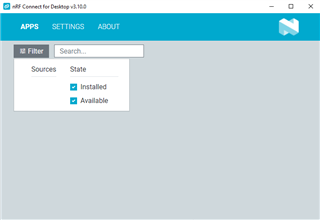
Trying uninstalling the nRF Connect for Desktop v3.10.0 and installing again the v 3.8.0, the apps page is still empty

Same condition even trying to restore Windows to yesterday i.e. before updating nRF Connect for Desktop to version v3.10.0

Any hints to solve the issue?

Thanks in advance


Cristian

Parents Reply Children
  • Hi Swathy

    Thanks for you support.

    I installed the nRF Connect for Desktop and the command line tools from the links you  shared, but the problem persisted.

    Anyway I think I managed to solve the problem. Below what I did.

    • I installed nRF Connect on another PC, where no version had ever been installed before. On this second pc everything worked fine.

    • I noticed that the contents of the directory C:/..installing_path../.nrfconnect-apps/ were different from that of the same directory on the PC where I had the problem. Some files were missing.

    • I copied the contents of the directory from second PC to first PC and the app started working correctly also on this one.

    • I tried, out of curiosity, to uninstall nRF Connect again from the first pc, also removing the Windows registry, and to install it again. The problem returns.

    • Copying the contents of the directory C:/..installing_path../.nrfconnect-apps/ solves again the problem.

    I can now use the nRF connect as expected

    Thanks and kind regards

    Cristian

Related