nRF Connect for vscode, Flash & Erase and flash actions do not work

The  "Flash" and "Erase and flash" actions wer working fine a few days ago,now it only execute "west build".

I pressed "Flash" or "Erase and flash", it just executed "west build", did not executed "west flash".

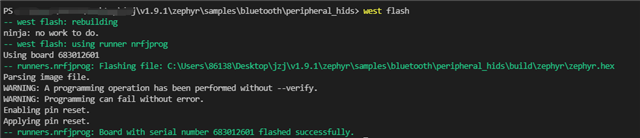
But I can run "west flash" well in terminal, and the flash function works fine.

"Flash" and "Erase and flash" has the same phenomenon, "Debug" can execute "west flash".

I tried to restart the computer and update the SDK to the latest, but it did not work. 

os: Windows 10 10.0.19004

board: nrf52840dk_nrf52840

SDK: v1.9.1

Parents Reply
  • Hi,

    This is a bug due to the VS Code update to v1.65. We will have a fix for this in the latest update for the nRF Connect extension for VS Code (releasing by next week). Until then, The bug can be overridden for the time being by flashing from the Command pallette, i.e. press Ctrl+Shift+P and then select "nRF Connect: Flash to Board" or "nRF Connect: Erase Board" or "nRF Connect: Erase and Flash Board", or another option will be to downgrade to VS Code v1.64.

    Regards,

    Priyanka

Children
No Data
Related