

Step Three of "Programming the nRF Sniffer firmware" states:
3. Locate the firmware HEX file for your DK or dongle.
All firmware HEX files are located in Sniffer_Software/hex/. Use the suitable file for your DK or dongle:
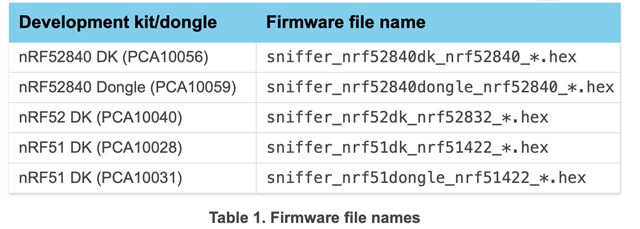
The previous instruction, step 2 says:
2. On macOS and Linux, install the SEGGER J-Link software.
It is available from SEGGER J-Link Software.
Well, what do I do with the SEGGER J-Link Software?
The instructions just move on to step 3 without mentioning what you do with the software...
Where is the Sniffer_Software/hex/ folder noted in step 3?
Where is the sniffer_nrf52840dongle_nrf52840_*.hex file?
Do I need to use the J-Link SW to download it?
From what I can tell, neither downloading the SEGGER J-Link SW, or the nRF Connect for desktop added any .hex files to my laptop.
Additionally, there is no access to a FW library on the nordic website.
Any help would be appreciated.
The instruction sI'm trying to follow are located at the following addresses:

