how to read MAC ID of nrf52832 using python and adalink

hello,

i had  read mac id of nrf52832 using python and adalink. Now my window is updated from window 10 to window 11

so i have to reinstalled all setup while reinstalling python 27 is installed but problem in installation of  Adafruit_Adalink project on Github

when i run the command python setup.py install I got a following response on CMD tool.
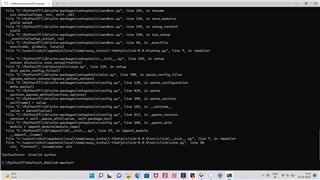
 

I have refer this for read MAC id installation 

  • As described in the post I linked:

    "The reason why "A7" becomes "E7" is because the specification says that the 2 MSBit of the address must be set '11' (if you're very interested, see Bluetooth Core v4.0, Vol 3, Part C, chapter 10.8.1.)"

    In your readout, the second last byte "0xBA" (0b10111010) will become 0xFA (0b11111010).

  • Much appreciated!

    If anyone works with Python feel free to use following code to format MAC printed in console to "aa:bb:cc:dd:ee:ff"

    #getShellStream is built based on subprocess lib
    data = getShellStream('nrfjprog -f nrf52 --memrd 0x100000A4 --n 8')
    # Arrange messy raw data from memory
    addr = (data.split(' ')[2] + data.split(' ')[1])[4:]
    # Create list of bytes and append 0x to each one
    hexList = [f'0x{addr[i: i+2].lower()}' for i in range(0, len(addr), 2)]
    # First byte of address is bitwise or'ed by (0b1100 0000)
    # Bluetooth Core v4.0, Vol 3, Part C, chapter 10.8.1.
    hexList[0] = str(hex(int(hexList[0], 16) | 192))
    mac = ""
    for byte in hexList:
        # Add ':' and remove '0x'
        mac += f'{byte[2:]}:'
    # Remove last ':'
    return mac[:(len(mac) - 1)]

Related