How to detect program change to call zigbee_erase_persistent_storage()

Hi,

we are developing a way to define through code a zigbee device composed of multiple endpoints, based on nRF5 SDK for Thread and Zigbee v4.1.0.
The program can be flashed to the board by an operator. We would like to call zigbee_erase_persistent_storage() when the board starts for the first time a new program after it has been flashed. We should do so because the data stored by ZBOSS in flash memory could be inconsistent since the address of some variables could be different.
Unfortunately, the flash area used by ZBOSS is not cleared when a new program is flashed (please note that we are not using Nordic bootloader).
At the moment, we have tested two possibilities to detect when a program changes:
- using the registers NRF_UICR registers to store a build timestamp that identifies the program
- using a sector of the Flash to store a build timestamp that identifies the program.
Both approaches seem to work, but we wonder if there is a better solution that does not involve a change to the bootloader.

Thank you,

Valerio

  • Hello,

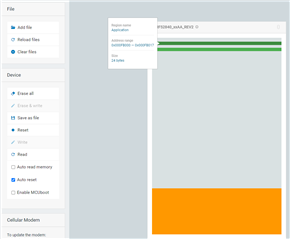
    There is no way to check whether the chip was reprogrammed since the last time the application was started. The persistent storage should be stored in the same location every time. You can check what that address is using nRF Connect for Desktop -> Programmer, or reading back the .hex file on the nRF and check the addresses manually. Checking using nRF Connect for Desktop gives this:

    There are two pages being used. One is on 0xF7000 and the other at 0xFB000.

    So my suggestion is that whenever you program the new application, if you want to delete the persistent data, you run:

    nrfjprog --erasepage 0xF7000

    nrfjprog --erasepage 0xFB000

    And if you want to program using nrfjprog as well, you can create a .bat file that you run that will do both programming and erasing the persistent storage:

    :: call this file e.g. flash.bat, and place it in the same folder as your project.
    
    nrfjprog --program _build\application.hex --verify --sectorerase
    :: change "application.hex" to the actual name of your application
    
    nrfjprog --erasepage 0xF7000
    nrfjprog --erasepage 0xFB000
    nrfjprog --reset

    Best regards,

    Edvin

Related