Why are the software examples with the Thingy91 so poor?

As requested I am posting a public question based on Nordic's request here:

https://www.linkedin.com/feed/update/urn%3Ali%3Aactivity%3A6911310498537869312/?commentUrn=urn%3Ali%3Acomment%3A%28activity%3A6911310498537869312%2C6911534484219674624%29&replyUrn=urn%3Ali%3Acomment%3A%28activity%3A6911310498537869312%2C6912286447882391552%29&midToken=AQGZYOhxIk1mNw&midSig=1o2UrOeart7ac1&trk=eml-email_notification_single_mentioned_you_in_this_01-notifications-1-hero%7Ecard%7Efeed&trkEmail=eml-email_notification_single_mentioned_you_in_this_01-notifications-1-hero%7Ecard%7Efeed-null-6472k%7El137mjh4%7Eot-null-voyagerOffline

You can tell the Thingy91 is a capable device because of all the peripherals it has:

https://infocenter.nordicsemi.com/index.jsp?topic=%2Fug_thingy91%2FUG%2Fthingy91%2Fhw_description%2Fhw_descr.html

However coding for it is a whole other problem, i.e. there are lots of peripherals, but you are not told how to use them. If you install nrfConnect you do get some code samples:
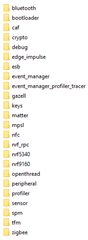
  • None of these project titles make any intiuitive sense:
    • What does caf do?
    • What is esb?
  • If I need to use nfc in a particular way, does the nfc sample help me?
  • If I want to use the analogue pins, where is the sample for that?
  • If I want to use pins from both nrf9160 and nRF52840 how to I do that?
    • The answer to the above is that it introduces a world of pain as the nRF52840 is used as a programmer for the device which means you need extra hardware. Where is the step through and code samples for that?

Far from being an easy device to use, Nordic have fallen at the first hurdle by making life extremely difficult for developers.

For reference, this is how I answer one of the above questions in the Arduino IDE:
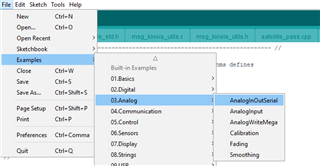
Now that took approximately 5 seconds to locate compared to the hours it would have taken with the Thingy91.

Parents
  • Hi John

    I would strongly start by looking at the documentation, here, rather than looking through the local files. 

    On the left you can navigate to different parts of the SDK, such as libraries, protocols and samples

    If you open the page for a sample you get a much better overview of what that example does, and which hardware boards it supports. 

    It is important to note that not all the samples in the SDK will work on the Thingy91. The nRF Connect SDK supports a wide range of boards in the nRF52, nRF53 and nRF91 family, and the Zephyr repository supports a wide range of boards from other companies as well, and most samples only work on a subset of the boards available. 

    Since the Thingy91 is more of a demo and evaluation platform than a full fledged development kit this also limits the number of officially supported samples. For this reason I would recommend getting an nRF9160DK as a companion to your Thingy if you plan to do extended development. 

    The DK gives you access to all the GPIO's on the device, and contains an on board debugger, making it much easier to develop and debug your code. The DK can also be used as a programmer to the Thingy, making it easier to update the code in the Thingy and debug the code if needed. 

    As for your specific requests:

    - Read about CAF here: https://developer.nordicsemi.com/nRF_Connect_SDK/doc/latest/nrf/libraries/caf/caf_overview.html
    -
     ESB: https://developer.nordicsemi.com/nRF_Connect_SDK/doc/latest/nrf/ug_esb.html#
    -
     Overview of the NFC samples: https://developer.nordicsemi.com/nRF_Connect_SDK/doc/latest/nrf/samples/samples_nfc.html

    If I want to use pins from both nrf9160 and nRF52840 how to I do that?
    • The answer to the above is that it introduces a world of pain as the nRF52840 is used as a programmer for the device which means you need extra hardware. Where is the step through and code samples for that?

    The nRF52840 device on the Thingy91 is running the connectivity_bridge firmware, and you would have to make changes to this code if you want to expand on the functionality of the nRF52840 without removing its default behavior as a bridge between the nRF9160 and the USB interface. 

    If you read the following documentation pages there is a pretty good overview of how to program the nRF9160 or nRF52840 devices in the Thingy91, either using the bootloader, or using an external development kit:
    Getting started with Thingy:91
    Developing with Thingy:91

    I am not sure what extra hardware you are referring to. It is technically possible to program both the nRF9160 and the nRF52840 through the bootloader, but I agree this process is a bit cumbersome if you are going to do extended development where you have to make various changes to the code and test it continuously. If this is the case then getting a DK is recommended. 

    Far from being an easy device to use, Nordic have fallen at the first hurdle by making life extremely difficult for developers.

    Ease of use is a continuously ongoing process. I agree we have some ways to go in this regard, but I don't think we will ever be at the Arduino level of usability.

    We are a chip manufacturer, and make money by selling chips in volume to other engineering companies putting our chips in their products. Our priorities then is on making software, tools etc to help them get to market as soon as possible. Ease of use is obviously an aspect, but we also have to spend a lot of resources on adding support for new features (libraries, protocols, security implementations etc), testing our software for compliance and reliability, optimizing for memory usage and power consumption, and other things that are critical when you are making a product that will be sold in the thousands. 

    Arduino has a different focus, and while it is much easier to use, it will typically be less suited to design an optimized, reliable, cost effective end product for mass production. 

    We do support various Arduino style projects based on Nordic devices, but in the end this would not be official Nordic boards, and would be supported by the companies making them.

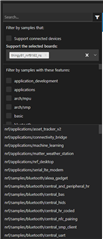
    As for finding samples we recently introduced a new feature in VSCode to allow you more easily to search through the various samples available:

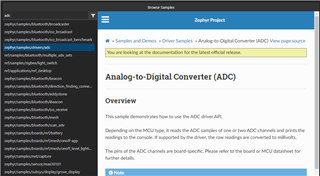
    Possibly the ADC sample was not the best one to highlight as this is not designed for Nordic devices unfortunately (as mentioned in the readme), there is a description of how to add ADC support to a Nordic example here

    In order to see only the samples supported by the Thingy91 you can filter on the board:

    Best regards
    Torbjørn

Reply
  • Hi John

    I would strongly start by looking at the documentation, here, rather than looking through the local files. 

    On the left you can navigate to different parts of the SDK, such as libraries, protocols and samples

    If you open the page for a sample you get a much better overview of what that example does, and which hardware boards it supports. 

    It is important to note that not all the samples in the SDK will work on the Thingy91. The nRF Connect SDK supports a wide range of boards in the nRF52, nRF53 and nRF91 family, and the Zephyr repository supports a wide range of boards from other companies as well, and most samples only work on a subset of the boards available. 

    Since the Thingy91 is more of a demo and evaluation platform than a full fledged development kit this also limits the number of officially supported samples. For this reason I would recommend getting an nRF9160DK as a companion to your Thingy if you plan to do extended development. 

    The DK gives you access to all the GPIO's on the device, and contains an on board debugger, making it much easier to develop and debug your code. The DK can also be used as a programmer to the Thingy, making it easier to update the code in the Thingy and debug the code if needed. 

    As for your specific requests:

    - Read about CAF here: https://developer.nordicsemi.com/nRF_Connect_SDK/doc/latest/nrf/libraries/caf/caf_overview.html
    -
     ESB: https://developer.nordicsemi.com/nRF_Connect_SDK/doc/latest/nrf/ug_esb.html#
    -
     Overview of the NFC samples: https://developer.nordicsemi.com/nRF_Connect_SDK/doc/latest/nrf/samples/samples_nfc.html

    If I want to use pins from both nrf9160 and nRF52840 how to I do that?
    • The answer to the above is that it introduces a world of pain as the nRF52840 is used as a programmer for the device which means you need extra hardware. Where is the step through and code samples for that?

    The nRF52840 device on the Thingy91 is running the connectivity_bridge firmware, and you would have to make changes to this code if you want to expand on the functionality of the nRF52840 without removing its default behavior as a bridge between the nRF9160 and the USB interface. 

    If you read the following documentation pages there is a pretty good overview of how to program the nRF9160 or nRF52840 devices in the Thingy91, either using the bootloader, or using an external development kit:
    Getting started with Thingy:91
    Developing with Thingy:91

    I am not sure what extra hardware you are referring to. It is technically possible to program both the nRF9160 and the nRF52840 through the bootloader, but I agree this process is a bit cumbersome if you are going to do extended development where you have to make various changes to the code and test it continuously. If this is the case then getting a DK is recommended. 

    Far from being an easy device to use, Nordic have fallen at the first hurdle by making life extremely difficult for developers.

    Ease of use is a continuously ongoing process. I agree we have some ways to go in this regard, but I don't think we will ever be at the Arduino level of usability.

    We are a chip manufacturer, and make money by selling chips in volume to other engineering companies putting our chips in their products. Our priorities then is on making software, tools etc to help them get to market as soon as possible. Ease of use is obviously an aspect, but we also have to spend a lot of resources on adding support for new features (libraries, protocols, security implementations etc), testing our software for compliance and reliability, optimizing for memory usage and power consumption, and other things that are critical when you are making a product that will be sold in the thousands. 

    Arduino has a different focus, and while it is much easier to use, it will typically be less suited to design an optimized, reliable, cost effective end product for mass production. 

    We do support various Arduino style projects based on Nordic devices, but in the end this would not be official Nordic boards, and would be supported by the companies making them.

    As for finding samples we recently introduced a new feature in VSCode to allow you more easily to search through the various samples available:

    Possibly the ADC sample was not the best one to highlight as this is not designed for Nordic devices unfortunately (as mentioned in the readme), there is a description of how to add ADC support to a Nordic example here

    In order to see only the samples supported by the Thingy91 you can filter on the board:

    Best regards
    Torbjørn

Children
No Data
Related