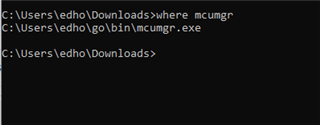
mcumgr command line tool setup issue in windows

Hi,

    we are following below link for DFU example i.e. serial dfu on nRF52833. we are not able to install mcumgr in windows . are we missing anything here. kindly help us.

https://devzone.nordicsemi.com/guides/nrf-connect-sdk-guides/b/software/posts/ncs-dfu
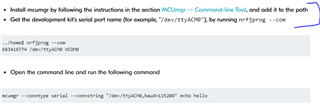
     

after this step, we are getting below 

...

Are we missing anything here. 

Parents
  • Hello,

    The guide that you refer to claims that it is written in Linux, and hence, the COM ports looks a bit different than what they do in Windows. What you see when you use "nrfjprog --conn" is expected. It means that your DK with the serial number 685999480 (the serial number of the programmer on the DK) is located on your "COM20". In order to use it with mcumgr (if you have mcumgr installed according to the guide), you can use the command:

    mcumgr --conntype serial --connstring "COM20" echo hello

    It also works without the " around COM20, but if you want to add more parameters, such as "baud=115200", you need the ", like this: "COM20,baud=115200". However, the baudrate is by default set to 115200.

    Best regards,

    Edvin

  • Thanks Edvin ,

                           COM20 was fine, we got that but after installing mcumgr also , we are facing the issue that 'mcumgr' is not recognized as an internal or external command,

Reply Children
Related